14
ox
ALARM
...
n1 1T]nnR
LIU LIU
TEf'lP
66
TODAY'S
HIGH
RECORDS
us TODAY'S
7 LOW
..., OX • Cl
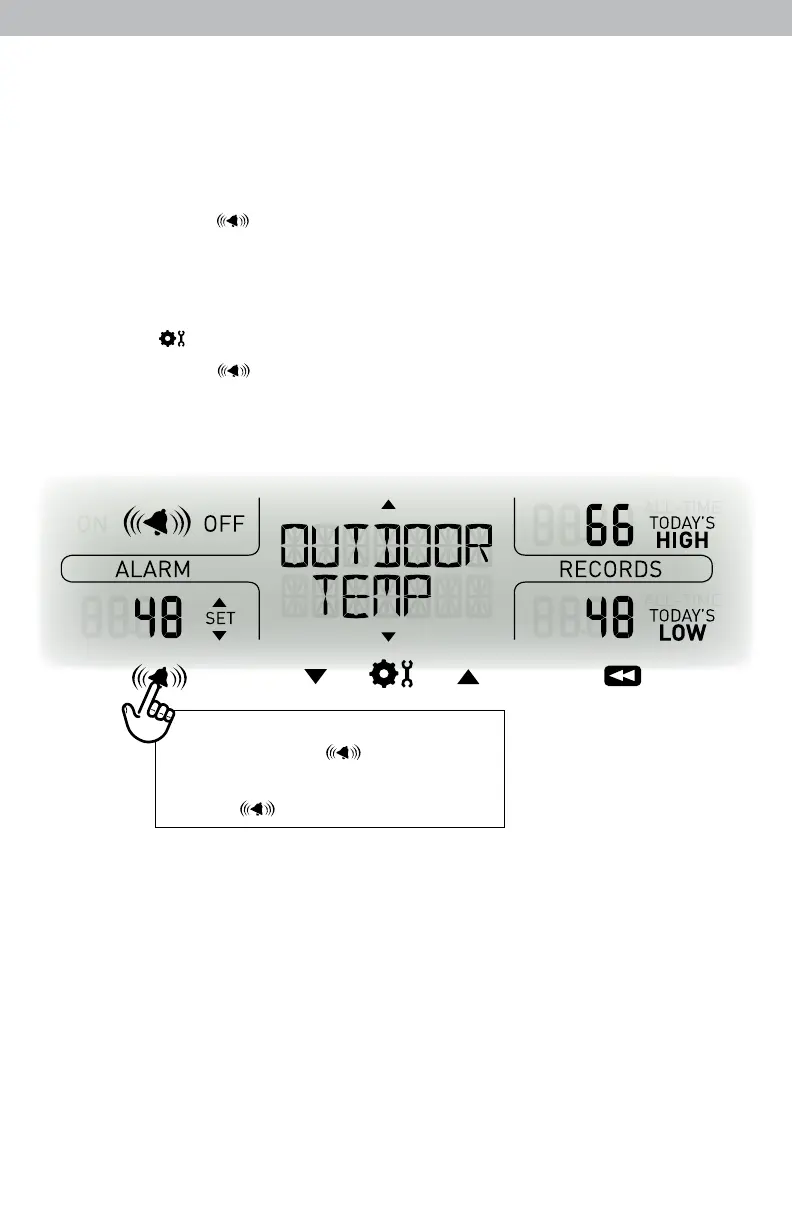
Set a Weather Alarm
1. Choose the weather category for which you wish to set an alarm by
pressing the up or down arrow buttons until the category is displayed on the
Selectable Category part of the display unit.
2. To program a value (only applies to alarms that require a value), press
AND HOLD the “ ” button until the “SET” indicator appears in the area
of the display labeled “ALARM” (left of the selected weather category) and
the alarm setting ashes.
3. Adjust the alarm value by pressing the up or down arrow buttons.
4. Press the “ ” button to conrm a value.
5. Next, press the “ ” button to activate the alarm. The alarm ON indicator
will highlight on the display.
Alarm is now programmed and turned on.
To set or adjust an alarm value:
Press and hold “
”
To activate or deactivate an alarm:
Press “
”
Silence a Sounding Alarm
The alarm sounds initially for a few minutes, then silences itself. The alarm then
sounds every few minutes afterwards until one of the following happens:
1. “SNOOZE” - Press any button. Alarm silences, but sounds again if the alarm
condition reoccurs.
2. Turn the alarm “OFF” - Deactivates the alarm.


 To Next Page