EasyManua.ls Logo

ACU-RITE 02050CCDI - User Manual

ACU-RITE 02050CCDI
16 pages
Print Icon
To Next Page IconTo Next Page
Loading...
Instruction Manual
Weather Station
model 02050CCDI / 440601
CONTENTS
Unpacking Instructions ........... 2
Package Contents .................. 2
Features and Benets: Sensor... 2
Features and Benets: Display . 3
Setup .................................... 5
Sensor Setup ......................... 5
Display Setup ........................ 6
Intelli-Time Clock.................... 7
Set the Time, Date and Units... 7
Backlight Settings................... 7
Placement Guidelines ............. 8
Using the Weather Station...... 9
Troubleshooting ....................10
Care and Maintenance .........11
Calibration ...........................12
Replace Intelli-Time Battery....13
Specications........................14
FCC Information ...................14
Customer Support .................15
Questions? Contact Customer Support at
(877) 221-1252 or visit www.AcuRite.com.
SAVE THIS MANUAL FOR FUTURE REFERENCE.
Question and Answer IconNeed help?

Do you have a question about the ACU-RITE 02050CCDI and is the answer not in the manual?

Overview

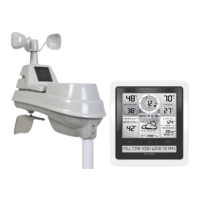
This document describes the AcuRite Weather Station, models 02050CCDI and 440601, a device designed to provide personalized weather forecasts and environmental data. The system consists of a display unit and an outdoor sensor, working together to deliver accurate temperature, humidity, and barometric pressure readings, along with a 12 to 24-hour weather forecast.

Function Description:

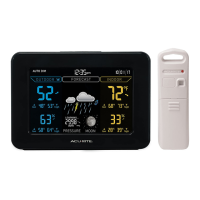
The AcuRite Weather Station is a self-calibrating forecasting system that utilizes data collected from an outdoor sensor to generate a personalized weather forecast for the user's exact location. It displays current outdoor and indoor temperature and humidity, barometric pressure with trending indicators, moon phase, and daily high and low records. The Intelli-Time clock automatically sets the time and date, including adjustments for Daylight Saving Time, once the time zone is selected. The display unit features a color screen with adjustable backlight settings, including an "AUTO DIM" mode that adjusts brightness based on the time of day.

Important Technical Specifications:

  • Temperature Range:
    • Outdoor: -40°C to 70°C (-40°F to 158°F)
    • Indoor: 0°C to 50°C (32°F to 122°F)
  • Humidity Range:
    • Outdoor: 1% to 99% RH
    • Indoor: 1% to 99% RH
  • Wireless Range: 100 m / 330 ft (depending on home construction materials)
  • Operating Frequency: 433 MHz
  • Power:
    • Display: 5vdc power adapter (primary), 3 x AA alkaline batteries (optional backup)
    • Sensor: 2 x AA alkaline or lithium batteries
  • Data Reporting:
    • Outdoor: 16-second updates
    • Indoor: 60-second updates

Usage Features:

  • Self-Calibrating Forecasting: The system enters a "Learning Mode" for 14 days to analyze pressure changes and determine altitude, leading to a highly accurate personalized forecast. The "Learning Mode" icon disappears once calibration is complete.
  • Weather Forecast Icons: Provides visual indicators for various weather conditions such as Stormy, Snow Likely, Snow/Rain Mix Likely, Rain Likely, and Mostly Cloudy.
  • Barometric Pressure: Displays current pressure with an arrow icon to show trending (Falling, Steady, or Rising).
  • Moon Phase: Features simple lunar phase icons to track the moon's cycle (New, Waxing Crescent, 1st Quarter, Full, 3rd Quarter, Waning Crescent).
  • High & Low Records: Automatically tracks and displays daily high and low records for indoor and outdoor temperature and humidity, which clear at 12:00 AM midnight. Users can manually clear these records.
  • Intelli-Time Clock: Pre-programmed with correct time and date, automatically adjusting for Daylight Saving Time.
  • Setup Mode: Allows users to set language, country, DST preference, time zone, clock hour/minute, calendar month/date/year, temperature scale (°F or °C), and barometric pressure scale (inHg or hPa).
  • Display Backlight Settings: Offers three brightness levels (High 100%, Medium 60%, Low 30%) when powered by the adapter. An "AUTO DIM" mode automatically adjusts brightness (100% from 6:00 a.m. - 9:00 p.m., 30% from 9:01 p.m. - 5:59 a.m.). When on battery power, the backlight is momentary.
  • A-B-C Switch: Both the display unit and outdoor sensor have an A-B-C switch in their battery compartments. They must be set to the same letter (A, B, or C) for proper synchronization.
  • Integrated Hanger: The outdoor sensor includes an integrated hanger for easy placement. The display unit also has an integrated hang hole for wall mounting.
  • Calibration: Indoor/outdoor temperature, humidity, and barometric pressure can be manually calibrated to improve accuracy, especially if sensor placement or environmental factors impact data.

Maintenance Features:

  • Battery Replacement:
    • Outdoor Sensor: Requires 2 x AA alkaline or lithium batteries. Lithium batteries are recommended for temperatures below -20°C / -4°F.
    • Display Unit: Uses 3 x AA alkaline batteries for optional backup power.
    • Intelli-Time Clock: Powered by a pre-installed CR2032 coin-cell battery, which stores time and date settings. This battery has a shelf life of several years and needs to be replaced when the time and date settings are no longer retained after power loss.
  • Cleaning:
    • Display Unit: Clean with a soft, damp cloth. Avoid caustic cleaners or abrasives. Keep free of dust, dirt, and moisture. Regularly clean ventilation ports with a gentle puff of air.
    • Outdoor Sensor: Clean with a soft damp cloth. Avoid caustic cleaners or abrasives.
  • Troubleshooting: The manual provides solutions for common issues such as no outdoor sensor reception, flashing or showing dashes for outdoor temperature, inaccurate forecasts, and inaccurate temperature or humidity readings. It also advises contacting customer support for further assistance.
  • Product Registration: Users are encouraged to register their product online to receive a 1-year warranty.

ACU-RITE 02050CCDI Specifications

General IconGeneral
BrandACU-RITE
Model02050CCDI
CategoryWeather Station
LanguageEnglish

Related product manuals