EasyManua.ls Logo

ACU-RITE 06024 - User Manual

ACU-RITE 06024
20 pages
Print Icon
To Next Page IconTo Next Page
Loading...
Instruction Manual
SAVE THIS MANUAL FOR FUTURE REFERENCE.
Questions? Contact Customer Support at
(877) 221-1252 or visit www.AcuRite.com.
CONTENTS
Unpacking Instructions ........... 2
Package Contents .................. 2
Features & Benets ................. 2
Setup .................................... 6
Display Setup ........................ 6
Set the Time, Date & Units ...... 7
Backlight Settings .................. 11
Placement Guidelines ............11
Using the Display ..................12
Programmable Alarms ........... 13
Troubleshooting ....................14
Calibration ...........................16
Specications ........................17
FCC Information ...................17
Customer Support .................18
Warranty..............................18
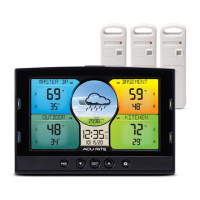
Home Environment Display
models 06024/06036
auto
This product requires at least one AcuRite Monitor or Sensor
(sold separately) to be operational.

Questions and Answers

Summary

Unpacking and Product Features

Package Contents

Lists all items included in the product package.

Front of Display Controls

Display Buttons Overview

Describes the function of buttons on the front of the display for operation and navigation.

Back of Display Components

Physical Features and Ports

Details ports, buttons, and mounting features on the back of the display unit.

Understanding the Display Screen

Display Screen Layout and Icons

Identifies and explains various icons, indicators, and data fields shown on the display screen.

Key Display Elements Explained

Provides detailed explanations for icons, data readings, and indicators on the display screen.

Display Setup and Installation

Initial Setup Steps

Guides through installing external sensor batteries, backup batteries, and the power adapter.

Setting Time, Date, and Units

Configuring Time and Unit Preferences

Step-by-step process to set time zone, DST, clock, date, and measurement units.

Expanding System Capabilities

Compatible Monitors and Sensors

Lists compatible AcuRite monitors/sensors and their ideal applications for extending monitoring.

Managing Location Data

Setting and Removing Location Names

How to label data readings by location and disconnect/remove location data from the display.

Sensor Management and Display Customization

Syncing New Monitors or Sensors

Manual process for adding new AcuRite monitors or sensors to the display.

Viewing Sensor Data and Swapping Positions

How to toggle sensor views and swap data area positions on the display.

Backlight Settings

Placement Guidelines for Accuracy

Display Placement Recommendations

Advice on placing the display in a dry, dust-free area for optimal performance.

Optimal Placement Tips

Guidelines to ensure accurate measurements and maximize wireless range.

Understanding Display Operations

Weather Forecast and Learning Mode

Explains the self-calibrating forecast and the 14-day learning period for altitude accuracy.

Barometric Pressure and High;Low Records

Describes barometric pressure trends and how to view historical high/low data for locations.

Programmable Alarms

Setting and Editing Alarms

Guides on configuring, enabling, disabling, and adjusting alarm thresholds for readings.

Troubleshooting and Support

Resolving Reception and Display Issues

Solutions for no signal, interference, temperature errors, and display screen problems.

Addressing Forecast and Sensor Recognition Problems

Troubleshooting inaccurate forecasts, readings, and sensor not recognized errors.

Care, Maintenance, and Calibration

Display Care and Cleaning

Instructions for cleaning and maintaining the display unit without damage.

Manual Calibration Procedures

Steps for manually calibrating temperature, humidity, and barometric pressure readings.

Specifications and Compliance

Product Specifications

Technical details including temperature/humidity ranges, wireless range, and power requirements.

FCC and Industry Canada Compliance

Regulatory information regarding device operation and interference limits.

Customer Support and Warranty Information

Customer Support Channels

Information on how to contact AcuRite for assistance, including phone and website.

Product Registration and Warranty Policy

Details on registering for warranty service and the terms of the limited 1-year warranty.

Summary

Unpacking and Product Features

Package Contents

Lists all items included in the product package.

Front of Display Controls

Display Buttons Overview

Describes the function of buttons on the front of the display for operation and navigation.

Back of Display Components

Physical Features and Ports

Details ports, buttons, and mounting features on the back of the display unit.

Understanding the Display Screen

Display Screen Layout and Icons

Identifies and explains various icons, indicators, and data fields shown on the display screen.

Key Display Elements Explained

Provides detailed explanations for icons, data readings, and indicators on the display screen.

Display Setup and Installation

Initial Setup Steps

Guides through installing external sensor batteries, backup batteries, and the power adapter.

Setting Time, Date, and Units

Configuring Time and Unit Preferences

Step-by-step process to set time zone, DST, clock, date, and measurement units.

Expanding System Capabilities

Compatible Monitors and Sensors

Lists compatible AcuRite monitors/sensors and their ideal applications for extending monitoring.

Managing Location Data

Setting and Removing Location Names

How to label data readings by location and disconnect/remove location data from the display.

Sensor Management and Display Customization

Syncing New Monitors or Sensors

Manual process for adding new AcuRite monitors or sensors to the display.

Viewing Sensor Data and Swapping Positions

How to toggle sensor views and swap data area positions on the display.

Backlight Settings

Placement Guidelines for Accuracy

Display Placement Recommendations

Advice on placing the display in a dry, dust-free area for optimal performance.

Optimal Placement Tips

Guidelines to ensure accurate measurements and maximize wireless range.

Understanding Display Operations

Weather Forecast and Learning Mode

Explains the self-calibrating forecast and the 14-day learning period for altitude accuracy.

Barometric Pressure and High;Low Records

Describes barometric pressure trends and how to view historical high/low data for locations.

Programmable Alarms

Setting and Editing Alarms

Guides on configuring, enabling, disabling, and adjusting alarm thresholds for readings.

Troubleshooting and Support

Resolving Reception and Display Issues

Solutions for no signal, interference, temperature errors, and display screen problems.

Addressing Forecast and Sensor Recognition Problems

Troubleshooting inaccurate forecasts, readings, and sensor not recognized errors.

Care, Maintenance, and Calibration

Display Care and Cleaning

Instructions for cleaning and maintaining the display unit without damage.

Manual Calibration Procedures

Steps for manually calibrating temperature, humidity, and barometric pressure readings.

Specifications and Compliance

Product Specifications

Technical details including temperature/humidity ranges, wireless range, and power requirements.

FCC and Industry Canada Compliance

Regulatory information regarding device operation and interference limits.

Customer Support and Warranty Information

Customer Support Channels

Information on how to contact AcuRite for assistance, including phone and website.

Product Registration and Warranty Policy

Details on registering for warranty service and the terms of the limited 1-year warranty.

ACU-RITE 06024 Specifications

General IconGeneral
BrandACU-RITE
Model06024
CategoryMonitor
LanguageEnglish

Related product manuals