format.
P. 181
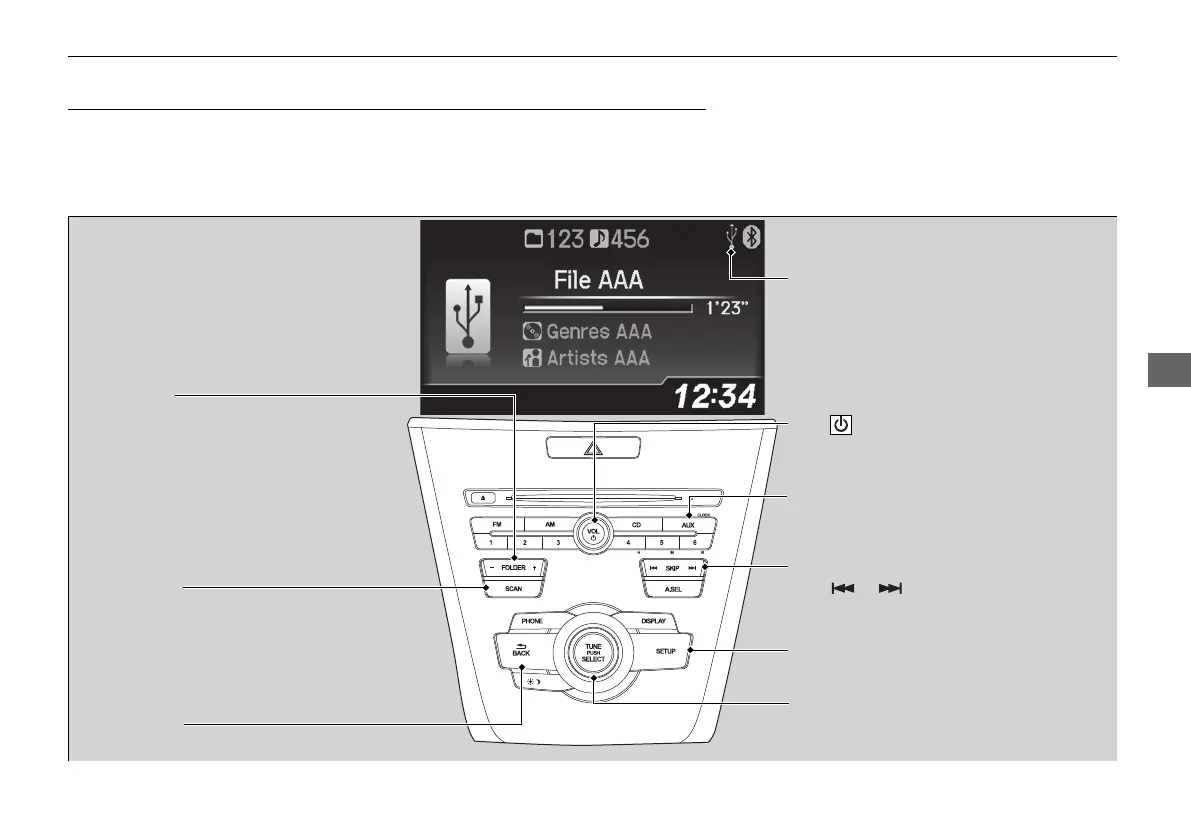
BACK Button
Press to go back to the previous display.
SKIP Bar
Press or to change files.
Press and hold to move rapidly within a
file.
SETUP Button
Press to display menu items.
Selector Knob
Press and turn to select a file, then press
to set your selection.
AUX Button
Press to select USB flash drive
(if connected).
VOL/ (Volume/Power) Knob
Press to turn the audio system on and off.
Turn to adjust the volume.
FOLDER Bar
Press
(+ to skip to the next folder, and (-
to skip to the beginning of the previous
folder.
SCAN Button
You will get a 10-second sampling of each file.
●
Press to sample all files in the current folder.
●
Press and hold to sample the first file in each
of the main folders.
●
To turn off scan, press the button.
USB Indicator
Appears when a USB flash drive is
connected.


 To Next Page