phone.
1Playing Bluetooth® Audio
Not all Bluetooth-enabled phones with streaming
audio capabilities are compatible with the system.
For a list of compatible phones:
• U.S.: Visit www.handsfreelink.com/Acura, or call 1-
888-528-7876.
• Canada: For more information on smartphone
compatibility, call 1-855-490-7351.
In some states, it may be illegal to perform some data
device functions while driving.
If more than one phone is paired to the HFL system,
there will be a delay before the system begins to play.
In some cases, the name of the artist, album, or track
may not appear correctly.
Some functions may not be available on some
devices.
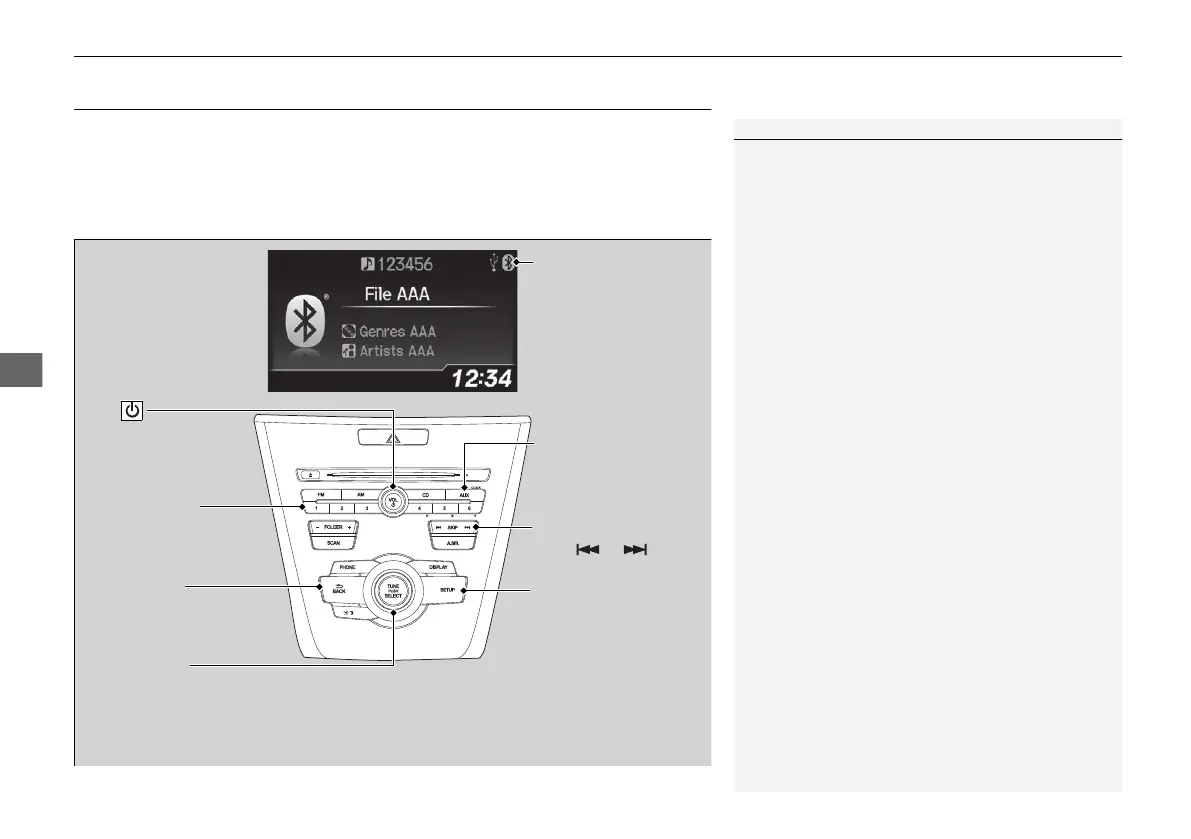
BACK Button
Press to go back to the
previous display.
SETUP Button
Press to display menu
items.
SKIP Bar
Press or to
change files.
AUX Button
Press to Bluetooth®
Audio.
VOL/
(Volume/Power) Knob
Press to turn the audio
system on and off.
Selector Knob
Turn to change files.
Turn to select an item, then press to
set your selection.
Press to display the device’s name.
Bluetooth Indicator
Comes on when your
phone is connected to
HFL.
Preset 1 Button
Press to switch the mode
between pause and
resume.


 To Next Page