344
Bluetooth® HandsFreeLink®
Bluetooth® HandsFreeLink® (HFL) allows you to place and receive phone calls using
your vehicle's audio system, without handling your cell phone.
Using HFL
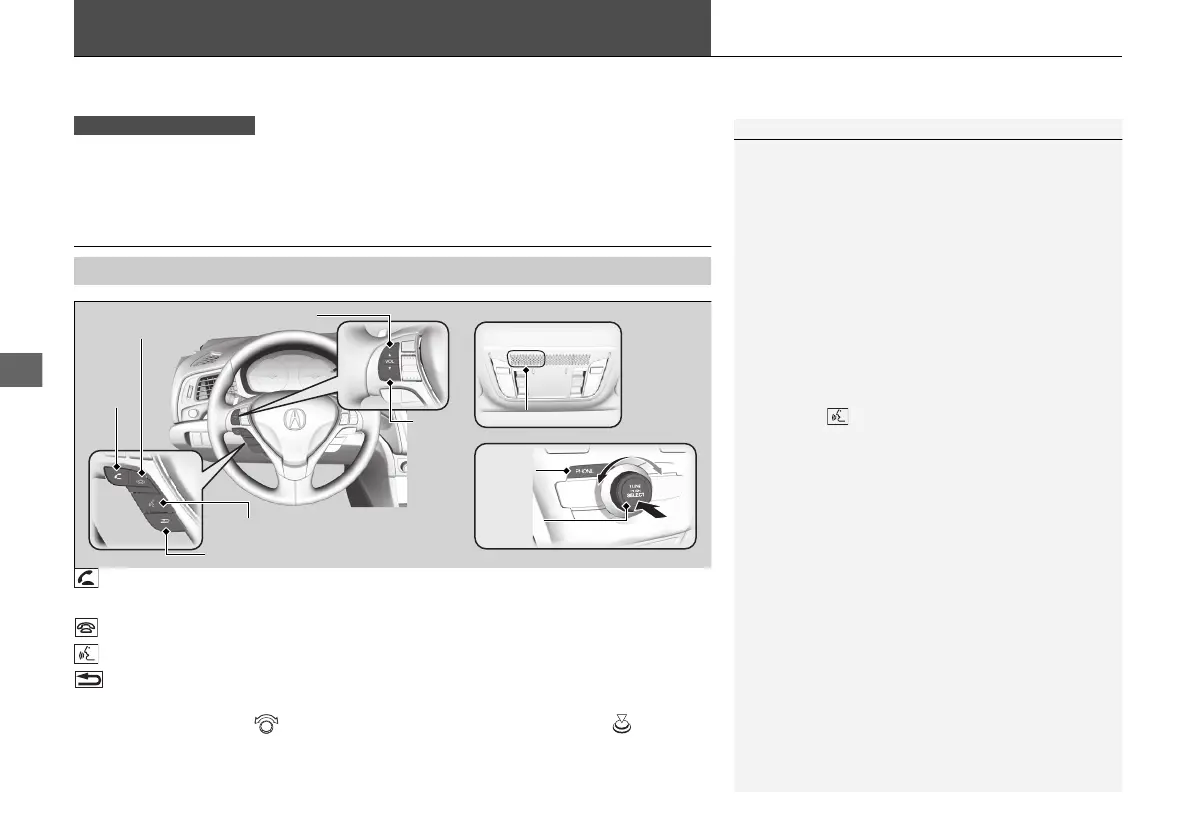
(Pick-up) button: Press to go directly to the Phone screen or to answer an
incoming call.
(Hang-up) button: Press to end a call.
(Talk) button: Press to call a number with a stored voice tag.
(Back) button: Press to cancel a command.
PHONE button: Press to go directly to the Phone screen.
Selector knob: Rotate to select an item on the screen, then press .
■
HFL Buttons
1Bluetooth® HandsFreeLink®
Place your phone where you can get good reception.
To use HFL, you need a Bluetooth-compatible cell
phone. For a list of compatible phones, pairing
procedures, and special feature capabilities:
• U.S.: Visit www.handsfreelink.com/Acura, or call 1-
888-528-7876.
• Canada: For more information on smartphone
compatibility, call 1-855-490-7351.
Voice control tips
• Aim the vents away from the ceiling and close the
windows, as noise coming from them may interfere
with the microphone.
• Press the button when you want to call a
number using a stored voice tag. Speak clearly and
naturally after a beep.
• If the microphone picks up voices other than yours,
the command may be misinterpreted.
State or local laws may prohibit the operation of
handheld electronic devices while operating a
vehicle.
Microphone
Pick-up
Button
Selector
Knob
PHONE
Button
Hang-up Button
Volume up
Volume
down
Back Button
Talk Button
21 ACURA ILX-31TX66800.book 344 ページ 2020年8月4日 火曜日 午後7時33分


 To Next Page