263
uuAudio System Basic OperationuPlaying Pandora®
*1
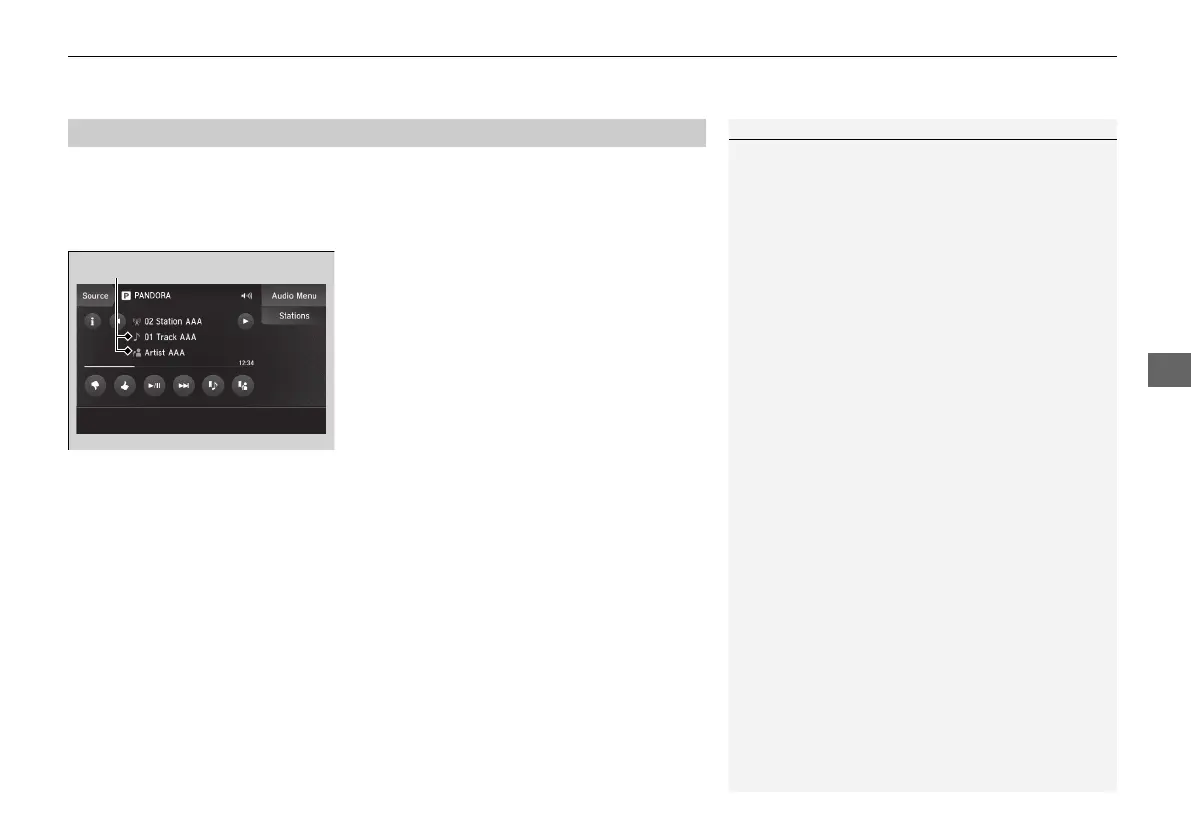
1. Select Stations.
2. Select an item to select a track.
■
Create Station
You can create a station by Genre, Current
Track or Current Artist.
1. Select Stations.
2. Select Create Station.
3. Select the item you want to create a station.
You can also create a station by the following
procedure.
1. Select track name or artist name.
2. Select Yes.
■
Select the connecting method
If the two devices that install Pandora app are connected via the USB and Bluetooth®
connection separately, you can select the USB or Bluetooth® connection to use the
Pandora®.
1. Select the PANDORA on the source list screen.
2. Select USB or Bluetooth.
■
How to Select a Track from the Stations List
1Playing Pandora®
*1
Pandora® is a personalized Internet radio service that
selects music based on an artist, track, or genre a user
enters, and streams what is likely to be of interest.
To use this service in your vehicle, the Pandora® app
must first be installed on your phone. Visit
www.pandora.com. for more information.
If you cannot operate Pandora® through the audio
system, it may be streaming through Bluetooth®
Audio. Make sure Pandora® mode on your audio
system is selected.
Available operating functions vary on software
versions. Some functions may not be available on the
vehicle’s audio system.
If there is a problem, you may see an error message
on the On Demand Multi-Use Display
TM
.
2 Pandora® P. 286
There are restrictions on the number of tracks you
can skip or dislike in a given hour.
If your phone is connected to Android Auto,
Pandora® is only available through the Android Auto
interface.
Visit the Android Auto website to check
compatibility.
Select track or artist name.
21 ACURA ILX-31TX66800.book 263 ページ 2020年8月4日 火曜日 午後7時33分


 To Next Page