Set up Weather Sharing
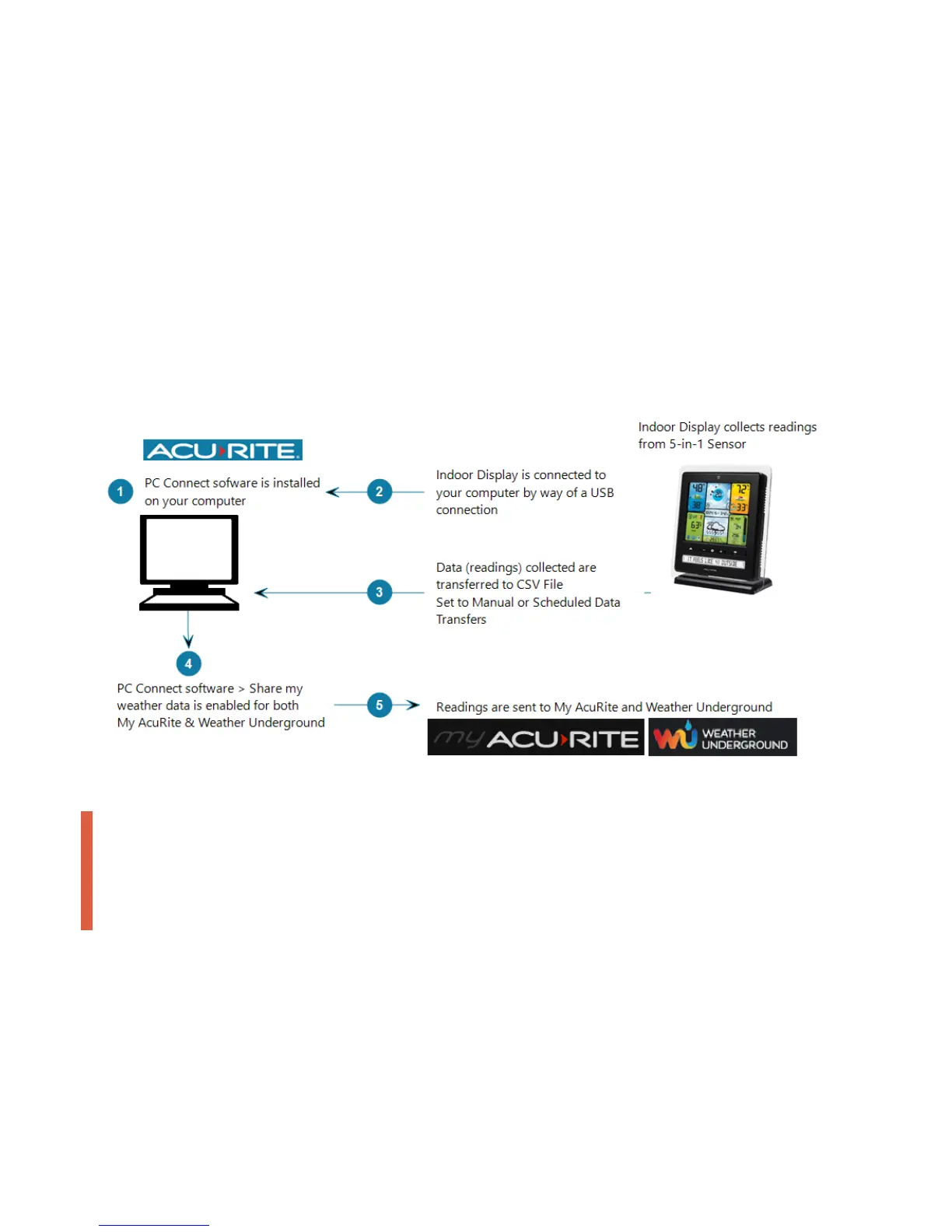
From PC Connect, you can share the readings collected by your 5-in-1 Weather Station with My AcuRite and Weather
Underground.
To view your readings online on at myacurite.com or from the AcuRite app, you must set up Weather Sharing in PC
Connect. Once set up, create a My AcuRite account or if you already have a My AcuRite account, add the Device ID
of the Indoor Display to your account.
To share with Weather Underground, you must have a My AcuRite account and enable sharing to My AcuRite in PC
Connect, then register your AcuRite Weather Station (Personal Weather Station) with Weather Underground to obtain
a Station ID and Password (Station Key).
How it works
WARNING
To ensure continuous sharing with My AcuRite and Weather Underground and to allow scheduled Data
Transfers, the PC Connect software must be open on your computer and your computer must be on and have
an internet connection at all times. The PC Connect software can be minimized.


 To Next Page