Remote Control
To Register Remote Control
Reset Remote Control
Optional Accessories
Step Icon Description
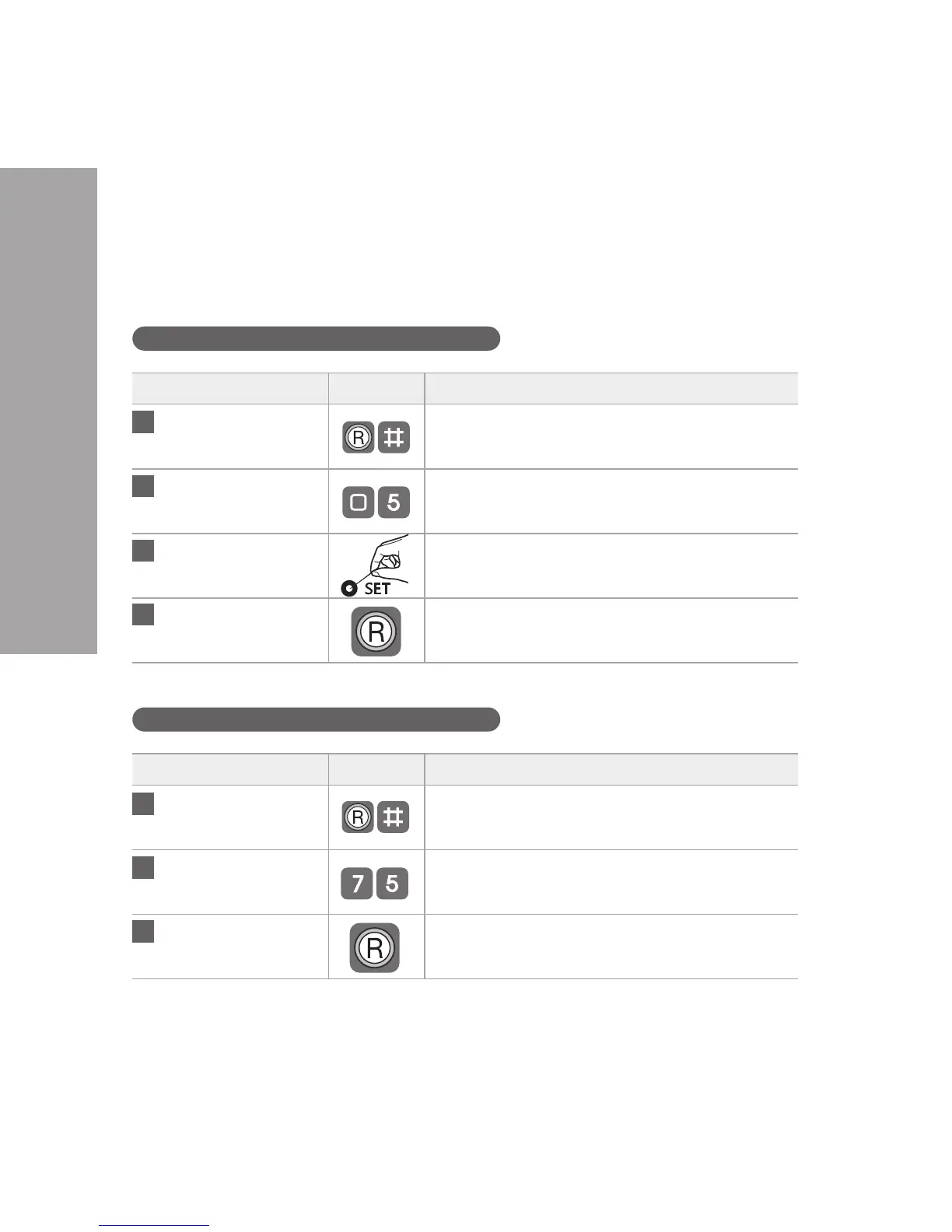
Press ® (Registration)
button and #
Open the battery cover in the Back Body.
Press ® (Registration) button and then #.
Enter number 0 and 5
on the keypad
Enter number 0 and then 5 on keypad.
Register Remote
Control
Press the SET button on the Remote Control.
(Up to 5 Remote Controls may be registered)
Press ® (Registration)
button
Press the ® (Registration) button in the Back Body
again to complete the procedure.
Step Icon Description
Press ® (Registration)
button and #
Open the battery cover in the Back Body.
Press ® (Registration) button and then #.
Enter number 7 and 5
on the keypad
Enter number 7 and then 5 on keypad.
Press ® (Registration) Press the ® (Registration) button in the Back Body
again to complete the procedure.
1
2
3
4
1
2
3
14


 To Next Page