User’s Guide: USB
Xchange
•
3
Note: Adaptec strongly recommends that you plug the USBXchange
directly into a USB port on your system. If you must connect
through a USB hub, use only a self-powered USB hub.
The USBXchange adapter is hot-pluggable, that is you can connect and
disconnect it from a live system. However, by industry standards, SCSI
devices are not hot-pluggable.
Contents of Kit
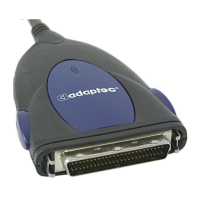
♦ USBXchange Adapter to 50-pin High-Density SCSI Connector
♦ 50-25 Pin Converter
♦ Installer CD-ROM with Mac and PC Drivers and Electronic User’s
Guide
♦ Quick-Install Guide (printed on the CD jacket)
♦ Registration Card
System Requirements
PC Compatible
♦ Desktop or laptop PC compatible with a USB port
♦ Windows
®
98, Windows 98 Second Edition, or Windows
®
2000
♦ UL approved DC adapter (optional) for external power supply
Macintosh
♦ Any Apple Macintosh with a built-in USB port
♦ Mac OS v.9.0.4 or above for fixed and removable drives
♦ Mac OS v.8.6 or 9.x for other SCSI peripherals
♦
Apple USB software version 1.4.1 or later
♦
UL approved DC adapter (optional) for external power supply


 To Next Page