EasyManua.ls Logo

ADC Advantage 2200 - User Manual

ADC Advantage 2200
10 pages
Print Icon
To Next Page IconTo Next Page
Loading...
1
ADC
®
2200
Advantage
TM
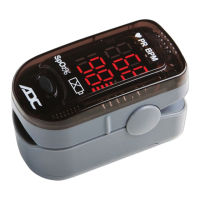
Fingertip
Pulse Oximeter
Directions for Use

Questions and Answers

  • J
    james74Jul 27, 2025
    What to do if the display suddenly powers off on my ADC Advantage 2200 Medical Equipment?
    • K
      Kathy JohnsonJul 27, 2025
      If your ADC Medical Equipment oximeter display suddenly powers off, it might be due to a couple of reasons. First, the device automatically shuts down if no signal is detected for more than 8 seconds, so try re-inserting or repositioning your finger. Alternatively, the batteries may be low, so try replacing them.
  • T
    Timothy MartinAug 2, 2025
    Why won't my ADC Advantage 2200 oximeter power on?
    • K
      kennethcarterAug 2, 2025
      If your ADC Medical Equipment oximeter isn't powering on, the batteries might be the issue. Try replacing them or reinstalling them to make sure they're correctly positioned. If that doesn't work, the oximeter might be damaged, and you should contact the warranty center for service.
  • M
    Mark CrawfordAug 7, 2025
    How to fix SpO2 or pulse rate not showing normally on ADC Medical Equipment?
    • M
      Marc WrightAug 7, 2025
      If the SpO2 or pulse rate isn't showing correctly on your ADC Medical Equipment, it could be due to a few reasons. First, make sure your finger is properly inserted and reposition it if necessary. Also, the oxyhemoglobin value might be too low to measure, so ensure the sensor is clean and not blocked. If problems persist, try taking a reading on a different finger or warm your finger by rubbing.
  • J
    Jennifer WuAug 13, 2025
    What to do if SpO2 or pulse rate is shown unstably on ADC Medical Equipment?
    • M
      Matthew KingAug 13, 2025
      If the SpO2 or pulse rate is unstable on your ADC Medical Equipment, it might be because your finger isn't inserted deep enough, so try re-inserting or repositioning it. Also, excessive movement during measurement can cause instability, so remain still while taking the reading.
  • P
    Paul StuartAug 20, 2025
    What does Error7 mean on my ADC Advantage 2200 Medical Equipment?
    • M
      Madison MillerAug 20, 2025
      If your ADC Medical Equipment displays Error7, it could be due to low power, so try replacing the batteries. If the issue persists, the oximeter might be damaged, and you should contact the warranty center for service.

Summary

Directions for Use

Contents of this Package

Lists the items included with the Advantage™ 2200 Pulse Oximeter, such as the device, lanyard, batteries, and user guide.

Intended use

Explains the device's purpose: measuring blood oxygen saturation (%SpO2) and pulse rate on fingers for sport and aviation.

Contraindications

Details conditions or situations where the pulse oximeter should not be used due to potential for inaccurate readings or harm.

Symbol Definitions

Defines the various symbols used on the Advantage™ 2200 pulse oximeter for clarity and understanding.

General Warnings

Provides critical safety warnings regarding choking hazards, strangulation risk, and use in explosive environments.

Battery Installation

Step-by-step instructions for correctly installing AAA batteries into the pulse oximeter.

Strap Installation

Instructions for attaching the lanyard strap to the pulse oximeter for secure use.

Operation Instructions

Guides users on how to properly hold, insert a finger, and power on the oximeter for measurement.

Reading Your Results

Explains how to interpret the displayed information: pulse bar graph, pulse rate (PR BPM), and oxygen saturation (SpO2%).

Changing Directions of the Display

Describes how to reorient the display to face the user or another person.

Maintenance and Storage

Provides guidelines for battery replacement, cleaning, and proper storage conditions to ensure device longevity.

Cleaning the Pulse Oximeter

Details the procedure for cleaning the device using isopropyl alcohol and maintaining hygiene.

Detailed Description of Product Functions

Outlines technical specifications including display type, measurement ranges, accuracy, power, dimensions, and environment requirements.

Troubleshooting

Offers solutions for common problems like no reading, unstable readings, device not powering on, or sudden power off.

Limited Warranty

Specifies the warranty coverage, exclusions, and procedures for obtaining service for the pulse oximeter.

Guidance and manufacturers declaration - electromagnetic emissions for all EQUIPMENT and SYSTEMS

Provides electromagnetic compatibility (EMC) guidance and declarations related to RF emissions for the pulse oximeter.

ADC Advantage 2200 Specifications

General IconGeneral
ECG Channels12
DisplayLCD
WirelessNo
ConnectivityUSB
BatteryRechargeable lithium battery

Related product manuals