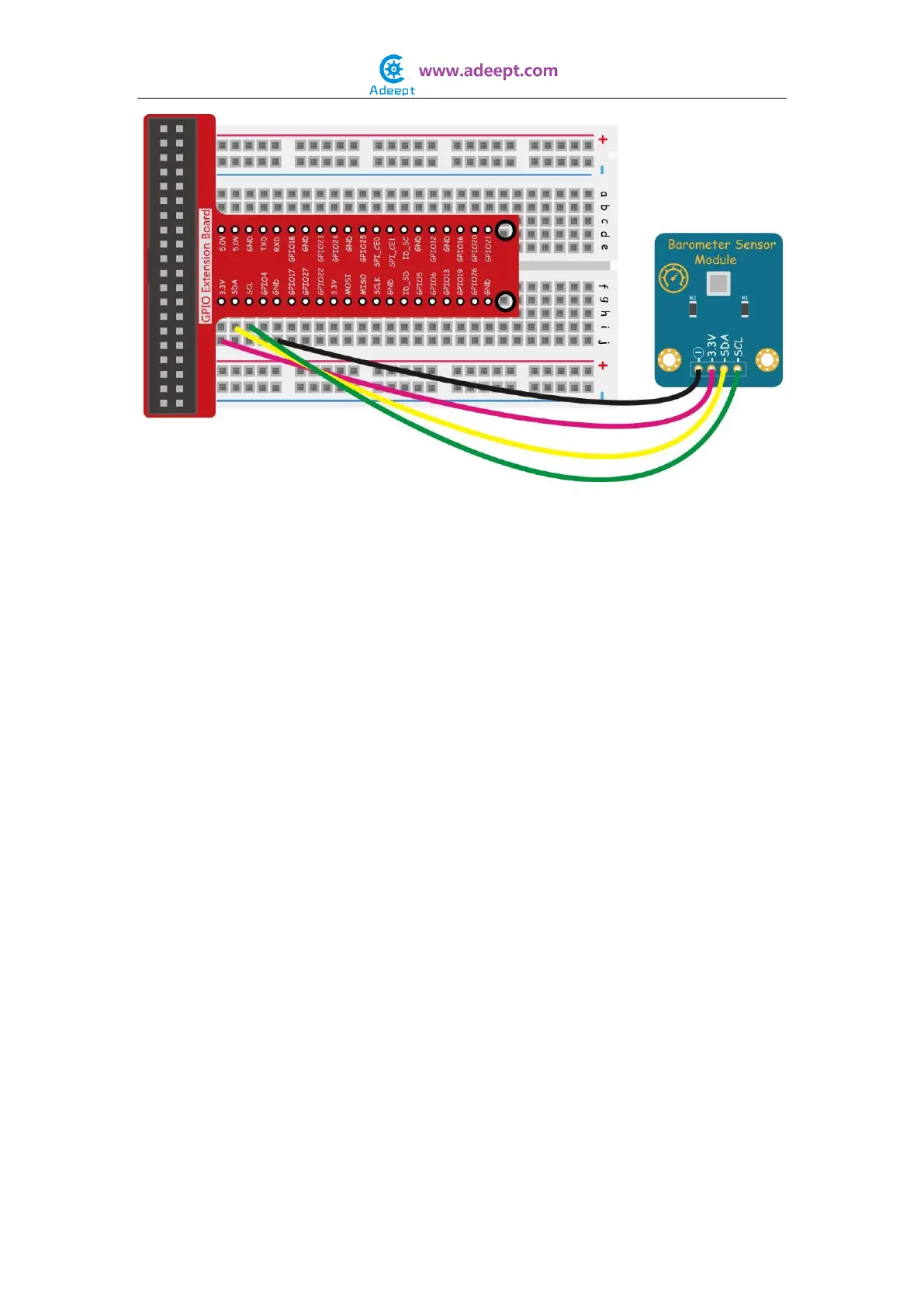
NOTE:
The following program uses an I2C interface. Before running the program, please make
sure the I2C driver module of Raspberry Pi has loaded normally.
For C language users:
Step 2: Edit and save the code with vim or nano.
(Code path: /home/Adeept_Sensor_Kit_for_RPi_C_Code/23_bmp180/bmp180dev3.c)
Step 3: Compile
$ gcc bmp180dev3.c -o bmp180 -lm
Step 4: Run
$ sudo ./bmp180
For Python users:
Step 2: Edit and save the code with vim or nano.
(Code path: /home/Adeept_Sensor_Kit_for_RPi_Python_Code/23_bmp180/examples/simpletest.py)
Step 3: Run
$ sudo python simpletest.py
Now you should see the atmospheric pressure and altitude data displayed on the terminal.


 To Next Page