This document serves as a quick guide for the Ademco Via-30PSE security system, providing essential instructions for its operation, maintenance, and troubleshooting. It covers various aspects of managing the system, from basic arming and disarming to more advanced features like bypassing zones, changing system settings, and managing user codes.
System Overview and Basic Operation
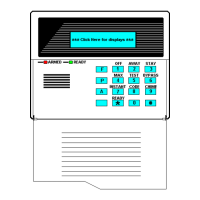
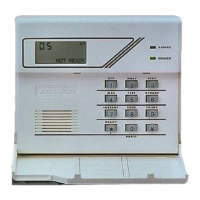
The Ademco Via-30PSE is a security system designed to protect premises. It features a keypad interface for user interaction, allowing for easy control and monitoring of the system's status. The system can be armed in different modes depending on the user's needs, and it provides clear indicators for various conditions, including power status and battery levels.
Arming and Disarming
The core function of the system involves arming and disarming to secure or unsecure the premises.
- Arming in STAY mode: This mode is used when occupants are remaining on the premises. To activate, users enter their security code followed by the
[STAY] command. This typically arms the perimeter zones while allowing movement within the interior.
- Arming in AWAY mode: This mode is for when occupants are leaving the premises. It is activated by entering the security code followed by the
[AWAY] command. This arms all protected zones, including both perimeter and interior.
- Arming in MAX mode: This mode provides maximum security with no entry delay. Users activate it by entering their security code followed by the
[MAX] command. This is suitable for situations where immediate and full protection is desired upon arming.
- Disarming: To disarm the system and unsecure the premises, users simply enter their security code followed by the
[OFF] command. This will deactivate all armed zones.
Battery Management
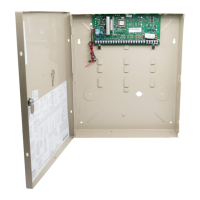
The Ademco Via-30PSE system relies on a UB 1270 battery for backup power.
- Battery Type: The system operates on a UB 1270 battery.
- Power Indicators: The system provides clear indications for power status:
NO AC. or AC LOSS indicates a loss of AC power, meaning the system is running on backup battery power.BAT or SYSTEM LO BAT indicates a low battery condition, signaling that the backup battery needs attention.
- Battery Replacement: Instructions for replacing the battery are available on a dedicated Battery Replacement Page, ensuring users can maintain the system's power reliability.
Advanced Features and Settings
Beyond basic arming and disarming, the Ademco Via-30PSE offers several advanced features to customize and manage the security system effectively.
Bypassing Protected Areas
Bypassing a zone allows users to arm the system while intentionally leaving certain protected areas unarmed. This is useful for accessing a specific area when the system is armed or for temporarily disabling a faulty sensor.
- To bypass a zone: Enter your
[security code] + [BYPASS] + [2 digit zone number]. This will temporarily exclude the specified zone from the armed system.
- To unbypass a zone: Disarm the system. Bypassed zones are typically reset when the system is disarmed.
Changing Time and Date
The system allows users to adjust the internal clock and calendar.
- Initiating the change: Enter your
[security code] + [#] + [6] + [3].
- Navigation: Once the time/date is displayed, press
[*] to move the cursor forward and [#] to move it backward.
- Entering time: Enter the 2-digit hour and minute settings (e.g.,
[06] and [17] for 6:17).
- AM/PM selection: Press
[1] for PM or [2] for AM.
- Entering date: Continue to enter 2-digit year, month, and day settings (e.g.,
[15], [08], and [23] for August 23, 2015).
- Exiting: Press
[*] when the cursor is on the last digit to save and exit.
Chimes and Beeps
The system can be configured to provide audible alerts for certain events.
- Chime mode: When chime mode is active, the system will sound three tones whenever a protected door or window is opened. This feature is useful for monitoring entry and exit points within the premises.
- Toggling chime mode: To turn chime mode on or off, enter your
[security code] + [CHIME].
Resetting the System Display
After an alarm event, the system's display will show the alarm history.
- Clearing alarm history: To clear the display and reset the alarm event history, enter your
[security code] + [OFF] sequence twice.
Security Codes and User Management
The Ademco Via-30PSE system supports multiple users, each with their own security code. However, only the Master user has the authority to manage other user codes.
- Adding a user: The Master user can add new users by entering their
[Master code] + [8] + [new user number] + [4-digit new user's code].
- Deleting a user: The Master user can delete existing users by entering their
[Master code] + [8] + [user number]. The keypad will verify the action after approximately three seconds.
Trouble Conditions and Troubleshooting
The system is designed to alert users to various issues that require attention, known as Trouble Conditions.
- Indication: Trouble conditions are displayed on the panel as the word
CHECK followed by a zone number, accompanied by beeping from the touchpad.
- Silencing beeping: To silence the beeping associated with Trouble Conditions, users should first check that the zone's protected areas are closed and secure. For wireless sensors, it's important to ensure that no environmental changes are blocking the wireless signal.
- Clearing the condition: If the problem is corrected, enter your
[security code] + [OFF] sequence twice to clear the trouble condition from the display.
- Further troubleshooting: For a comprehensive list of Trouble Conditions beyond
CHECK, users are directed to consult the full Ademco Via – 30PSE system manual.
This quick guide provides a concise overview of the Ademco Via-30PSE security system's functions, usage, and basic maintenance, enabling users to effectively manage their security setup. For more detailed information and advanced configurations, the complete system manual remains the primary resource.



 To Next Page


 General