EasyManua.ls Logo

ADEMCO VIA-30PSE - User Manual

ADEMCO VIA-30PSE
4 pages
Print Icon
To Next Page IconTo Next Page
Loading...
For a detailed review of the entire system, please view the Ademco Via – 30PSE system manual.
Arm and Disarm
Arm:
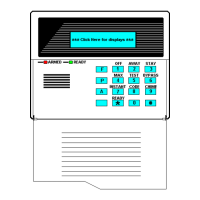
To arm in STAY mode when you are not leaving the premises, enter your [security code] + [STAY].
To arm in AWAY mode when you are leaving the premises, enter your [security code] + [AWAY].
To arm in MAX when there is no entry delay, enter your [security code] + [MAX].
Disarm:
To disarm, enter your [security code] + [OFF].
Battery
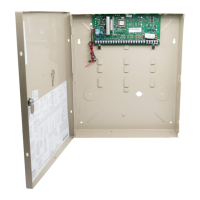
The Ademco Via 30PSE operates on a UB 1270 battery.
Quick Guide: Ademco Via-30PSE

Other manuals for ADEMCO VIA-30PSE

Questions and Answers

  • J
    Jordan BlakeSep 9, 2025
    Why is my ADEMCO VIA-30PSE not responding to keypad inputs?
    • M
      millermichaelSep 9, 2025
      If your ADEMCO VIA-30PSE isn't responding to keystrokes on the keypad, it could be because "CC" or "MODEM COMM" is displayed, indicating the system is communicating with a downloader at the central station; wait until the download session is finished. Alternatively, "d1" or "System Busy" might be displayed, meaning the system has just been powered and is in its one-minute initialization period; to bypass this time, press '#' + '0'. If "E4" or "E8" is displayed, more zones have been programmed than the zone expansion modules can handle; delete some zones or use a higher capability RF receiver. Finally, the keypad address setting might be incorrect; keypads must be set for address 31 (non-addressable mode).
  • L
    Linda HarrisSep 8, 2025
    Why ADEMCO 5800 RF System transmitter doesn't respond in normal operation but clears in Go/NoGo mode?
    • J
      Joseph RobinsonSep 8, 2025
      With the ADEMCO 5800 RF System, if there's no response to a transmitter in normal operation, but the zone number clears during Go/NoGo mode, it could be due to the wrong loop input being entered during programming, assuming another input causes the zone to be displayed. To fix this, delete the input's serial number (not the zone) and enter the proper loop input (see field *56). If there is no response at all from this transmitter, this physical transmitter has not been entered into the system. Determine which transmitter is programmed for this zone and reprogram as necessary.
  • M
    markayersSep 6, 2025
    Why is the digital communicator message from my ADEMCO VIA-30PSE Security System not being received?
    • A
      amber39Sep 6, 2025
      If the digital communicator message from your ADEMCO Security System is not being received, it could be due to several reasons. The control might be in TEST mode, so remove it from TEST mode. Check that the telephone connection is secure. The digital communicator itself might be malfunctioning, so test with a different VIA-30PSE. The telephone number in the program might need a prefix or access code, so program the prefix or access code into the control. If the telephone call to the central monitoring station requires operator assistance, the system cannot work in this situation.
  • J
    Julie CainSep 5, 2025
    What causes nuisance alarms in my ADEMCO Security System?
    • A
      Aimee WatsonSep 5, 2025
      Nuisance or phantom alarms in your ADEMCO Security System can be caused by sensors that are not properly installed, wired, or monitored; check the installation against established procedures. Another potential cause is a universal transmitter (5715/5817) programmed incorrectly; verify the programming switches on the transmitter.
  • T
    Tyler LarsonSep 3, 2025
    Why ADEMCO VIA-30PSE Security System does not arm properly?
    • D
      Daniel KnappSep 3, 2025
      If your ADEMCO Security System isn't arming properly, it may be because the READY light is not on. Check for faulted zones by pressing [,]; make sure these zones are intact, or use Bypass arming if you prefer.
  • P
    Patricia CruzSep 1, 2025
    Why am I getting a repeated low battery signal from my ADEMCO Security System?
    • S
      Sarah PerezSep 1, 2025
      A repeated low battery signal from your ADEMCO Security System can be due to several reasons. The transmitter might be located in an area where the temperature drops below 32°F; if so, change its location and use magnetic contacts to protect the opening. It could also be due to a poor-quality or unspecified battery; check the battery and use only those specified in the instructions (this does not apply to transmitters with non-replaceable batteries). Finally, the transmitter itself might be malfunctioning; in this case, replace the faulty transmitter.
  • B
    Brittany LopezAug 30, 2025
    What to do if ADEMCO Security System does not arm properly?
    • C
      Crystal NielsenAug 31, 2025
      If your ADEMCO Security System doesn't arm properly, it might be because the READY light is not on. Check for faulted zones by pressing [,]; make sure these zones are intact, or use Bypass arming if you prefer.
  • S
    Stacey BrooksAug 29, 2025
    Why is my ADEMCO Security System keypad beeping periodically?
    • L
      Lauren JacksonAug 29, 2025
      Periodic beeping from your ADEMCO Security System keypad can indicate several issues. It might mean the system is in TEST mode, which can be resolved by entering "Code" + OFF. It could also signal a low battery in a wireless transmitter (displayed on the keypad); in this case, enter "Code" + OFF and replace the battery. Finally, it may indicate a supervision CHECK; inspect the wireless transmitter and restore communication to the RF receiver.
  • S
    Sherry GonzalezAug 28, 2025
    How to fix 'POWER' light off or 'NO AC' displayed on ADEMCO Security System?
    • J
      josewardAug 28, 2025
      If the "POWER" light is off or “NO AC” is displayed on your ADEMCO Security System, the AC power supply may be interrupted. Check the transformer connection and the power line circuit breaker.
  • C
    cbrownAug 27, 2025
    Why does my ADEMCO Security System keypad show a low battery message?
    • L
      Lisa BlackwellAug 27, 2025
      The "Bat" or “System Lo Bat” message (without zone numbers) indicates the system battery is low or missing. If you see "Bat" or “Lo Bat” + "00", the remote RF keypad battery is low. If the message is "Bat" or “Lo Bat” + "nn", it means the transmitter for zone “nn” has a low battery. Replace the corresponding battery to resolve the issue.

Summary

Arm and Disarm

Arming Modes

Instructions on how to arm the system in STAY, AWAY, and MAX modes using security code and specific commands.

Disarming the System

Procedure for disarming the alarm system by entering the security code followed by the OFF command.

Battery Operation

Battery Type

Specifies that the Ademco Via 30PSE operates using a UB 1270 battery.

Bypassing Zones

Zone Bypassing Procedure

Details on how to bypass a zone using the security code, BYPASS command, and zone number.

System Settings

Change Time and Date

Guide for modifying system date and time settings via keypad commands and numerical inputs.

Chime Mode Control

Instructions on enabling or disabling the chime alert feature using the security code and CHIME command.

System Reset

Procedure to clear alarm event history by entering the security code and OFF sequence twice.

User Management

Security Code Management

Overview of user code assignment, noting that only the Master user can add or delete user codes.

Trouble Conditions

Trouble Condition Handling

Guidance on identifying, silencing, and clearing trouble conditions indicated by CHECK on the panel.

Overview

This document serves as a quick guide for the Ademco Via-30PSE security system, providing essential instructions for its operation, maintenance, and troubleshooting. It covers various aspects of managing the system, from basic arming and disarming to more advanced features like bypassing zones, changing system settings, and managing user codes.

System Overview and Basic Operation

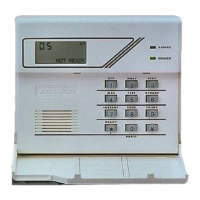
The Ademco Via-30PSE is a security system designed to protect premises. It features a keypad interface for user interaction, allowing for easy control and monitoring of the system's status. The system can be armed in different modes depending on the user's needs, and it provides clear indicators for various conditions, including power status and battery levels.

Arming and Disarming

The core function of the system involves arming and disarming to secure or unsecure the premises.

  • Arming in STAY mode: This mode is used when occupants are remaining on the premises. To activate, users enter their security code followed by the [STAY] command. This typically arms the perimeter zones while allowing movement within the interior.
  • Arming in AWAY mode: This mode is for when occupants are leaving the premises. It is activated by entering the security code followed by the [AWAY] command. This arms all protected zones, including both perimeter and interior.
  • Arming in MAX mode: This mode provides maximum security with no entry delay. Users activate it by entering their security code followed by the [MAX] command. This is suitable for situations where immediate and full protection is desired upon arming.
  • Disarming: To disarm the system and unsecure the premises, users simply enter their security code followed by the [OFF] command. This will deactivate all armed zones.

Battery Management

The Ademco Via-30PSE system relies on a UB 1270 battery for backup power.

  • Battery Type: The system operates on a UB 1270 battery.
  • Power Indicators: The system provides clear indications for power status:
    • NO AC. or AC LOSS indicates a loss of AC power, meaning the system is running on backup battery power.
    • BAT or SYSTEM LO BAT indicates a low battery condition, signaling that the backup battery needs attention.
  • Battery Replacement: Instructions for replacing the battery are available on a dedicated Battery Replacement Page, ensuring users can maintain the system's power reliability.

Advanced Features and Settings

Beyond basic arming and disarming, the Ademco Via-30PSE offers several advanced features to customize and manage the security system effectively.

Bypassing Protected Areas

Bypassing a zone allows users to arm the system while intentionally leaving certain protected areas unarmed. This is useful for accessing a specific area when the system is armed or for temporarily disabling a faulty sensor.

  • To bypass a zone: Enter your [security code] + [BYPASS] + [2 digit zone number]. This will temporarily exclude the specified zone from the armed system.
  • To unbypass a zone: Disarm the system. Bypassed zones are typically reset when the system is disarmed.

Changing Time and Date

The system allows users to adjust the internal clock and calendar.

  • Initiating the change: Enter your [security code] + [#] + [6] + [3].
  • Navigation: Once the time/date is displayed, press [*] to move the cursor forward and [#] to move it backward.
  • Entering time: Enter the 2-digit hour and minute settings (e.g., [06] and [17] for 6:17).
  • AM/PM selection: Press [1] for PM or [2] for AM.
  • Entering date: Continue to enter 2-digit year, month, and day settings (e.g., [15], [08], and [23] for August 23, 2015).
  • Exiting: Press [*] when the cursor is on the last digit to save and exit.

Chimes and Beeps

The system can be configured to provide audible alerts for certain events.

  • Chime mode: When chime mode is active, the system will sound three tones whenever a protected door or window is opened. This feature is useful for monitoring entry and exit points within the premises.
  • Toggling chime mode: To turn chime mode on or off, enter your [security code] + [CHIME].

Resetting the System Display

After an alarm event, the system's display will show the alarm history.

  • Clearing alarm history: To clear the display and reset the alarm event history, enter your [security code] + [OFF] sequence twice.

Security Codes and User Management

The Ademco Via-30PSE system supports multiple users, each with their own security code. However, only the Master user has the authority to manage other user codes.

  • Adding a user: The Master user can add new users by entering their [Master code] + [8] + [new user number] + [4-digit new user's code].
  • Deleting a user: The Master user can delete existing users by entering their [Master code] + [8] + [user number]. The keypad will verify the action after approximately three seconds.

Trouble Conditions and Troubleshooting

The system is designed to alert users to various issues that require attention, known as Trouble Conditions.

  • Indication: Trouble conditions are displayed on the panel as the word CHECK followed by a zone number, accompanied by beeping from the touchpad.
  • Silencing beeping: To silence the beeping associated with Trouble Conditions, users should first check that the zone's protected areas are closed and secure. For wireless sensors, it's important to ensure that no environmental changes are blocking the wireless signal.
  • Clearing the condition: If the problem is corrected, enter your [security code] + [OFF] sequence twice to clear the trouble condition from the display.
  • Further troubleshooting: For a comprehensive list of Trouble Conditions beyond CHECK, users are directed to consult the full Ademco Via – 30PSE system manual.

This quick guide provides a concise overview of the Ademco Via-30PSE security system's functions, usage, and basic maintenance, enabling users to effectively manage their security setup. For more detailed information and advanced configurations, the complete system manual remains the primary resource.


ADEMCO VIA-30PSE Specifications

General IconGeneral
Power SupplyTransformer
Power Supply Voltage16.5 VAC
Input Voltage120 VAC
Output Voltage12 VDC
Zones8
Battery BackupYes
Operating Temperature0°C to 49°C (32°F to 120°F)
HumidityUp to 85% non-condensing

Related product manuals