Industrial Electronic Devices
ADFweb.com S.r.l.
Document code: MN67912_ENG Revision 1.000 Page 16 of 30
SET COMMUNICATION:
This section define the fundamental communication parameters of HART and
Modbus buses.
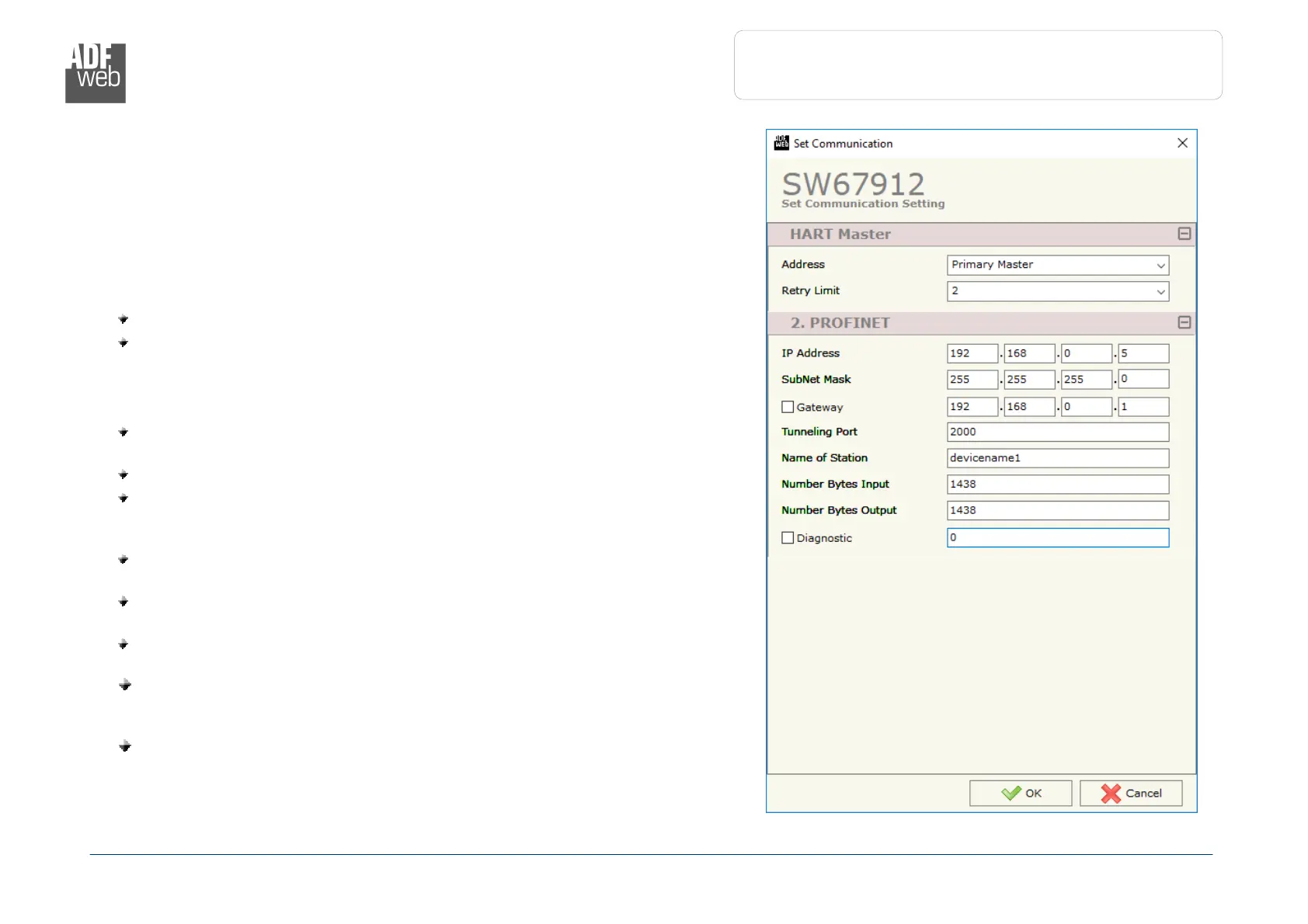
By Pressing the “Set Communication” button from the main window for SW67912
(Fig. 2) the window “Set Communication” appears (Fig. 3).
The means of the fields for the “HART Master” section are:
In the field “Address” the type of Master is defined;
In the field “Retry Limit” the maximum number of retries in case of missing
response from HART device is defined;
The meaning of the fields of “PROFINET” are:
In the field “IP ADDRESS” the IP address to assign to the converter is
defined;
In the field “SUBNET Mask” the SubNet Mask of the converter is defined;
In the field “GATEWAY” the default gateway of the network is defined. This
feature can be enabled or disabled pressing the Check Box field. This feature
is used for going out of the net;
In the field “Tunneling Port” the port to use for the “Tunneling mode” is
defined (see page 28 for more details);
In the field "Name of Station" the name of PROFINET side of the converter
is defined;
In the field "Number Bytes Input" the number of byte from the PROFINET
Master to the converter is defined (it is possible to use up to 1439 byte);
In the field "Number Bytes Output " the number of byte from the
converter to the PROFINET Master is defined (it is possible to use up to 1439
byte);
If the field “Diagnostic” is checked, the diagnostic function is enabled. In
the field on the right, the starting PROFINET byte where saving the
diagnostic is defined (see page 24 for more details).
: “Set Communication” window


 To Next Page