EasyManua.ls Logo

ADI AR-446 - Page 13

Default Icon
44 pages
Print Icon
To Next Page IconTo Next Page
To Previous Page IconTo Previous Page
Loading...
@DTMF
key
Pressing
this
key
alone
to
select
the
PAG,
CSQ
function
if
the
OTMF
Board
is
installed.
Otherwise,
a
BU-sound
will
be
generated.
Pressing
the
F
key
for
longer
than
1
second
and
then
pressing
the
DTMF
key
will
turn
the
BEEP
function
Off
or
ON.
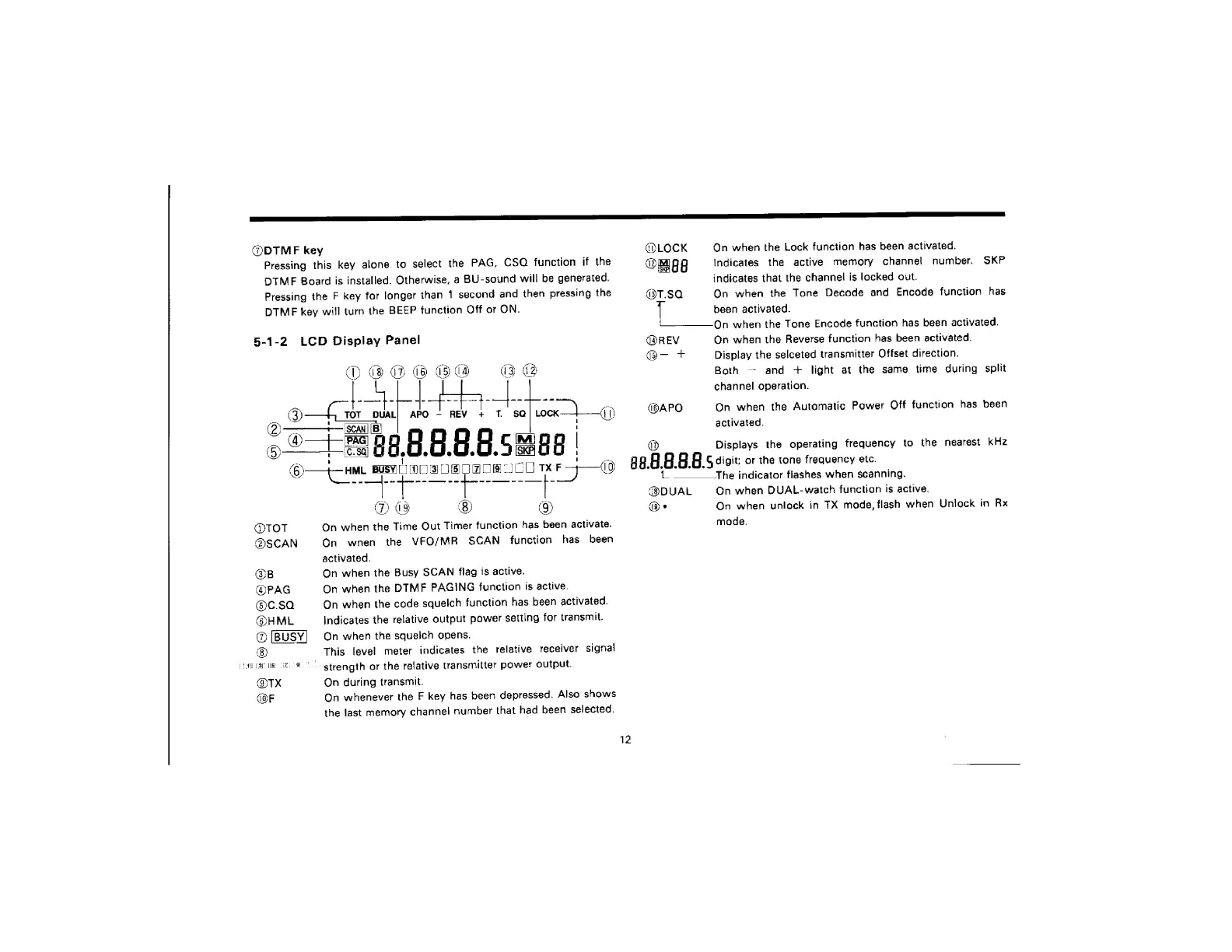
5-1-2
LCD
Display
Panel
erp
ee
ce
errs
apo
J
REV
+
.
se
Lock
—}_—
3
5
Pe
BB
BBR
Sues
-
©—{oHML
BUS
Busy
{0
aS
0RoOs8
IC
a
F>—O
@TOT
@SCAN
@B
@PAG
@c.sa
@HML
@
[BUSY]
®
fly
al
Iie
@TX
(OF
Ne.
9)
On
when
the
Time
Out
Timer
function
has
been
activate.
On
wnen
the
VFO/MR
SCAN
function
has
been
activated.
On
when
the
Busy
SCAN
flag
is
active.
On
when
the
DTMF
PAGING
function
is
active.
On
when
the
code
squelch
function
has
been
activated.
Indicates
the
relative
output
power
setting
for
transmit.
On
when
the
squelch
opens.
This
level
meter
indicates
the
relative
receiver
signal
-'
strength
or
the
retative
transmitter
power
output.
On
during
transmit.
On
whenever
the
F
key
has
been
depressed.
Also
shows
the
last
memory
channel
number
that
had
been
selected.
@LOCK
Oma
@T.$a
@REV
@-
+
dBAPO
On
when
the
Lock
function
has
been
activated.
Indicates
the
active
memory
channel
number.
indicates
that
the
channel
is
locked
out.
On
when
the
Tone
Decode
and
Encode
function
has
been
activated.
On
when
the
Tene
Encode
function
has
been
activated.
On
when
the
Reverse
function
has
been
activated.
Display
the
selceted
transmitter
Offset
direction.
Both
and
+
light
at
the
same
time
during
split
channel
operation.
SKP
On
when
the
Automatic
Power
Off
function
has
been
activated.
Displays
the
operating
frequency
to
the
nearest
kHz
48.
8
8.
5
5.
G
digit:
or
the
tone
frequency
etc.
@DUAL
‘On
______The
indicator
flashes
when
scanning.
On
when
DUAL-watch
function
is
active.
On
when
unlock
in
TX
mode,
flash
when
Uniock
in
Rx
mode.

Related product manuals