EasyManua.ls Logo

ADI AR-446 - Reception

Default Icon
44 pages
Print Icon
To Next Page IconTo Next Page
To Previous Page IconTo Previous Page
Loading...
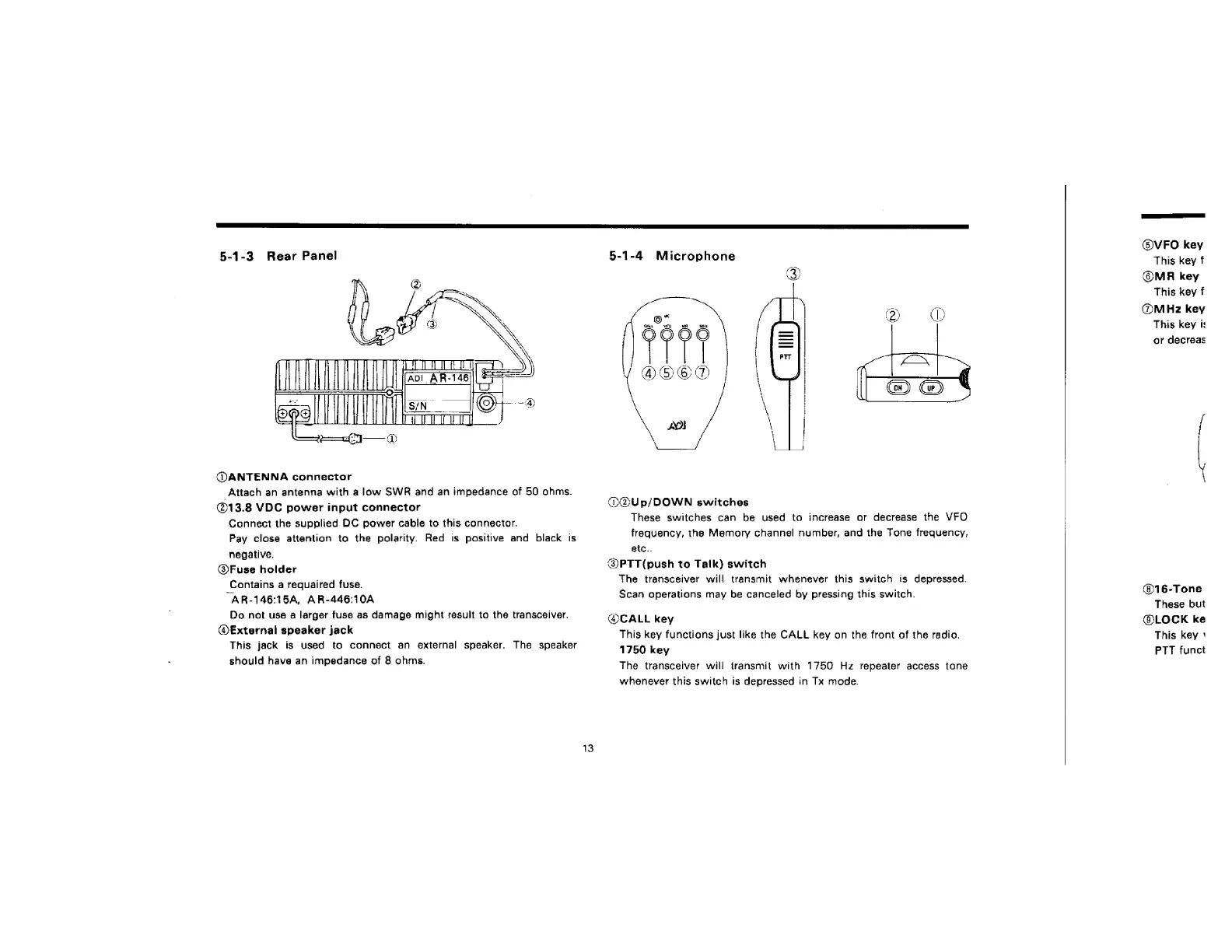
5-1-3
Rear
Panel
@ANTENNA
connector
Attach
an
antenna
with
a
low
SWR
and
an
impedance
of
50
ahms.
@13.8
VDC
power
input
connector
Connect
the
supplied
DC
power
cable
to
this
connector.
Pay
close
attentian
to
the
polarity.
Red
is
positive
and
black
is
negative.
@Fuse
holder
Contains
a
requaired
fuse.
“AR-146:154,
AR-446:10A
Do
not
use
a
larger
fuse
as
damage
might
result
to
the
transceiver.
®€xternal
speaker
jack
This
jack
is
used
to
connect
an
external
speaker.
The
speaker
should
have
an
impedance
of
8
ohms.
5-1-4
Microphone
OOUp/DOWN
switches
These
switches
can
be
used
to
increase
or
decrease
the
VFO
frequency,
the
Memory
channel
number,
and
the
Tone
frequency,
etc..
@PTT(push
to
Talk)
switch
The
transceiver
will
transmit
whenever
this
switch
is
depressed.
Scan
operations
may
be
canceled
by
pressing
this
switch.
@CALL
key
This
key
functions
just
like
the
CALL
key
on
the
front
of
the
radio.
1750
key
The
transceiver
will
transmit
with
1750
Hz
repeater
access
tone
whenever
this
switch
is
depressed
in
Tx
mode.
@)VFO
key
This
key
f
@MRA
key
This
key
f
@MHz
key
This
key
i:
or
decreas
@®16-Tone
These
but
@LOCK
ke
This
key
'
PTT
funct

Related product manuals