The ADJ LINK™ is a sophisticated 4-DMX 512 universe lighting controller designed for managing compatible DMX devices through a dedicated LINK App for iPad, available as a free download from the Apple App Store. This controller is ideal for small production events, nightclubs, bars, and any venue requiring flexible wireless iPad control and a robust 4-DMX universe app-based lighting solution.
Function Description:
The LINK controller establishes a private, standalone 2.4 or 5 GHz Wi-Fi network, eliminating the need for existing network infrastructure and allowing it to coexist effectively in busy RF environments. It enables users to control lighting parameters, call lighting effects, scenes, and colors directly from the physical controller, which mirrors the functionality of the iPad app. The device is compatible with iPad only, requiring iOS 12 or later (iPad not included).
Important Technical Specifications:
- Control / Connections:
- 11 Shortcut Buttons
- 1 Master and 8 Control 100mm Faders
- 16 Buttons Above Faders
- 8 Rotary Dials with Push-In Selection Above Faders
- 1 Blackout Button
- 32 Effect or Scene Buttons
- 4 Rotary Encoder Wheels with Push-In Selection
- 2 Wheel Shift Buttons
- USB 2.0 Type “B” Port
- Size / Weight:
- Length: 20.3" (514mm)
- Width: 13.2" (336mm)
- Vertical Height: 3.5" (88mm)
- Weight: 13.0 LBS. (5.9 kg)
- Included Items:
- USB Cable
- USB Light
- DC9V Power Supply
- Rack Mount Kit
- Additional Features:
- Wi-Fi and USB compatible
- 2.4 and 5Ghz GHz Wi-Fi Network
- 4 DMX Universes
- USB Input for Gooseneck Work Light
- Removable Outer Case for 6U Rack Mounting
- Kensington™ Security Device Slot
- Power:
- DC9V Power Supply (rated for 1A at 9VDC)
Usage Features:
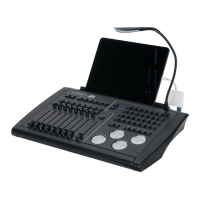
The LINK controller offers a comprehensive set of physical controls designed to enhance the user experience when operating the LINK App.
- Faders Section: This section includes 8 faders, each with a rotary push-in style knob and two buttons. It is used for fixture channel control or as scene sub-masters. The rotary knobs provide fine control for channel levels and act as effect speed controls in sub-master mode. The fader buttons are used to add or subtract channels in channel mode or as scene buttons in sub-master mode, with an LED in the top button indicating active channels or sub-masters. Fader scroll buttons allow navigation through fader pages.
- Master Fader and Blackout Button: A central master fader controls the overall level of stage lights, accompanied by a blackout button for immediate light cutoff.
- App Shortcut Buttons: Six shortcut buttons are positioned above the playback buttons for selecting app views on the iPad (Fixtures, Channels, Effects, Scenes, Shows, Subs). Additionally, five general-purpose shortcut buttons (Clear, Save, Solo, Audio, Top) are located above the jog wheels for frequently used functions.
- Matrix Buttons: The controller features 32 matrix buttons that correspond to button-based views in the iPad app, such as fixture or scene selection. Page select buttons allow users to navigate through different pages of matrix buttons. These buttons can be used to trigger lighting effects, scenes, colors, and more.
- Jog Wheels: Four large jog wheels are provided for controlling various lighting parameters. These wheels also function as push buttons for additional functions.
- Connectivity: The LINK controller connects to an iPad via its private Wi-Fi network ("ADJLink" with default password "link1234") or a hardwired USB connection. For USB, various adapters are supported depending on the iPad model (Lightning connector: Figures A and B; iPad Pro with USB C: Figure C). The Wi-Fi network operates on dual bands (2.4GHz or 5GHz), with 5GHz being the default for faster, less congested connections, and 2.4GHz offering longer range and better wall penetration. Only one device can connect to the network for security. It is highly recommended to change the default Wi-Fi password for public use.
- USB LED Light: A flexible LED work light is included, plugging into the "USB Light" port on the top panel. It features a touch switch with three brightness settings.
- Rack Mounting: The LINK™ comes with replacement sides for standard 19” rack mounting. To install, plastic end caps are removed, and metal rack-mountable sides are attached using the existing screws. The unit occupies 7.5 rack spaces, leaving room for the USB cable at the top.
Maintenance Features:
- Firmware Updates: The device's firmware can be updated periodically to introduce new features. Firmware updates and the boot loader software are available for download from www.adj.com. The current firmware revision is displayed on the fader page display upon power-up. To update, users must install the boot loader program on a Windows PC, power on the LINK™ while holding down wheel 1 to enter Update Mode (indicated by a flashing Blackout LED), and then use the boot loader utility to load and program the new firmware file (.cyacd). The device will automatically reboot after a successful update.
- Safety Guidelines: The manual emphasizes that there are no user-serviceable parts inside the device. Any attempts at repair or modification will void the warranty. The device is designed for indoor/dry locations only and must not be exposed to rain, moisture, or liquids. It should be kept away from heat sources and operated only with covers in place. Users are advised against brute force during installation or operation and to handle the power cord by the plug end, disconnecting from the main power source before any service or cleaning.

 Need help?
 General








 To Next Page