Adjustment methods of each part
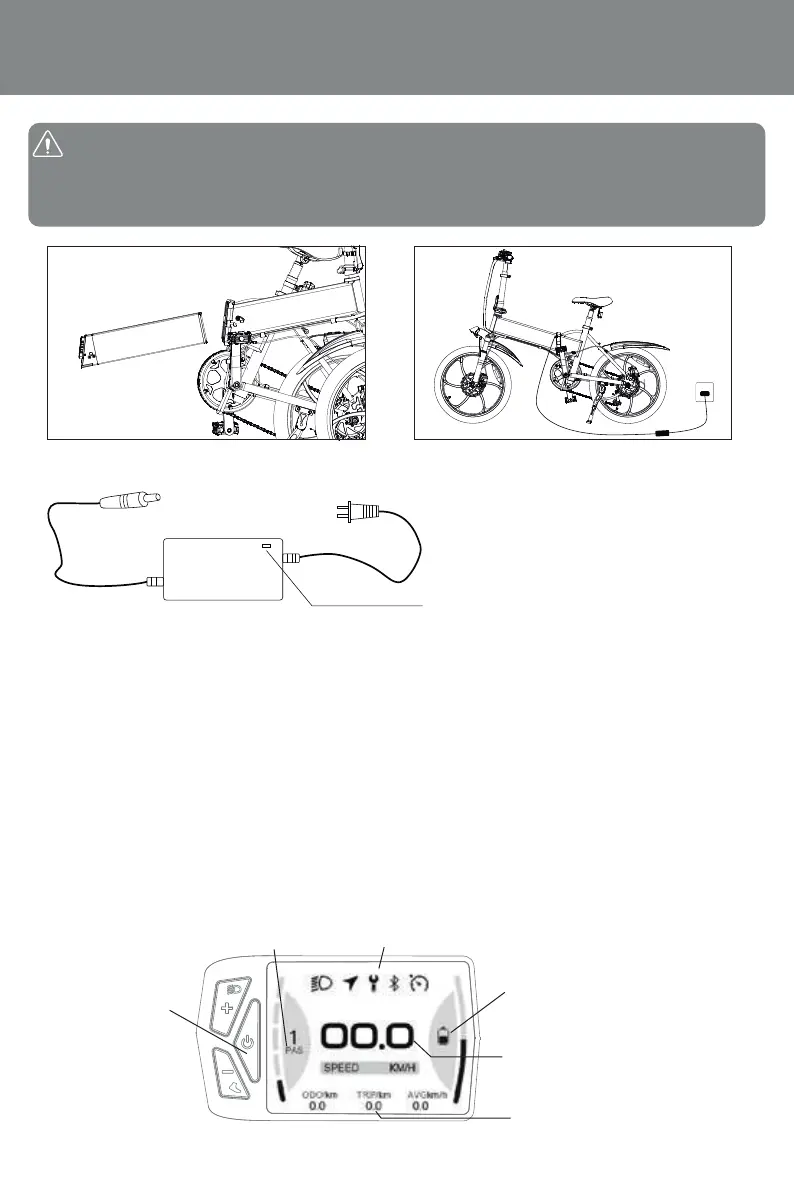
VIII.Instructions for using the code table:
1. Long press Power key for 3 second to switch on/off the ebike;
2. In the power-on state, press POWER KEY, the multi-function area will display ODO, TRIP, TIME.
ODO: Total mileage of this bicycle
TRIP: Miles since the ride
TIME: Start-up time of this ride
3. Press the “+” button to increase the gear. The higher the gear, the faster the speed.
4. Press the “-” button to lower the gear. The lower the gear, the slower the speed.
5. PAS gear: (After pedaling to 6 km/h, start the power assist)
Gear 1: Max 15km/h Gear 2: Max 20km/h Gear 3: Max 25km/h
Note: Before using the bicycle, insert the ey and turn it counterclocwise by 45, the battery is activated.
Finished using the bicycle, turn the ey 45 cloc wise, the battery is powered o, and tae out the ey.
emove the battery step, insert the ey, press it upward and then rotate it 90 clocwise. Note that need
to remove the ey and then tae out the battery to avoid damaging the ey.
3.Take out the battery and charge the
battery separately
4. You can also choosevehicle
charging
ed light indicates normal charging reen
light indicates charging completed
Switch on/off
Battery power
Speed display
Assist gear
Vehicle status
Multifunctional display area
08


 To Next Page