Guia de instalação e registo da aplicação
5. Main features of the APP:
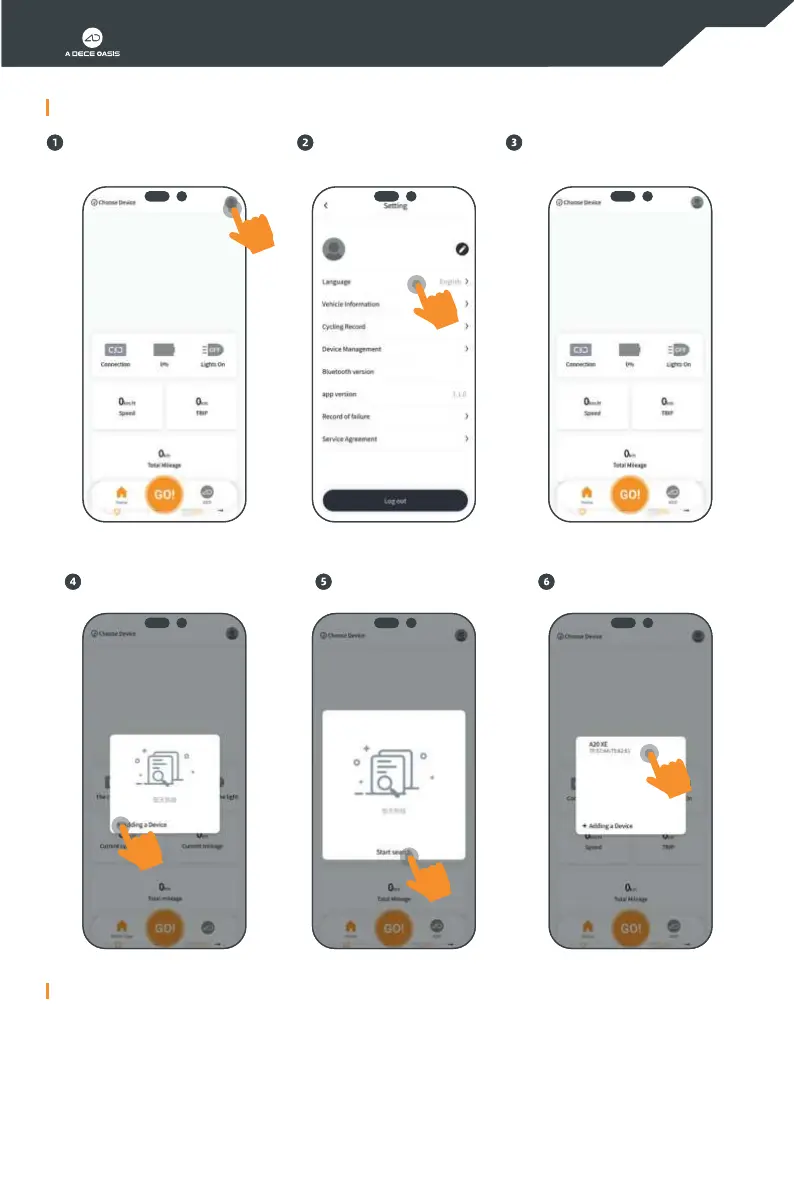
Click "Adding a Device" on the pop-up
window
* Data connection and statistics
* Navigation for travel
* Special statistics on navigation data
* Riding record
* Meet users' demands
* ADO QTLlab display
* Parameters setting
* Device upgrade
Click "Start searching" Click the device "ADO-EBIKE" for
connection
Power on the bicycle and enable your
mobile phone Bluetooth, and then click
"Choose Bluetooth" on the upper right
corner
Guide for App Installation and Registration
4. Device connection:
Please click on the top right if you
need to switch to your desired language
Click "Select a voice" to switch
10


 To Next Page