Guide for App Installation and Registration
1. Download the App:
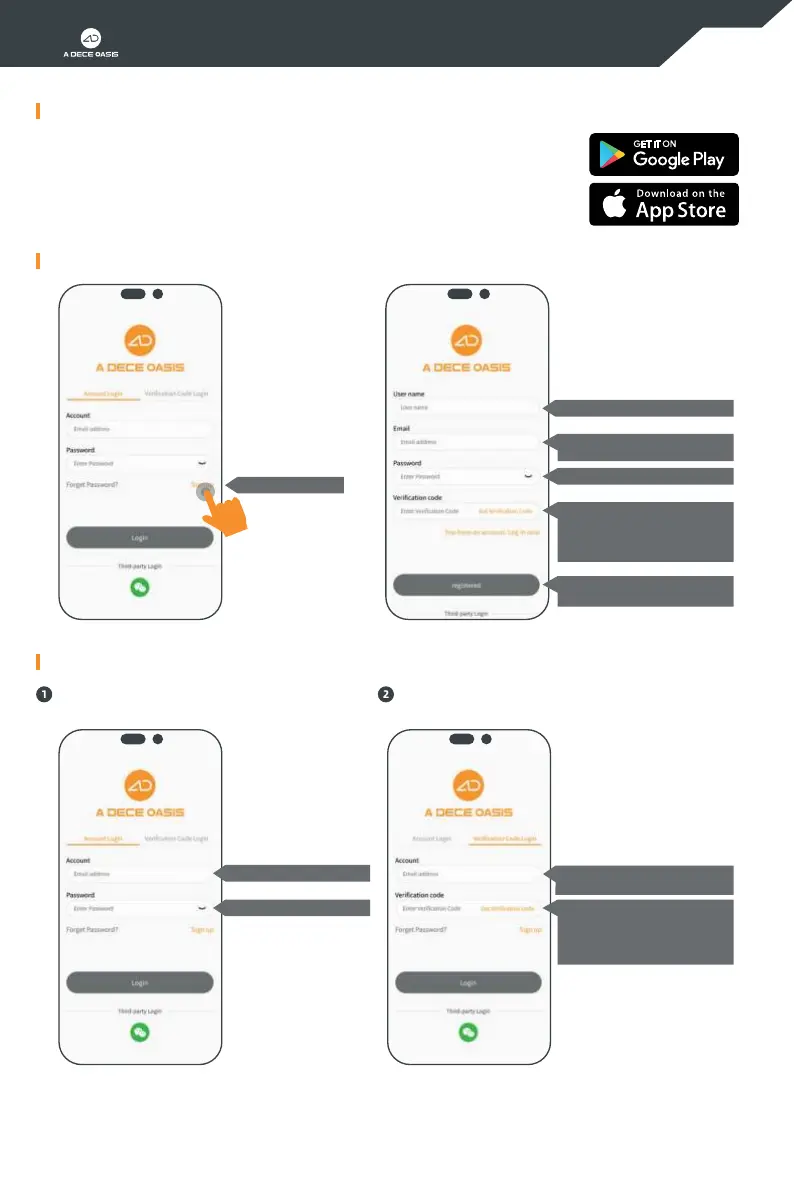
2. Register an account:
3. Login:
1.1 For an iOS device, please search for "ADO EBIKE" in the App Store and install it.
1.2 For an Android device, please search for "ADO EBIKE" in Play Store or scan the QR
code below to download and install it.
* When installinq the App, please read all the relevant prompts and agreements, and
agree to all the authorizations, otherwise the ADO EBIKE App may not work normally.
Click "Sign up"
Enter your username
Enter your personal email
Click “OK” to complete the
registration
Enter your personal email
Enter your personal email
Click on the orange text to
obtain a verication code, and
enter the received verication
code in the input box
Enter your login password
Set your login password
Click on the orange text to obtain
a verication code, and enter the
received verication code in the
input box
Log in with the account and password
you registered
Log in with the registered email and
verication code
09


 To Next Page