PSR78 Repeater
User Manual V0.1
Page | 12
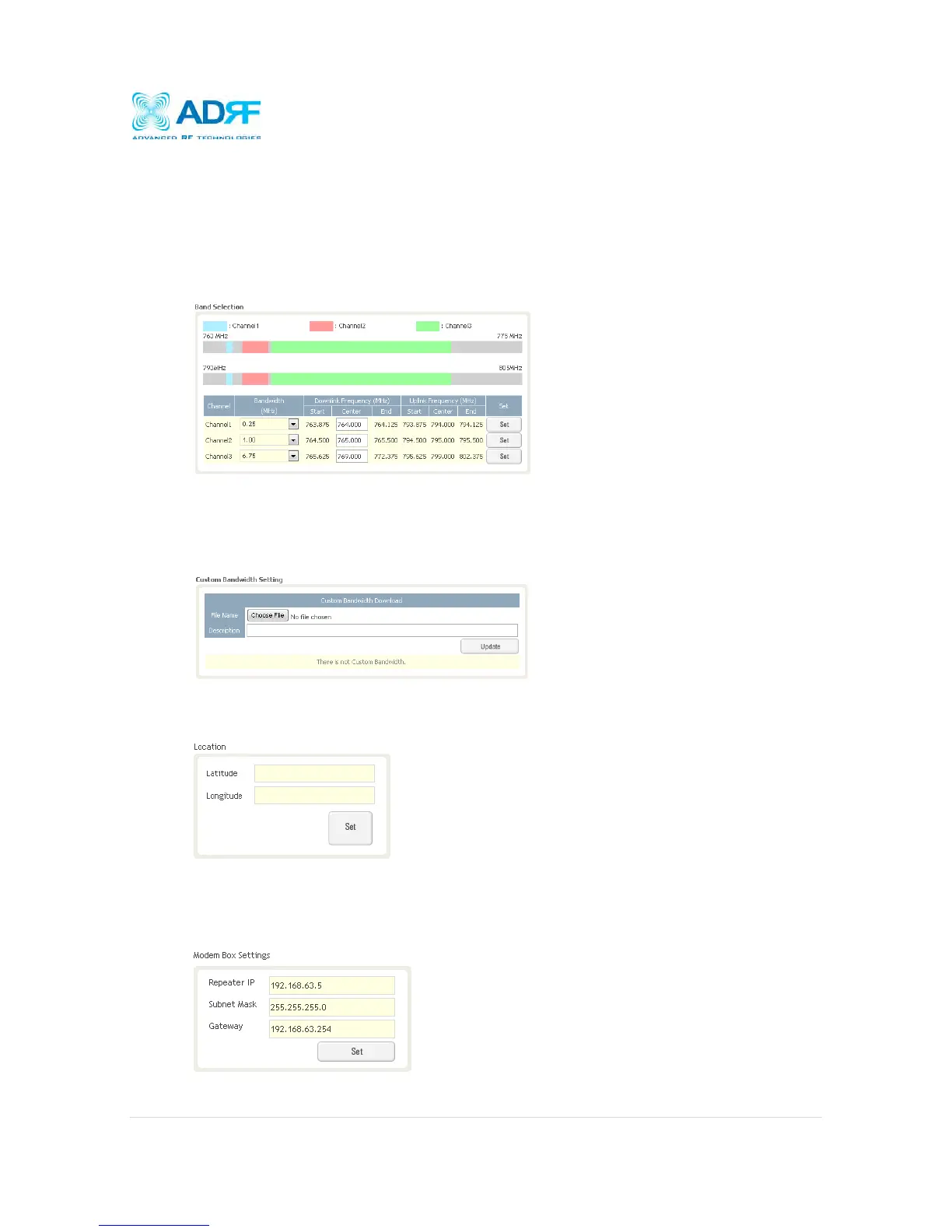
4.4.1.1 Bandwidth Selection
This section allows the user to specify the desired bandwidths and frequencies ranges to be amplified. First
select the desired bandwidth from the dropdown menu in the Bandwidth column. Next, input the center
frequencies of the desired frequencies and click the Set button. Once the Set button is pressed, desired
frequencies will be highlighted in the frequency table.
4.4.1.2 Custom Bandwidth Setting
This section allows the user to download custom filter bandwidth. The PSR78 supports bandwidths
selections in 250 KHz steps. If there are any special applications that require custom bandwidth, please
contact our Sales department.
4.4.1.3 Location
This section allows the user to input the latitude and the longitude of the repeater.
4.4.1.4 Modem Box Settings:
This section allows the user to specify an alternative Repeater IP, Subnet Mask, and Gateway settings.
These settings are enabled when the Host/Remote switch is set to the Remote position. When the
Host/Remote switch is changed, the repeater will reboot and will result in a temporary loss in coverage.



 To Next Page