C1-01-3
7-2007-11-07
Display & Functions
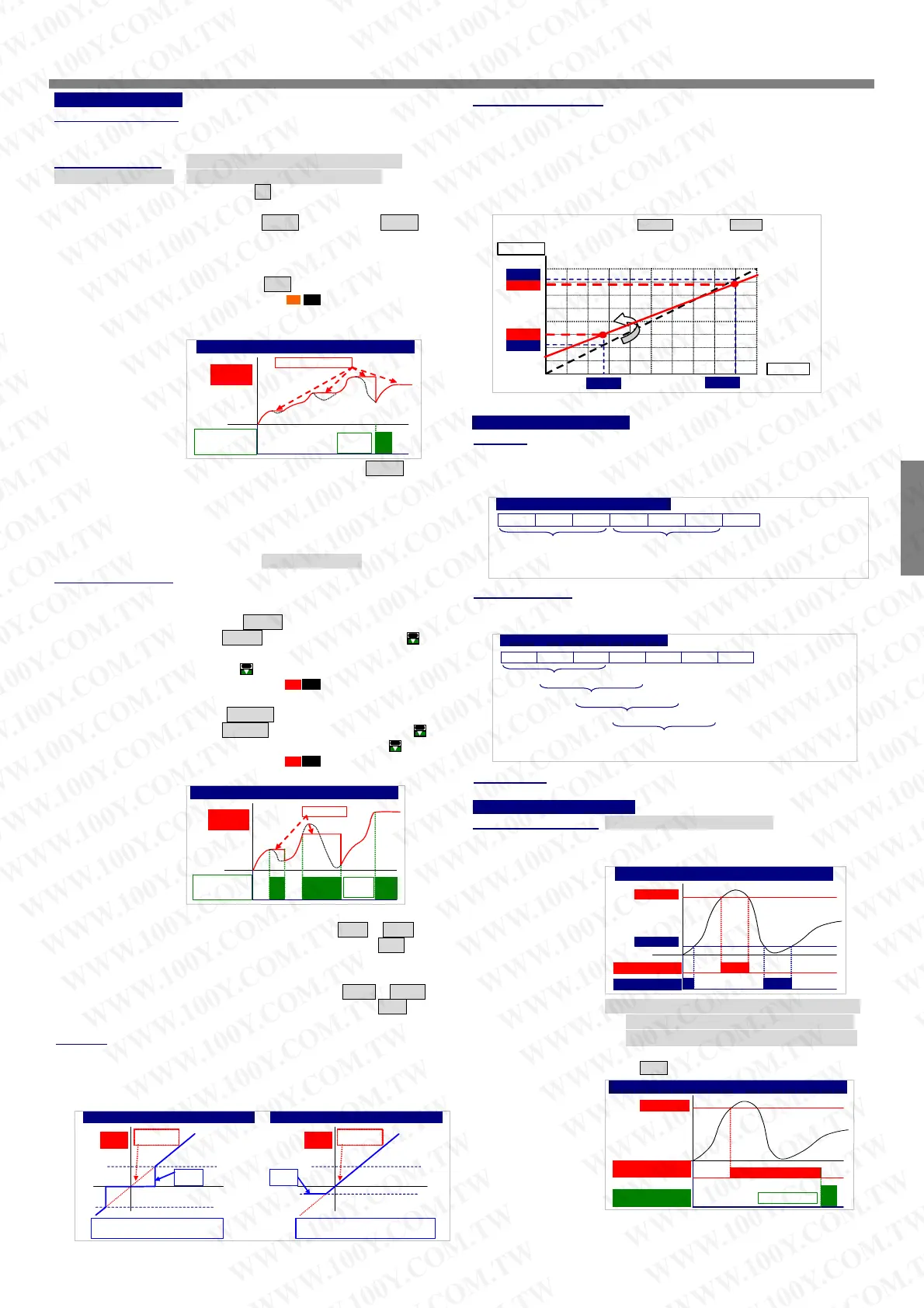
Digital fine adjustment:
Max / Mini recording:
The meter will storage the maximum and minimum value in
【User Level】during power on in order to review drifting
of PV.
Display functions: PV / Max(Mini) Hold / RS 485 programmable in
(Please refer to step A-07) 【dSPLY】function of【inPUt GroUP】
Present Value Pv: The display will show the value that
Relative to Input signal.
Users can get Fine Adjustment for Zero & Span of PV by front key of
the meter, and “Just Key In” the value which user want to show in
the current input signals.
Especially, the【Pv.Zro】&【Pv.SPn】are not only in zero & span of
PV, but also any lower point for【Pv.Zro】& higher point for【Pv.SPn】.
The meter will be linearization for full scale.
The adjustment can be clear in function【Z.S.CLr】.
Maximum Hold Max.H / Minimum Hold Mini.H :
The meter will keep display in maximum(minimum)
value during power on, until press front key to reset
(If the down key function in【inPUt GroUP】has
been set to M.rSt .)
¾ Please find the
M.H
sticker that enclosure the
package of the meter to stick on the right side of
square orange LED
Default Input: Lo.SC: 0.00, Hi.SC: 199.99
Digital fine adjut.: input 2.75V,
Display: Low point from 55.00 to 80.00
High point from 180.00 tp 170.00
SCALE
INPUT
0.00
199.99
0V
10V5V
100.00
2.75
55.00
150.00
80.00
9.00V
180.00
170.00
Reading Stable Function
Average:
Max. ( Mini.) Hold & Reset
Reset the Max
(Mini) Hold by
E.C.I. or F. Key
O
N
Level
Trigger
Maximum Hold
Present
Value
Remote Display by RS485 command RS485 : The
meter will show the value that received from RS485
Basically, the sampling rate of meter is 15cycles/sec. If the function
set to be 3 times, It means the meter will update of display will be 5
times/sec.
sending. In past, The meter normally receive
or 0~10V from AO or digital output from BCD module
of PLC .We support a new solution that PV shows
the value from RS485 command of master can so
that can be save cost and wiring from PLC.
Front key functions: Relative PV / PV Hold / Reset for maxi(mini) hold /
verage set to be 3
Remark: The higher average setting will cause the response time of Relay and Analogue output slower.
Sample 1 Sample 2 Sample 3 Sample 4 Sample 5 Sample 6 …….
Display Update Value =
(Sample 1 + Sample 2 + Sample 3)/3
Display Update Value =
(Sample 4 + Sample 5 + Sample 6)/3
Reset for relay energized latch programmable in
Moving average:
【dn.KEY】function of 【inPUt GroUP】
Relative PV rEL.Pv :【dn.KEY】function can be set to
If the function to be set 3 times, the meter will update delay in first 3
samples, then it will update 15 times/sec continuously.
be rEL.Pv function. When user press the
key,
the display will show the differential value(∆PV), until
press
key again.
¾ Please find the
R.P
sticker to stick on the right
side of square red LED.
PV Hold Pv. HLd :【dn.KEY】function can be set to
be Pv. HLd function. When user press the
key,
the display will be hold until press the
key again.
¾ Please find the
PV.H
sticker to stick on the right
Moving Average set to be 3
Remark: The higher moving average setting wouldn’t cause the response time of Relay and Analogue
output slower after first 3 samples.
Sample 1 Sample 2 Sample 3 Sample 4 Sample 5 Sample 6 …….
In first 3 samples, Display Update Value = (Sample 1 + Sample 2 + Sample 3)/3
Display Update Value = (Sample 2 + Sample 3 + Sample 4)/3
Display Update Value = (Sample 3 + Sample 4 + Sample 5)/3
Display Update Value = (Sample 4 + Sample 5 + Sample 6)/3
side of square red LED.
Digital filter:
The digital filter can reduce the magnetic noise in field.
Control functions(option)
Relay energized mode: Hi / Lo / Hi.HLd / Lo.HLd programmable
Hi: Relay will energize when PV > Set-Point
Lo: Relay will energize when PV < Set-Point
PV Hold & Reset
Present
Value
Reset PV Hold
by Front
DownKey
O
N
Edge
Trigger
ON ON
PV Hold
Reset for Max(Mini) Hold: when the【dSPLY】in
【inPUt GroUP】set to be Max.H or Mini.H ,
【dn.KEY】function can be set to be M.rSt to reset
the display when it is holding in maxim or mini value.
Reset for relay energized latch: when the【rY1.Md】in
【rELAY GroUP】set to be Hi.HLd or Lo.HLd ,
Hi / Lo Relay Energized
Hi Settin
Hi Relay Energized
ON
Lo Settin
Lo Relay Energized
ON
【dn.KEY】function can be set to be rY.rSt to reset
Hi.HLd (Lo.HLd): When the PV is Higher (or lower) than
the relay when it is energizing and latching.
set-point, the relay will be energized and latch until
Low cut:
manual reset by from key in【User Level】or press
down key to reset(If the 【dn.KEY】function set to
be rY.rSt)
If the setting value is positive, it means when the absolutely value of
PV ≤ Setting value, the display will be 0. If the setting value is
negative, it means when the PV under setting value(PV≤ -Setting
value), the display will be setting value.
Hi(Lo) Energized Latch & Reset
Hi.HLd(High Hold)
Rela
Ener
ized
ON
Reset the relay
Latch by Down Key
ON
Level Trigger
Hi Setting
Low Cut set to be +0.50
Low Cut set to be -0.10
-0.10
Low cut
function
Low Cut is set for 0.50, if the PV is
from -0.50~+0.50, that display will be 0.
Low Cut is set for -0.10, if the PV is under
(< = -0.10), that display will be -0.10.
PV according
to input signal
Present
Value
Low cut
function
0.50
-0.50
Present
Value
PV according
to input signal
CS2-
A
CSM-321S CSM-CSM-
CS1-PR
CSM-321S CSM-CSM-
CSM-321S CSM-
CSM-321S
WWW.100Y.COM.TW WWW.100Y.COM.TW WWW.100Y.COM.TW
WWW.100Y.COM.TW WWW.100Y.COM.TW WWW.100Y.COM.TW
WWW.100Y.COM.TW WWW.100Y.COM.TW WWW.100Y.COM.TW
WWW.100Y.COM.TW WWW.100Y.COM.TW WWW.100Y.COM.TW
WWW.100Y.COM.TW WWW.100Y.COM.TW WWW.100Y.COM.TW
WWW.100Y.COM.TW WWW.100Y.COM.TW WWW.100Y.COM.TW
WWW.100Y.COM.TW WWW.100Y.COM.TW WWW.100Y.COM.TW
WWW.100Y.COM.TW WWW.100Y.COM.TW WWW.100Y.COM.TW
WWW.100Y.COM.TW WWW.100Y.COM.TW WWW.100Y.COM.TW
WWW.100Y.COM.TW WWW.100Y.COM.TW WWW.100Y.COM.TW
WWW.100Y.COM.TW WWW.100Y.COM.TW WWW.100Y.COM.TW
WWW.100Y.COM.TW WWW.100Y.COM.TW WWW.100Y.COM.TW
WWW.100Y.COM.TW WWW.100Y.COM.TW WWW.100Y.COM.TW
WWW.100Y.COM.TW WWW.100Y.COM.TW WWW.100Y.COM.TW
WWW.100Y.COM.TW WWW.100Y.COM.TW WWW.100Y.COM.TW
WWW.100Y.COM.TW WWW.100Y.COM.TW WWW.100Y.COM.TW
WWW.100Y.COM.TW WWW.100Y.COM.TW WWW.100Y.COM.TW
WWW.100Y.COM.TW WWW.100Y.COM.TW WWW.100Y.COM.TW
WWW.100Y.COM.TW WWW.100Y.COM.TW WWW.100Y.COM.TW
WWW.100Y.COM.TW WWW.100Y.COM.TW WWW.100Y.COM.TW
WWW.100Y.COM.TW WWW.100Y.COM.TW WWW.100Y.COM.TW
WWW.100Y.COM.TW WWW.100Y.COM.TW WWW.100Y.COM.TW
WWW.100Y.COM.TW WWW.100Y.COM.TW WWW.100Y.COM.TW
WWW.100Y.COM.TW WWW.100Y.COM.TW WWW.100Y.COM.TW
WWW.100Y.COM.TW WWW.100Y.COM.TW WWW.100Y.COM.TW
WWW.100Y.COM.TW WWW.100Y.COM.TW WWW.100Y.COM.TW
WWW.100Y.COM.TW WWW.100Y.COM.TW WWW.100Y.COM.TW
WWW.100Y.COM.TW WWW.100Y.COM.TW WWW.100Y.COM.TW
WWW.100Y.COM.TW WWW.100Y.COM.TW WWW.100Y.COM.TW
WWW.100Y.COM.TW WWW.100Y.COM.TW WWW.100Y.COM.TW
WWW.100Y.COM.TW WWW.100Y.COM.TW WWW.100Y.COM.TW
WWW.100Y.COM.TW WWW.100Y.COM.TW WWW.100Y.COM.TW
WWW.100Y.COM.TW WWW.100Y.COM.TW WWW.100Y.COM.TW
WWW.100Y.COM.TW WWW.100Y.COM.TW WWW.100Y.COM.TW
WWW.100Y.COM.TW WWW.100Y.COM.TW WWW.100Y.COM.TW
WWW.100Y.COM.TW WWW.100Y.COM.TW WWW.100Y.COM.TW
WWW.100Y.COM.TW WWW.100Y.COM.TW WWW.100Y.COM.TW
WWW.100Y.COM.TW WWW.100Y.COM.TW WWW.100Y.COM.TW


 To Next Page
 Loading...