C1-01-4
7-2007-11-07
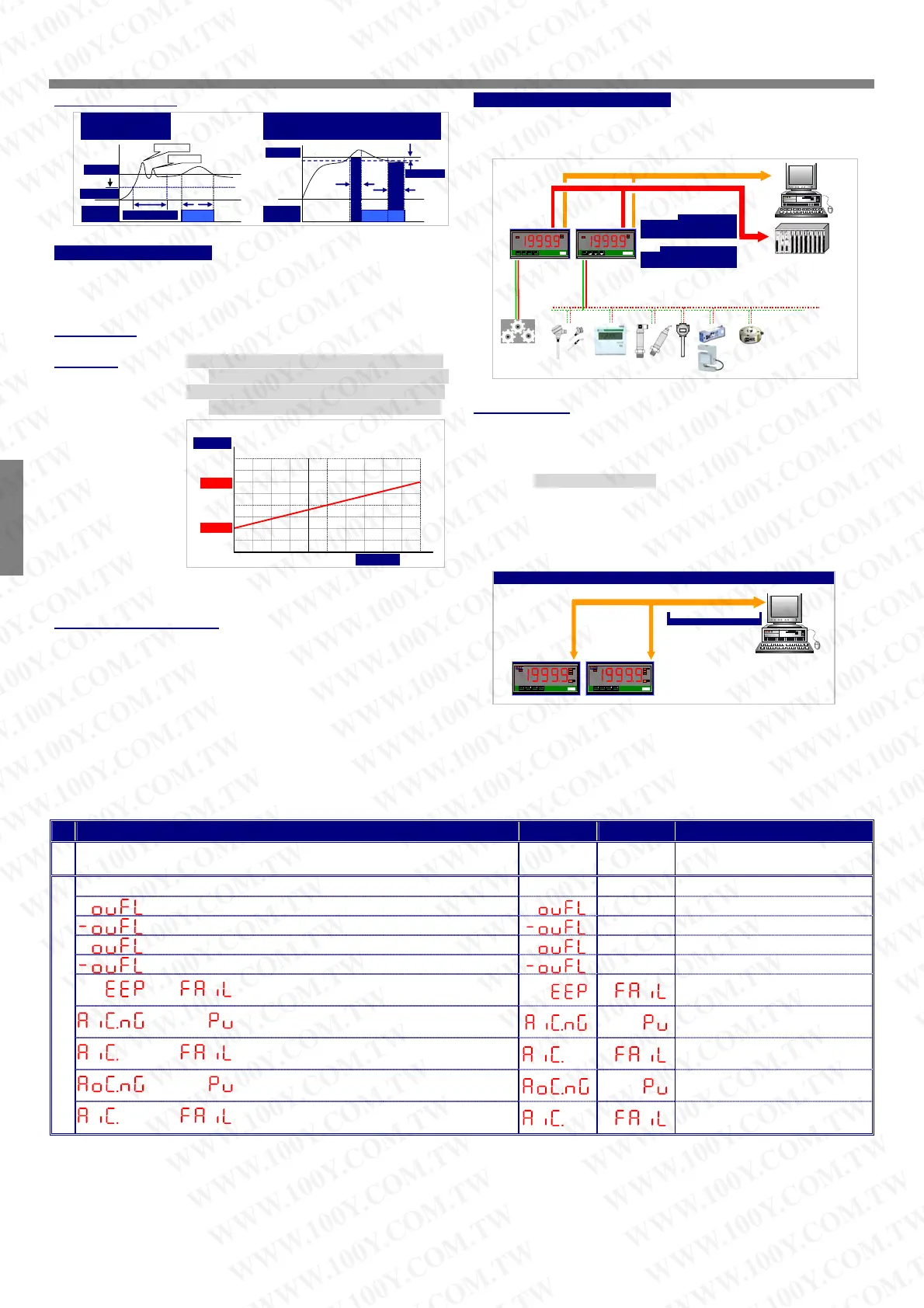
Energized functions:
Start delay / Energized & De-energized delay / Hysteresis
RS 485 Communication(option)
The RS485’s protocol is Modbus RTU mode, and baud rate up to
38400 bps. It’s convenience to remote monitoring, display for
reading.
Start Dela
Energized
De-energized
Delay & Hysteresis
Start Dela
Time
Start Band
Hi Setting
Relay
Energized
ON
Inhibit
Inhibit
Energized delay tim
ON
H
steresis
De-energized
delay time
Hi Setting
Relay
Energized
Analogue output(option)
Please specify the output type either an o~10V or 4(0)~20mA in
ordering. The programmable output low and high scaling can be
based on various display values. Reverse slope output is possible by
reversing point positions.
Output range: Voltage: 0~5V / 0~10V / 1~5V programmable
Current: 0~10mA / 0~20mA / 4~20mA programmable
Functions:
Ao.HS(output range high): setting the Display value High
to versus output range High(as like as 20mA in 4~20)
RS 485 Modbus RTU Mode (up to 38400bps)
1 Relay Output:
Mode: High or Low Energized
Functions: Start delay / Energized &
De-energized delay / Hysteresis
Analo
Output 0~10V/0(4)~20mA
Display:
Mode: Measuring Value / Maximum Hold /
Minimum Hold / Reading value from
RS485 command
M
ENT/
N
◄
▲
▼
RPM
M
Kg/cm
Ao.LS(output range Low): setting the Display value Low
to versus output range Low(as like as 4mA in 4~20)
Remote display:
The meter will show the value that received from RS485 command.
In past, The meter normally receive 4~20mA or 0~10V from AO or
digital output from BCD module of PLC .We support a new solution
that PV shows the value from RS485 command of master so that
can be save cost and wiring from PLC.
When the【dSPLY】set to be RS485, it means, the PV screen will
show the number from RS485 command & data. The data(number)
will be same as PV that will compare with set-point, analogue output
and ECI functions so that is to control analogue output, relay
energized and so on.
Set Scaling: Lo.SC: 0.00, Hi.SC: 199.99;
Output: Ao.LS: 50.00(Display Value Low),
Ao.HS: 150.00(Display Value High)
0.00% 100.00%50.00%
OUTPUT
199.99
100.00
0.00
50.00
150.00
SCALE
The range between Ao.HS and Ao.LS should be over
20% of span at least; otherwise, it will be got less
resolution of analogue output.
Fine zero & span adjustment:
Users can get Fine Adjustment of analogue output by front key of
the meter. Please connect standard meter to the terminal of
analogue output. To press the front key(up or down key) of meter to
adjust and check the output of meter.
【Ao.Zro】: Fine Zero Adjustment for Analog Output;
CS1 APPLICATION FOR REMOTE DISPLAY FROM RS485 COMMAND
RS 485 Modbus RTU Mode (up to 38400bps)
RS485 wiring 1.2KM maximum
Terminate Resistor:
RL1
M
I11
ENT/FN
◄
▲
▼
Kg
cm
M.H
M.H
RL1
M
I11
ENT/FN
◄
▲
▼
Kg
cm
M.H
M.H
Settable range: -38011~27524;
【Ao.Spn】: Fine Span Adjustment for Analog Output;
Settable range: -38011~27524;
ERROR MASAGE
DESCRIPTION DISPLAY FLASH REMARK
BEFORE POWER ON, PLEASE CHECK THE SPECIFICATION AND
CONNECTION AGAIN.
SELF-DIAGNOSIS AND ERROR CODE:
: Display is positive-overflow (Signal is over display range)
(Please check the input signal)
: Display is negative-overflow (Signal is under display range)
(Please check the input signal)
: ADC is positive-overflow (Signal is higher than input 120%)
(Please check the input signal)
: ADC is negative-overflow (Signal is lower than input -120%)
(Please check the input signal)
/
: EEPROM occurs error
(Please send back to
manufactory for repaired)
/
: Calibrating Input Signal do not process
(Please process Calibrating
Input Signal)
/
: Calibrating Input Signal error
(Please check Calibrating Input
Signal)
/
: Calibrating Output Signal do not process
(Please process Calibrating
Output Signal)
/
: Calibrating Output Signal error
(Please check Calibrating
Output Signal)
CS2-
A
CSM-321S CSM-CSM-
CS1-PR
CSM-321S CSM-CSM-
CSM-321S CSM-
CSM-321S
WWW.100Y.COM.TW WWW.100Y.COM.TW WWW.100Y.COM.TW
WWW.100Y.COM.TW WWW.100Y.COM.TW WWW.100Y.COM.TW
WWW.100Y.COM.TW WWW.100Y.COM.TW WWW.100Y.COM.TW
WWW.100Y.COM.TW WWW.100Y.COM.TW WWW.100Y.COM.TW
WWW.100Y.COM.TW WWW.100Y.COM.TW WWW.100Y.COM.TW
WWW.100Y.COM.TW WWW.100Y.COM.TW WWW.100Y.COM.TW
WWW.100Y.COM.TW WWW.100Y.COM.TW WWW.100Y.COM.TW
WWW.100Y.COM.TW WWW.100Y.COM.TW WWW.100Y.COM.TW
WWW.100Y.COM.TW WWW.100Y.COM.TW WWW.100Y.COM.TW
WWW.100Y.COM.TW WWW.100Y.COM.TW WWW.100Y.COM.TW
WWW.100Y.COM.TW WWW.100Y.COM.TW WWW.100Y.COM.TW
WWW.100Y.COM.TW WWW.100Y.COM.TW WWW.100Y.COM.TW
WWW.100Y.COM.TW WWW.100Y.COM.TW WWW.100Y.COM.TW
WWW.100Y.COM.TW WWW.100Y.COM.TW WWW.100Y.COM.TW
WWW.100Y.COM.TW WWW.100Y.COM.TW WWW.100Y.COM.TW
WWW.100Y.COM.TW WWW.100Y.COM.TW WWW.100Y.COM.TW
WWW.100Y.COM.TW WWW.100Y.COM.TW WWW.100Y.COM.TW
WWW.100Y.COM.TW WWW.100Y.COM.TW WWW.100Y.COM.TW
WWW.100Y.COM.TW WWW.100Y.COM.TW WWW.100Y.COM.TW
WWW.100Y.COM.TW WWW.100Y.COM.TW WWW.100Y.COM.TW
WWW.100Y.COM.TW WWW.100Y.COM.TW WWW.100Y.COM.TW
WWW.100Y.COM.TW WWW.100Y.COM.TW WWW.100Y.COM.TW
WWW.100Y.COM.TW WWW.100Y.COM.TW WWW.100Y.COM.TW
WWW.100Y.COM.TW WWW.100Y.COM.TW WWW.100Y.COM.TW
WWW.100Y.COM.TW WWW.100Y.COM.TW WWW.100Y.COM.TW
WWW.100Y.COM.TW WWW.100Y.COM.TW WWW.100Y.COM.TW
WWW.100Y.COM.TW WWW.100Y.COM.TW WWW.100Y.COM.TW
WWW.100Y.COM.TW WWW.100Y.COM.TW WWW.100Y.COM.TW
WWW.100Y.COM.TW WWW.100Y.COM.TW WWW.100Y.COM.TW
WWW.100Y.COM.TW WWW.100Y.COM.TW WWW.100Y.COM.TW
WWW.100Y.COM.TW WWW.100Y.COM.TW WWW.100Y.COM.TW
WWW.100Y.COM.TW WWW.100Y.COM.TW WWW.100Y.COM.TW
WWW.100Y.COM.TW WWW.100Y.COM.TW WWW.100Y.COM.TW
WWW.100Y.COM.TW WWW.100Y.COM.TW WWW.100Y.COM.TW
WWW.100Y.COM.TW WWW.100Y.COM.TW WWW.100Y.COM.TW
WWW.100Y.COM.TW WWW.100Y.COM.TW WWW.100Y.COM.TW
WWW.100Y.COM.TW WWW.100Y.COM.TW WWW.100Y.COM.TW
WWW.100Y.COM.TW WWW.100Y.COM.TW WWW.100Y.COM.TW


 To Next Page
 Loading...