542
Advanced Diagnostics USA Manual for MVP & TCODE PRO – Copyright 2014 Advanced Diagnostics USA INC.
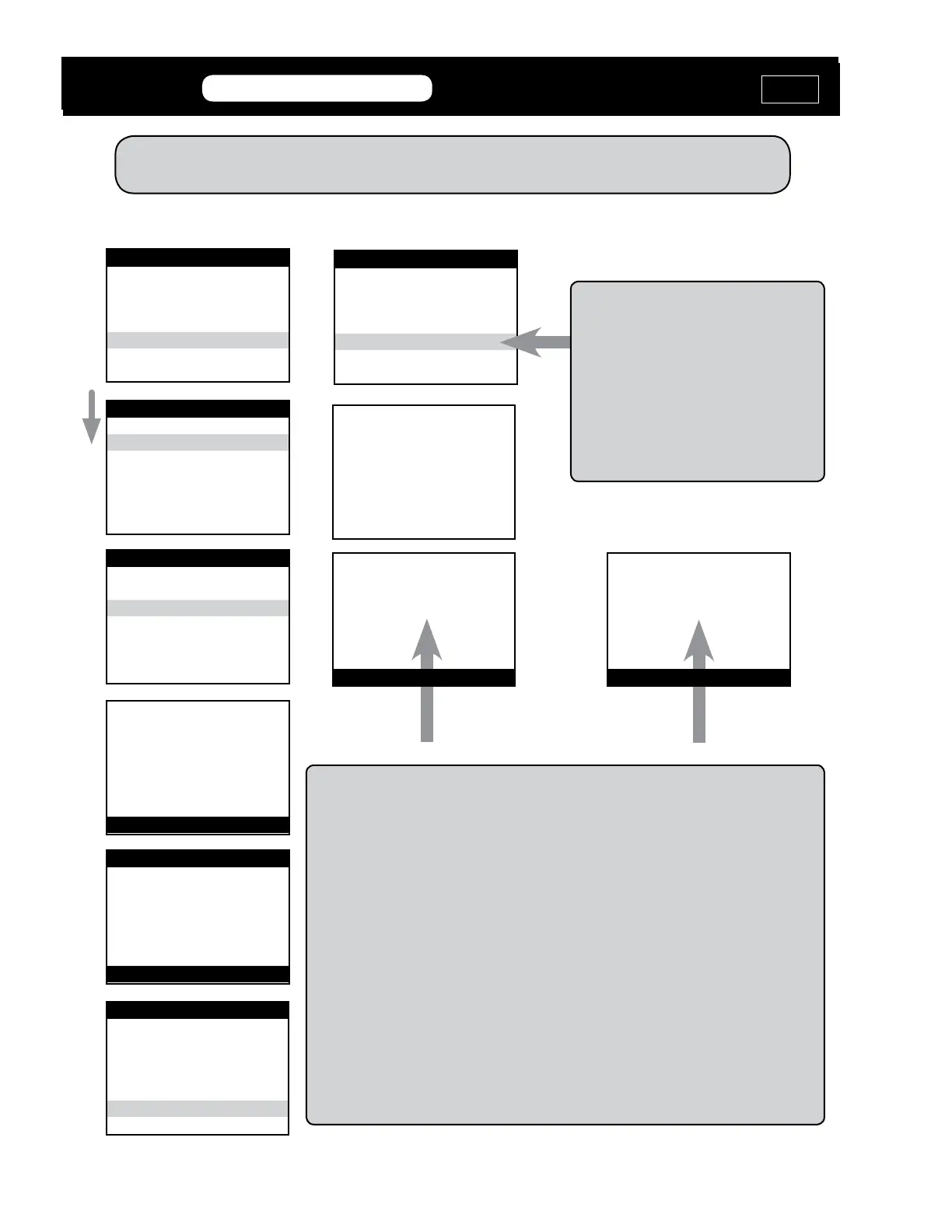
VEHICLE SELECTION
MITSUBISHI
NISSAN
SUZUKI
> TOYOTA
V.W./AUDI GROUP
VEHICLE SELECTION
> Immobilizer
REMOTE
VEHICLE SELECTION
TYPE 1
> TYPE 2
TYPE 3
TYPE 4
TYPE 5
ECU IDENTIFICATION
TOYOTA/LEXUS TYPE 2
PRESS ENTER KEY
SWITCH IGNITION ON
PRESS ENTER KEY
DIAGNOSTIC MENU
ECU IDENTIFICATION
FAULT CODES
LIVE DATA
ACTUATORS
> SPECIAL FUNCTIONS
DIAGNOSTIC MENU
RESET Immobilizer
PROGRAM KEY
ERASE KEYS
> QUICK RESET Immobilizer
TRYING TO COMMUNICATE
QUICK RESET IMMOBILIZER
This will RESET the immobilizer and place
the system in “AUTO LEARN MODE”
Within just seconds.
WATCH THE SECURITY LIGHT!
Most of the time you will see PROCEDURE COMPLETE message on the tester.
However, sometimes the car does not signal the tester that the immobilizer has been
reset and you may see COMMUNICATION FAILED on the screen.
DO NOT WATCH THE TESTER,
WATCH THE CARS SECURITY LIGHT!
Auto Learn mode is indicated by the steady illumination of the Security Light.
Once you see a solid immo light. Insert each key you want to program - but do not turn
the key ON - only insert and remove after 5 seconds. The vehicle may learn up to 4 keys
before the Auto Learn cycle is shut down.
You can close the cycle early by turning the ignition lock from Off to On and back to Off
6-8 times, very fast, with a Master key. Remove the key and re-insert it and the Security
Lite should be out when there is a programmed key in the ignition.
(Use this method if you have no Master Keys.)
Quick” RESET Immobilizer - TYPE 2
MVP &
TCODE
TOYOTA
ADVANCED DIAGNOSTICS USA
powered
by
RESET Immobilizer
PROCEDURE COMPLETE
PRESS ENTER KEY
RESET Immobilizer
COMMUNICATION FAILED
PRESS ENTER KEY
OR
Both are OK
MVP &
TCODE
ADVANCED DIAGNOSTICS USA
powered
by
PRIUS ‘04-’09
MVP &
TCODE
TOYOTA
ADVANCED DIAGNOSTICS USA
powered
by


 To Next Page