31 MIO-5251 User Manual
Chapter 3 AMI BIOS Setup
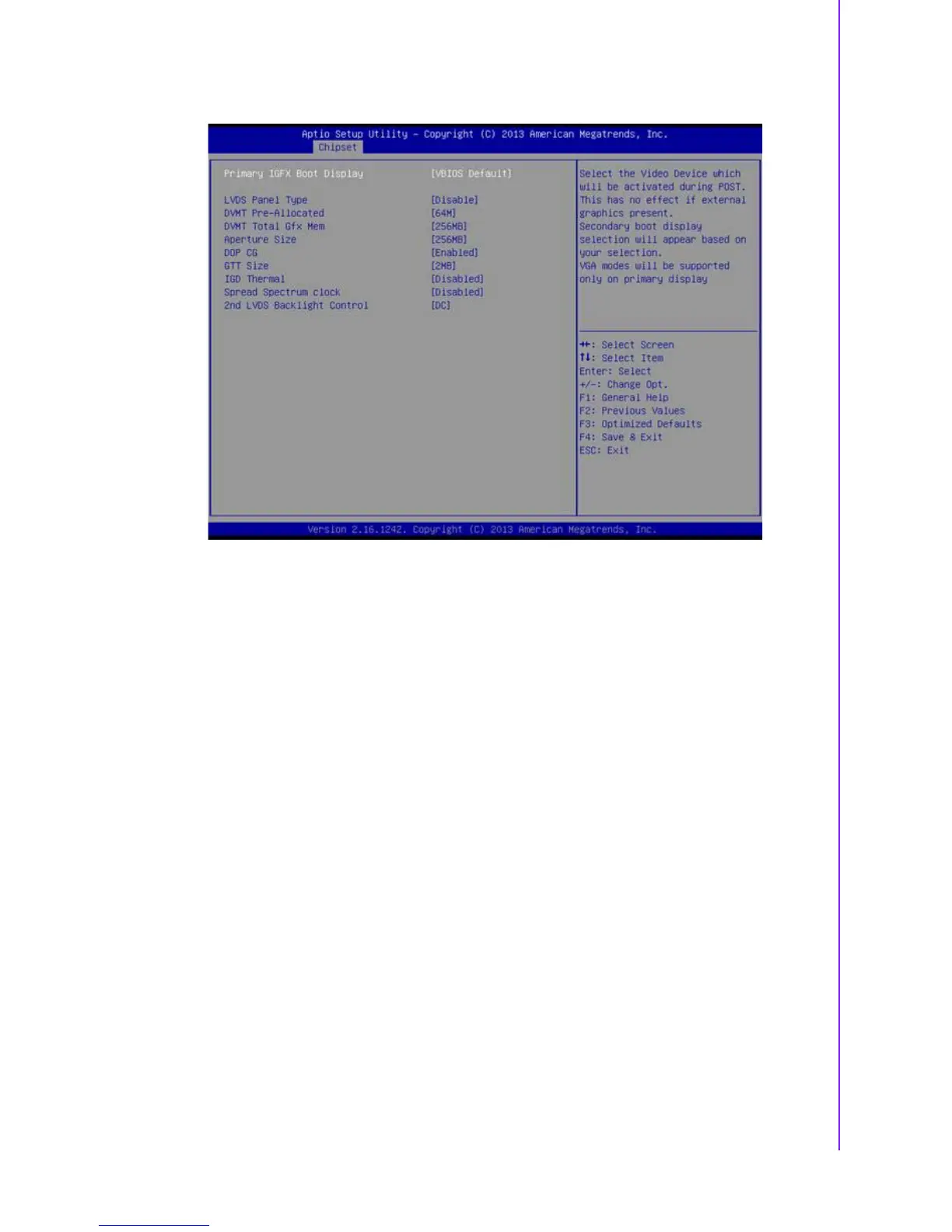
3.1.3.2 Intel IGD Configuration
Primary IGFX Boot Display
Select the Video Device which will be activated during POST. This has no effect
if an external graphics present. Secondary boot display selection will appear
based on your selection. VGA modes will be supported only on primary display.
LVDS Panel Type
This item allow user to select LVDS panel type.
DVMT Pre-Allocated
Select DVMT 5.0 Pre-Allocated (Fixed) Graphics Memory size used by the
Internal Graphics Device.
DVMT Total Gfx Mem
Select DVMT 5.0 Total Graphic Memory size used by the Internal Graphics
Device.
Aperture Size
Select the Aperture Size.
DOP CG
Enable/Disable DOP clock gating.
GTT Size
Select the GTT Size
IGD Thermal
Enable/Disable IGD Thermal.
Spread Spectrum clock
Enable/Disable Spread Spectrum clock.







 To Next Page