20
imer seng
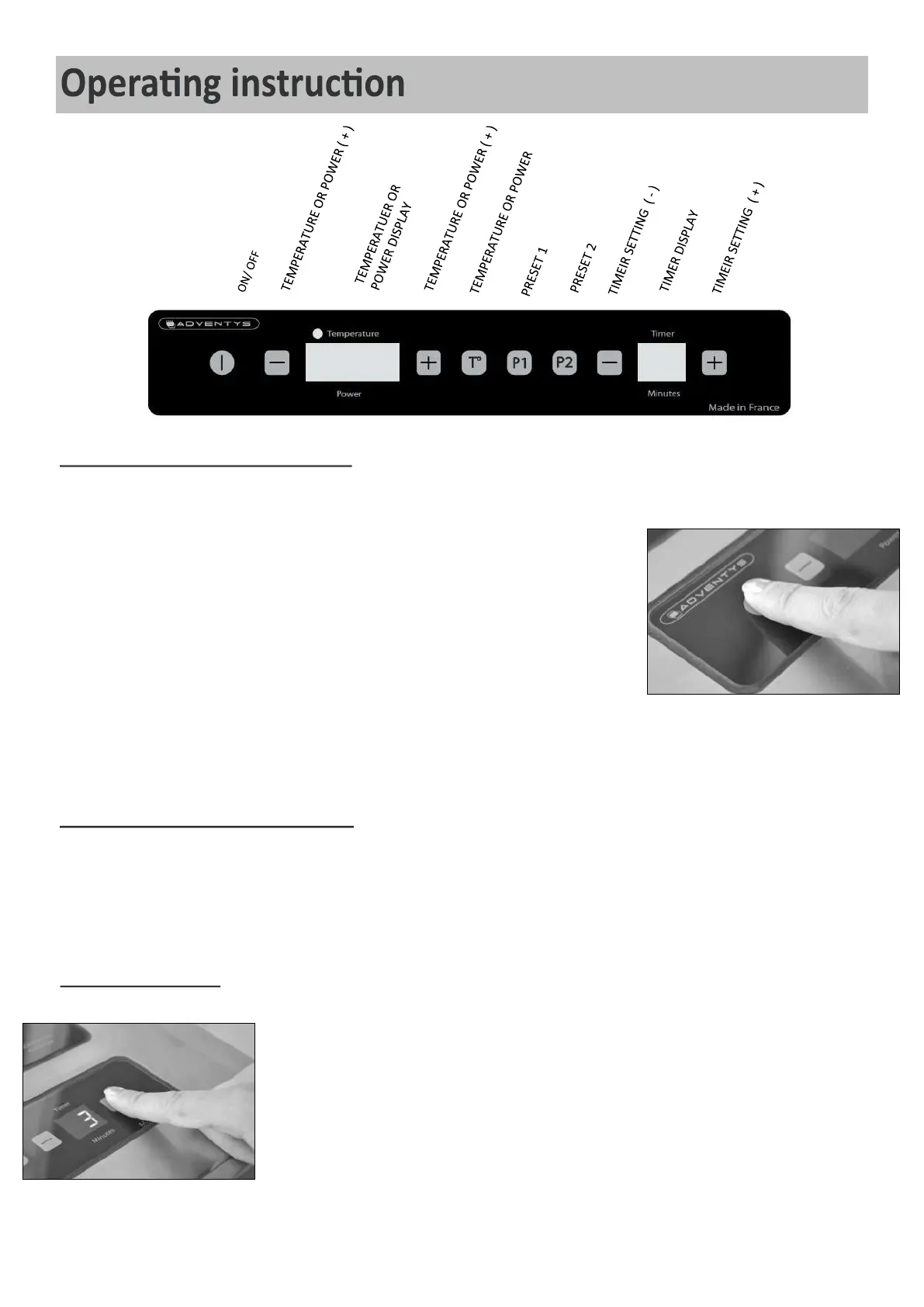
Press (+) and (-) to adjust the mer. The duraon of the mer is between 1 and 99
minutes.
The end of the mer forces the stop of the power. The product is automacally
switched o. To stop the sound emied at the end of the mer, a brief press on any
touches is enough.
By pressing simultaneously on both (+) and (-) touches MINUTES/TIMER, the mer is
desacvated.
witching On the device
Press the touch to switch on the device. The value « 0 » displays on
the indicator of temperature or power. Sll no power is sent at that point.
Press the touche if you wish to make an adjustment in temperature (the
led indicang the use of the temperature mode lights on), or to stay in power
mode (the led is o). The led is located over the display, next to the word
« Temperature ».
Press either the power touches or (if you already memorized a
power for them), to send power to the pan. The power (or temperature) display
indicates the power or temperature level set into the pan.
witching O the device
Press the touch to sswitch o the product. The power is cut and the display turns o.
Aer removing the pan from the cooktop, an « H » (stands for « Hot ») might be ashing on the display as long as
the temperature on the vitroceramic glass exceeds 60°C (140°F).


 To Next Page