4. Troubleshooting
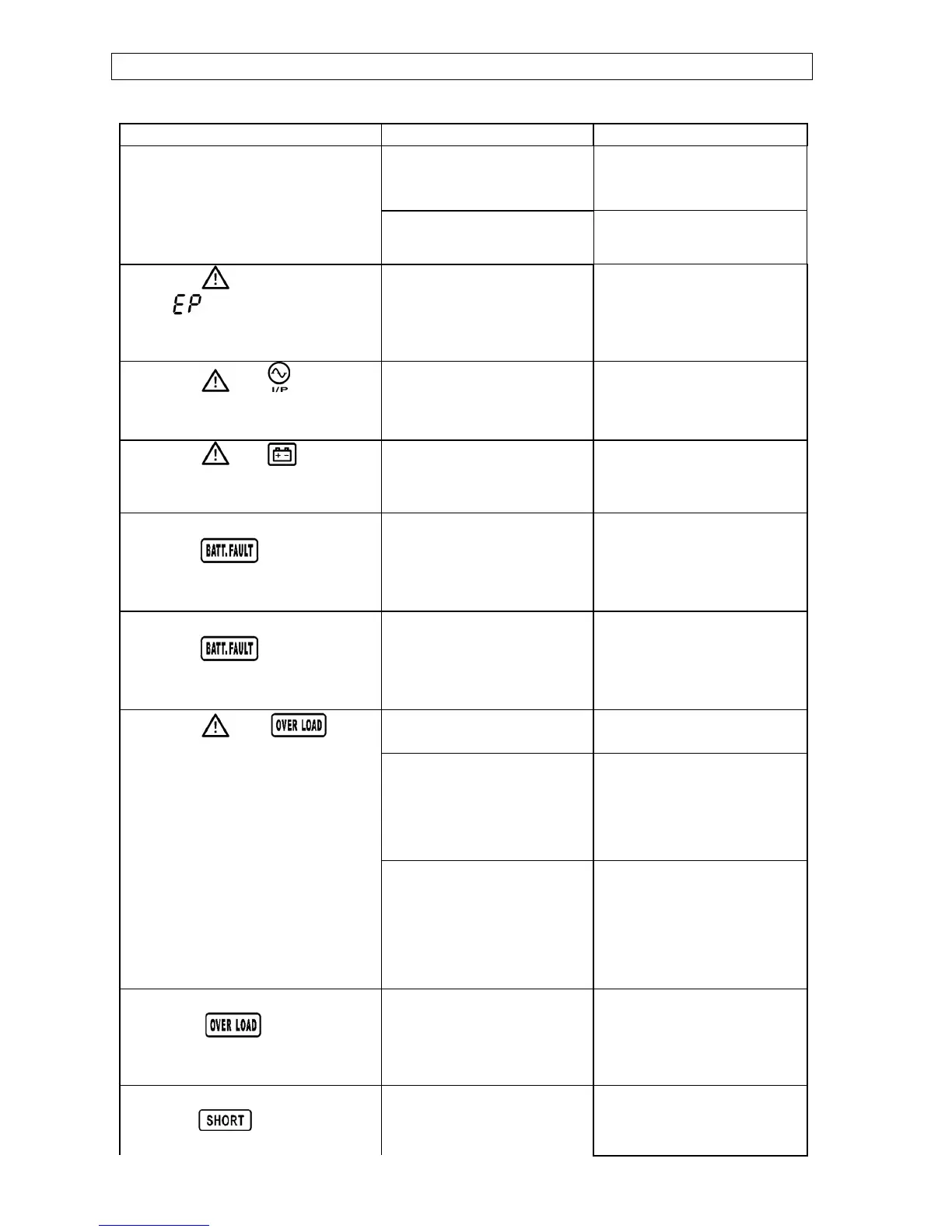
If the UPS system does not operate correctly, please solve the problem by using the table
below.
Symptom Possible cause Remedy
The AC input power is not
connected well.
Check if input power cord
firmly connected to the
mains.
No indication and alarm even
though the mains is normal.
The AC input is connected
to the UPS output.
Plug AC input power cord
to AC input correctly.
The icon and the warning
code flashing on LCD
display and alarm is sounding
every second.
EPO function is activated.
Set the circuit in closed
position to disable EPO
function.
The icon and flashing
on LCD display and alarm is
sounding every second.
Line and neutral
conductors of UPS input
are reversed.
Rotate mains power
socket by 180° and then
connect to UPS system.
The icon and flashing
on LCD display and alarm is
sounding every second.
The external or internal
battery is incorrectly
connected.
Check if all batteries are
connected well.
Fault code is shown as 27 and
the icon is lighting on
LCD display and alarm is
continuously sounding.
Battery voltage is too
high or the charger is
fault.
Contact your dealer.
Fault code is shown as 28 and
the icon is lighting on
LCD display and alarm is
continuously sounding.
Battery voltage is too low
or the charger is fault.
Contact your dealer.
UPS is overload Remove excess loads
from UPS output.
UPS is overloaded.
Devices connected to the
UPS are fed directly by
the electrical network via
the Bypass.
Remove excess loads
from UPS output.
The icon and is
flashing on LCD display and
alarm is sounding twice every
second.
After repetitive
overloads, the UPS is
locked in the Bypass
mode. Connected devices
are fed directly by the
mains.
Remove excess loads
from UPS output first.
Then shut down the UPS
and restart it.
Fault code is shown as 43 and
The icon is lighting on
LCD display and alarm is
continuously sounding.
The UPS shut down
automatically because of
overload at the UPS
output.
Remove excess loads
from UPS output and
restart it.
Fault code is shown as 14 and
the icon is lighting on
LCD display and alarm is
automatically because
short circuit occurs on the
Check output wiring and if
connected devices are in
short circuit status.



 To Next Page