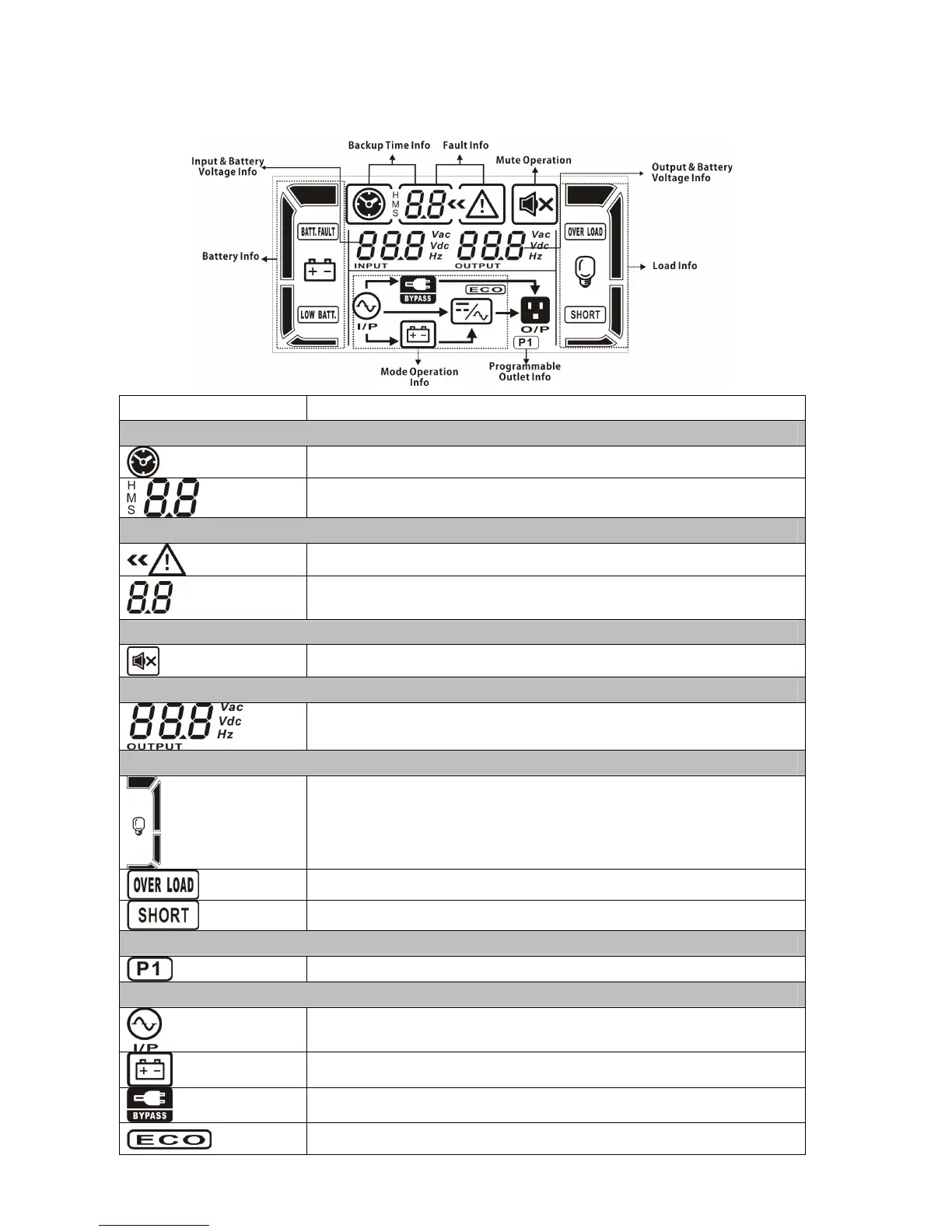
3-2. LCD Panel
Display Function
Backup time information
Indicates the backup time in pie chart.
Indicates the backup time in numbers.
H: hours, M: minute, S: second
Fault information
Indicates that the warning and fault occurs.
Indicates the warning and fault codes, and the codes are listed
in details in 3-5 section.
Mute operation
Indicates that the UPS alarm is disabled.
Output & Battery voltage information
Indicates the output voltage, frequency or battery voltage.
Vac: output voltage, Vdc: battery voltage, Hz: frequency
Load information
Indicates the load level by 0-25%, 26-50%, 51-75%, and
76-100%.
Indicates overload.
Indicates the load or the UPS output is short circuit.
Programmable outlets information
Indicates that programmable management outlets are working.
Mode operation information
Indicates the UPS connects to the mains.
Indicates the battery is working.
Indicates the bypass circuit is working.
Indicates the ECO mode is enabled.



 To Next Page