14
GB
Save & Exit Cancel Apply
PROFILE 1 PROFILE 2 PROFILE 3 PROFILE 4 PROFILE 5
ASSIGN BUTTONS MACRO MANAGER ADVANCED SETTING LIGHT
LOAD PROFILE SAVE PROFILE
Start record
Record delay time
Number of loops
1
Create Delete
Macro 2
Macro 3
Macro 1
MACRO SELECT RECORD OPTIONSKEY PRESS SEQUENCE
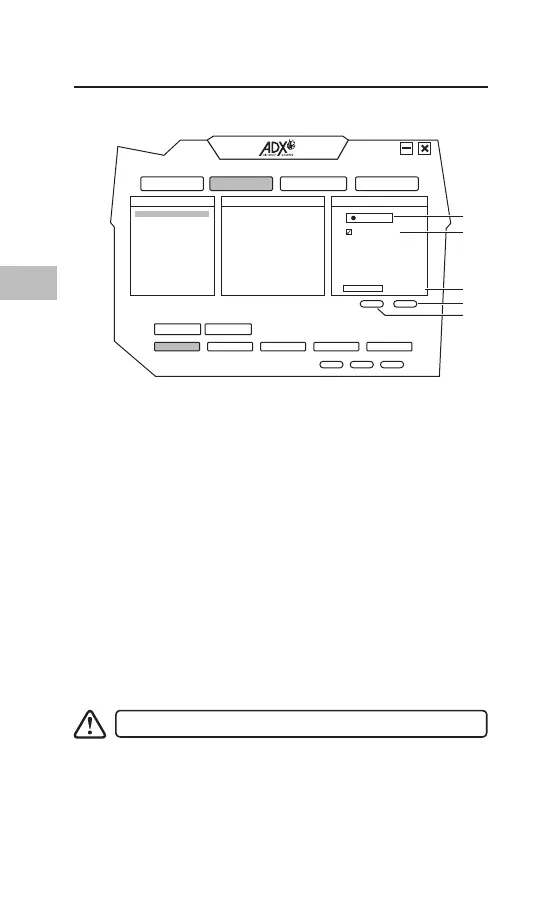
Assigning Macro
By assigning a macro to a mouse button, you can execute
complex combinations with ease.
a) Choose Create to create new macro prole.
b) Press Start record to start macro by pressing keyboard
keys.
c) Press Stop record when nishing macro.
d) Choose a desired mouse button to apply MACRO from the
function list.
e) Press the chosen mouse button to playback macro.
Macro function can only record keyboard keypress.
1. Start/Stop record
2. Delay (1sec = 1000ms)
3. Loop
4. Create new macro
5. Delete selected macro
Macro Setting
Select MACRO MANAGER from the user interface.
1
3
4
5
2



 To Next Page