GB
15
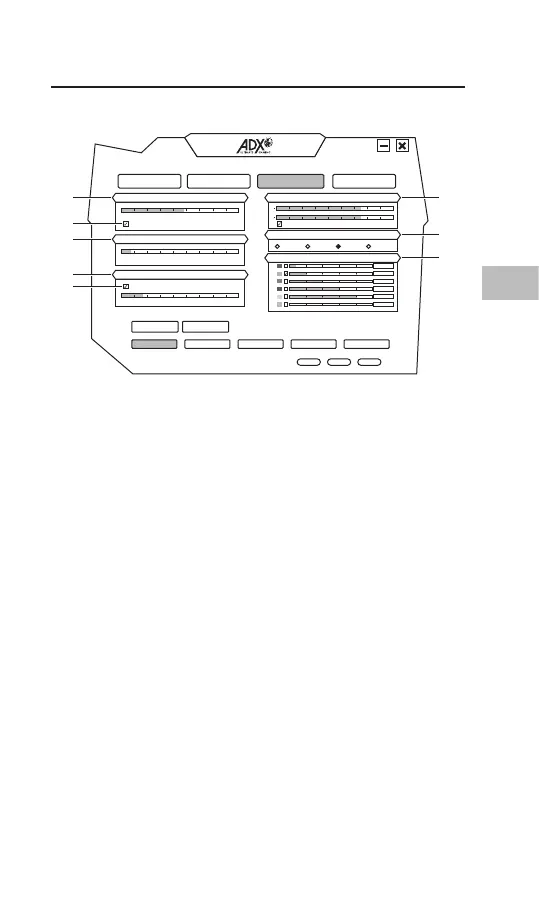
1. Pointer Speed
Adjust the speed of your mouse pointer.
2. Pointer Acceleration
Acceleration increases the cursor’s movement speed
depending on how quickly the mouse is moved.
3. Double-click
Adjust the double click response time.
4. Scroll Wheel
Adjust the scrolling speed.
5. Scroll for One Page
Scroll per vision page.
6. Sensitivity
Sensitivity (DPI) pertains to how much eort is needed to
move the mouse pointer in any direction. The higher the DPI,
the faster the mouse movement.
You may set dierent sensitivity values to each of the axis by
selecting Enhance Advanced Sensitivity.
Advanced Setting
Select ADVANCED from the user interface.
POINTER SPEED SENSITIVITY
POLLING RATE
DPI SETTING
DOUBLE CLICK SPEED
SCROLL WHEEL
1 2 3 4 5 6 7 8 9 10
X
1 2 3 4 5 6 7 8 9 10
1 2 3 4 5 6 7 8 9 10
Pointer acceleration
Enhance Advanced Sensitivity
One page
Y
1 2 3 4 5 6 7 8 9 10
125 Hz 250 Hz 1000 Hz500 Hz
800 16400
500
800 16400
500
800 16400
500
800 16400
500
800 16400
500
800 16400
500
Save & Exit Cancel Apply
PROFILE 1 PROFILE 2 PROFILE 3 PROFILE 4 PROFILE 5
ASSIGN BUTTONS MACRO MANAGER ADVANCED SETTING LIGHT
LOAD PROFILE SAVE PROFILE
8
7
6
1
3
2
5
4



 To Next Page