13
Operation
Switching On/O
• Press and hold the control stick to switch on the unit. The display will show the ADX
logo.
• Press and hold the control stick again to switch o the unit.
• Unplug the mains adapter from the mains socket to switch o the unit completely.
Input Source Selection
1. Slide the control stick to the left enter the input signal source menu.
2. Slide the control stick upwards/downwards to select Auto, DP or HDMI input.
3. Slide the control stick to the right to conrm.
The unit will show No Signal Connected, and then Enter Sleep Mode if no input
source is detected. Then the unit will enter Sleep mode.
Customizing Settings
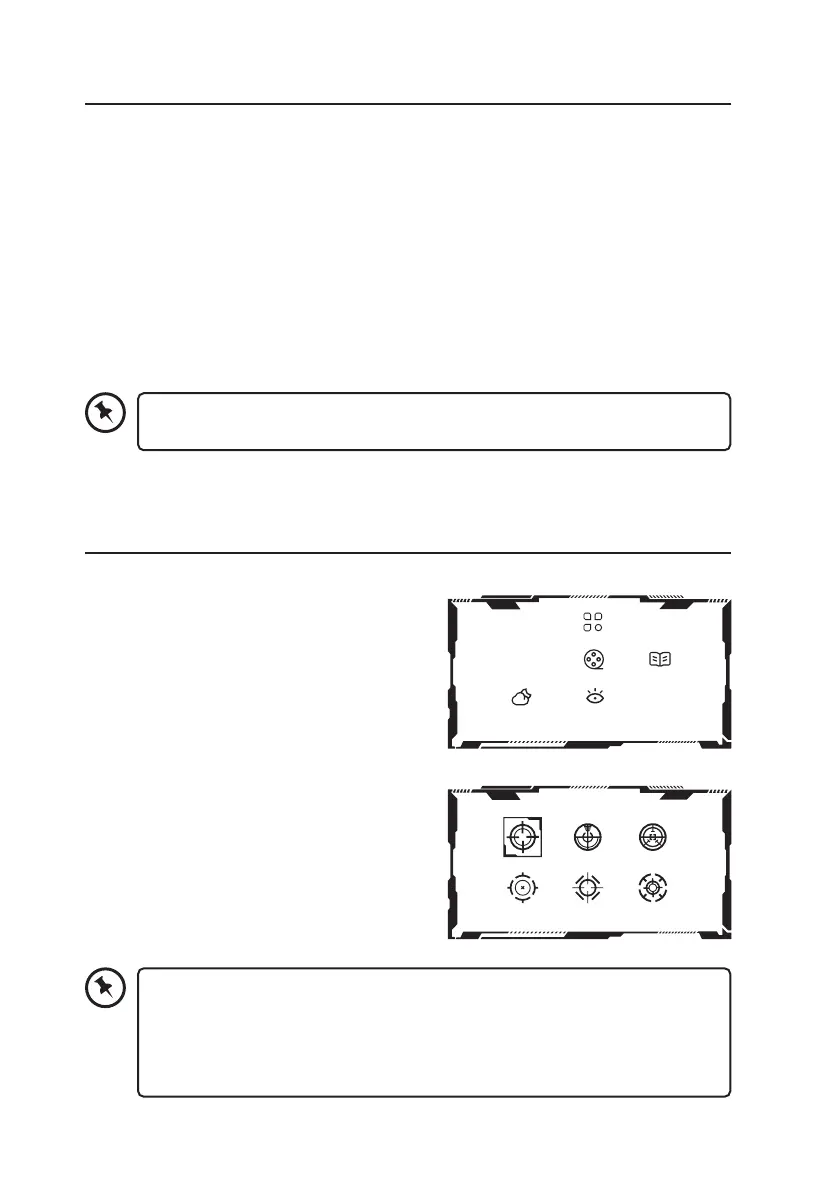
Contextual Mode Settings
1. Slide upward the control stick to enter the
Contextual menu.
2. Slide the control stick upward/downward to
select OFF / Movie / Reading / Night / Care
Eyes Mode.
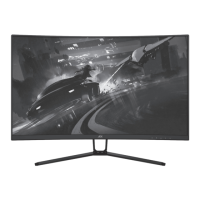
Game Crosshair Mode Settings
1. Slide downward the control stick to enter the
Contextual menu.
2. Slide the control stick upward/downward to
select your desired setting, and then slide the
control stick to the right to conrm.
OFF
You may recongure the Hotkey1-3 Setting in the OSD Settings menu.
The default setting of the Hotkeys are as below:
• Hotkey1 (left): Enter the Input Source menu.
• Hotkey2 (up): Enter the Contextual Mode menu.
• Hotkey3 (down): Enter the Game Crosshair Mode menu.


 To Next Page