14
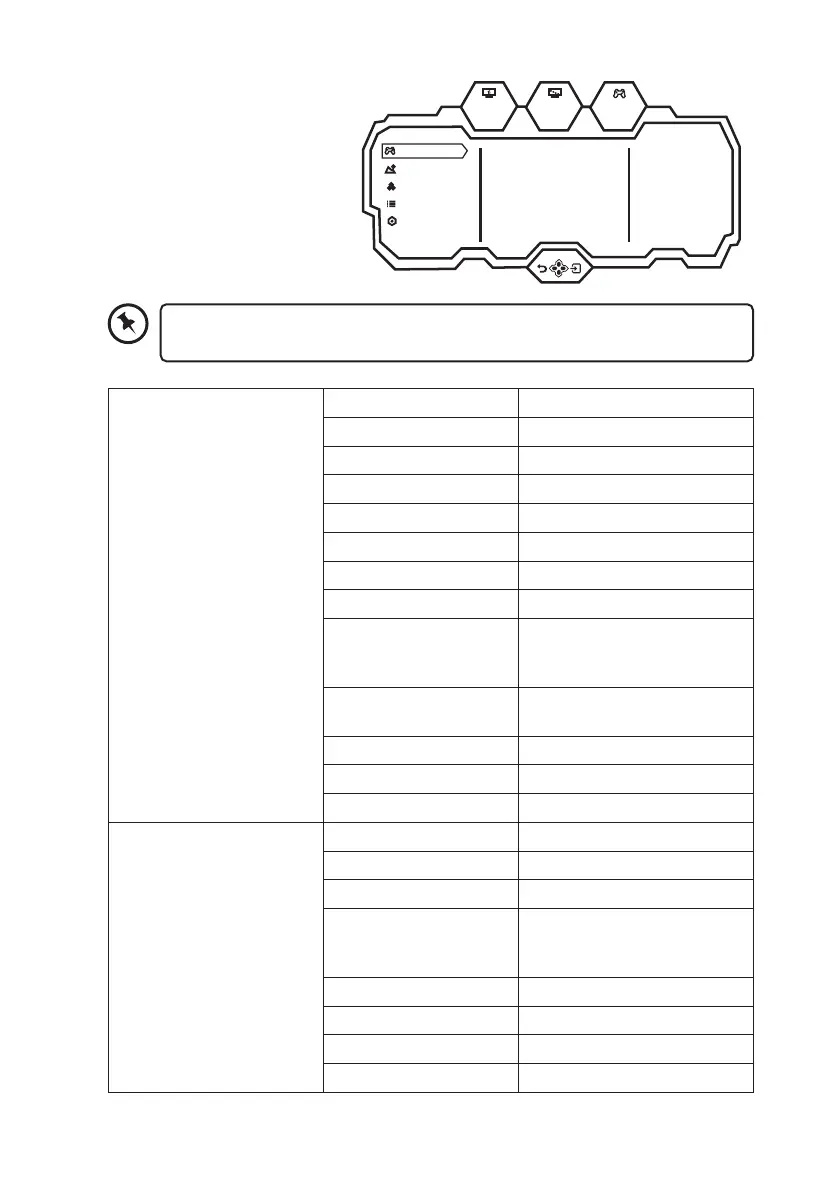
General Settings
1. Slide the control stick to the
right to enter the General
Settings menu.
2. Slide the control stick to select
the following options
3. Slide it to right to conrm your
settings.
Standard Mode
On
On
O
O
O
RTS/RPG Mode
FPS Arena Mode
MOBA Arena Mode
Adaptive-Sync
Shadow Balance
50
Game Settings
Picture Settings
Color Settings
OSD Settings
Other Settings
165hz
1920
1080
X
OFF
Game Settings Standard Mode Off/On
RTS/RPG Mode Off/On
FPS Arena Mode Off/On
MOBA Arena Mode Off/On
Adaptive-Sync Off/On
Shadow Balance 0-100
Response Time Off/Normal/Fast/Ultrafast
Refresh Rate Off/On/Position
Game Crosshair Off/Crosshair 1/Crosshair
2/Crosshair 3/Crosshair 4/
Crosshair 5/Crosshair 6
Game Time Off/15:00/30:00/45:00/60:00/
Position
Dynamic Brightness Off/Normal/Expert/Elaboration
Virtual Response Time Off/On
Ambient Lighting Off/On
Picture Settings Brightness 0-100
Contrast 0-100
DCR Off/On
Contextual Model Off/Movie Mode/Reading
Mode/Night Mode/Care Eyes
Mode
Low Blue Light 0-100
Sharpness 0-5
Gamma 1.8/2.0/2.2/2.4/2.6/S.curve
Aspect Ratio Wide Screen/4:3/1:1/Auto
To enter the General Settings menu, make sure that your unit is connected with
a device with input signal. Otherwise, the unit will Enter Sleep Mode.


 To Next Page