English
27
Protect the device from moist and ingress of fluids.
Danger from Laser Radiation
WARNING:
The unit is equipped with a class 1 Laser. Laser
radiation can damage your eyes!
Please observe the following safety precautions to avoid
laser radiation:
Do not open the casing of the unit.
Repairs only by authorized service cente.
Do not modify the unit.
Traffic Safety
WARNING:
Traffic safety has the highest priority!
Please observe the following safety precautions to keep
yourself and others safe:
Study the functions before you drive.
Only operate the unit when traffic permits! Rather top
in a suitable place and operate/set the unit.
Attach and remove the front panel only when parking.
Set a sensible volume to hear acoustic signals of fire
trucks, police cars and other emergency services in
good time.
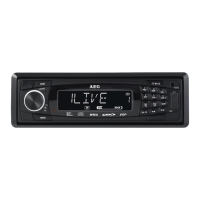
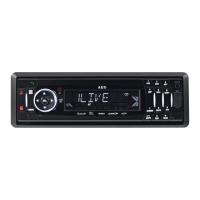
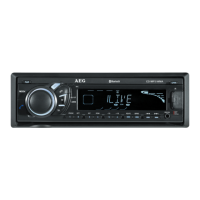
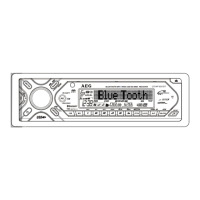
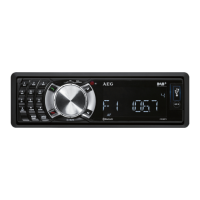
Overview of the Components
(See Fold-out Page)
Car radio
1 Unlock button for front panel
2 1/
button:
Call up stored radio stations/Start and pause playback/
Numeric button for entering telephone numbers
3 2/SCN button:
Call up stored radio stations/Activate SCAN function/
Numeric button for entering telephone numbers
4 3/RPT button:
Call up stored radio stations/Activate and deactivate
repeat functions/Numeric button for entering telephone
numbers
5 button:
Accept call or dial the entered number/last selected
number
6 Multicontroller VOL:
Turn to set the volume/Change an option in the menu.
Press to call up other setting options.
SEL button:
Open the settings/Confirm
7 button:
Manual search up/auto search up/skip to next track
8 IR receiver for remote control signals
9 Display
10 USB port
11 AUX-IN:
3.5 mm stereo input
12 Microphone
13
button:
Manual search down/auto search down/skip to previous
track
14
/MUTE button:
Turn unit off/switch to mute
15
/LOU/BND button:
End telephone call or reject incoming call/Select frequen-
cy band/activate and deactivate LOUDNESS function
16 T-MENU/TRANS button:
Open telephone menu/Transfer an active telephone call
17 MODE/PAIR button:
Register devices/Set mode
18 6/DIR + button:
Call up stored radio stations/Select next album/Numeric
button for entering telephone numbers
19 9/PTY button:
Numeric button for entering telephone numbers/Pro-
gramme type/Open more settings
20 #/SCAN button:
Hash button for entering telephone numbers/Reconnect
or disconnect/Frequency scan for receivable radio sta-
tions in the current range
21 */+ / AS/PS button:
Asterisk/Plus button for entering telephone numbers/
auto search and save radio stations
22 8/TA/EQ button:
Numeric button for entering telephone numbers/Select
default equalizer settings/Activate and deactivate traffic
announcements
23 5/DIR - button:
Call up stored radio stations/Select previous album/Nu-
meric button for entering telephone numbers
24 0/DISP button:
Numeric button for entering telephone numbers/Display
additional information
25 7/AF button:
Numeric button for entering telephone numbers/Switch
AF on/off/Switch to Mono/Stereo
26 4/SHF button:
Call up stored radio stations/Activate and deactivate
random playback/Numeric button for entering telephone
numbers
27 button:
Eject CD
28 CD drive
29 RESET button:
Reset the unit to default settings (behind the front panel)
30 SD/MMC card slot (only accessible when the front panel
is removed)


 To Next Page