The Plus Steam button works only
with the True Fan Cooking PLUS
function.
The indicator turns on.
6. Turn the knob for the temperature to
select a temperature.
CAUTION!
Do not refill the cavity
embossment with water
during cooking or when
the oven is hot.
7. To deactivate the appliance, press
the Plus Steam button , turn the
knobs for the oven functions and
temperature to the off position.
The indicator of the Plus Steam button
turns off.
8. Remove water from the cavity
embossment.
WARNING!
Make sure that the
appliance is cool before
you remove the
remaining water from
the cavity embossment.
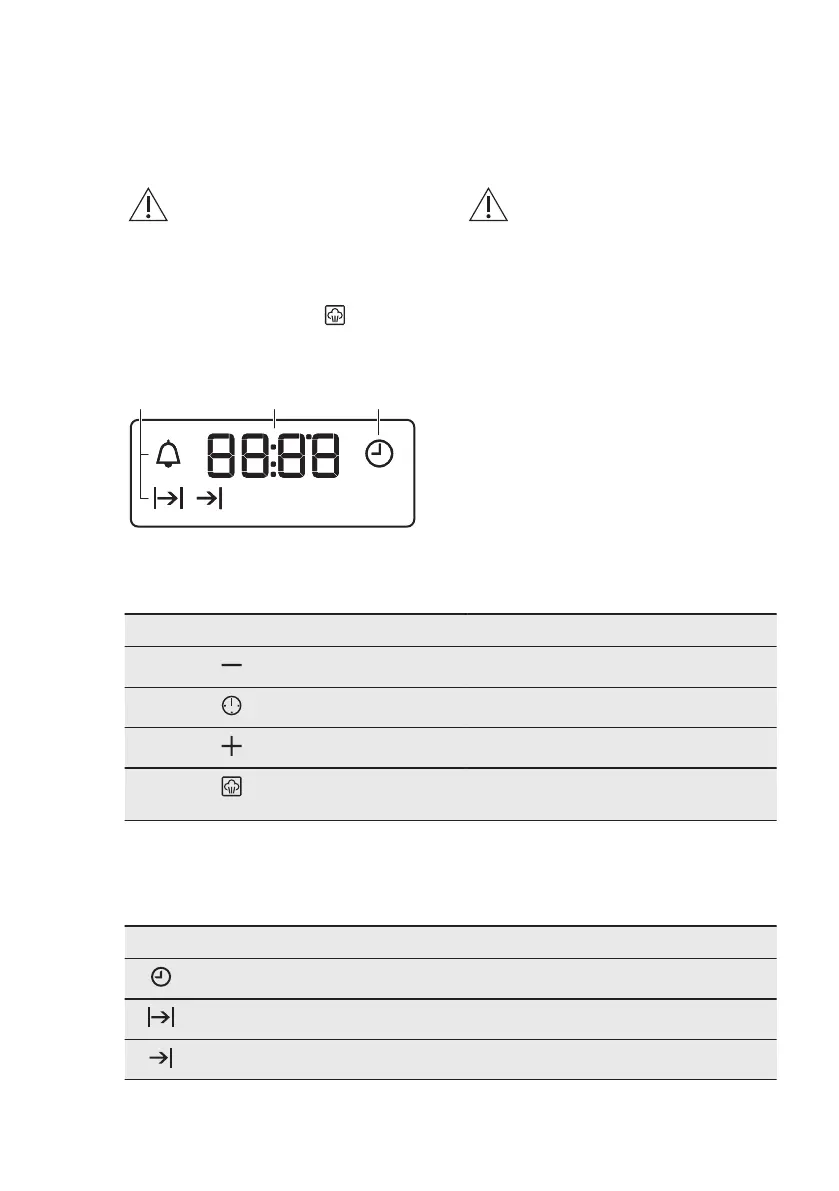
6.5 Display
A. Function indicators
B. Time display
C. Function indicator
6.6 Buttons
Sensor field / Button Function Description
MINUS To set the time.
CLOCK To set a clock function.
PLUS To set the time.
PLUS STEAM To turn on the True Fan Cooking PLUS
function.
7. CLOCK FUNCTIONS
7.1 Clock functions table
Clock function Application
TIME OF DAY To set, change or check the time of day.
DURATION To set how long the appliance operates.
END To set when the appliance deactivates.
www.aeg.com10


 To Next Page