For the best cooking results:
Ingredients should be at room tem‐
perature.
Do not use it for liquid dishes. During cooking it must remain in the dish.
The oven calculates an approximate end of cooking time. It depends on the quantity of food,
the set oven function and the temperature.
How to use: Food Sensor
Step 1 Turn on the oven.
Step 2 Set a heating function and, if necessary, the oven temperature.
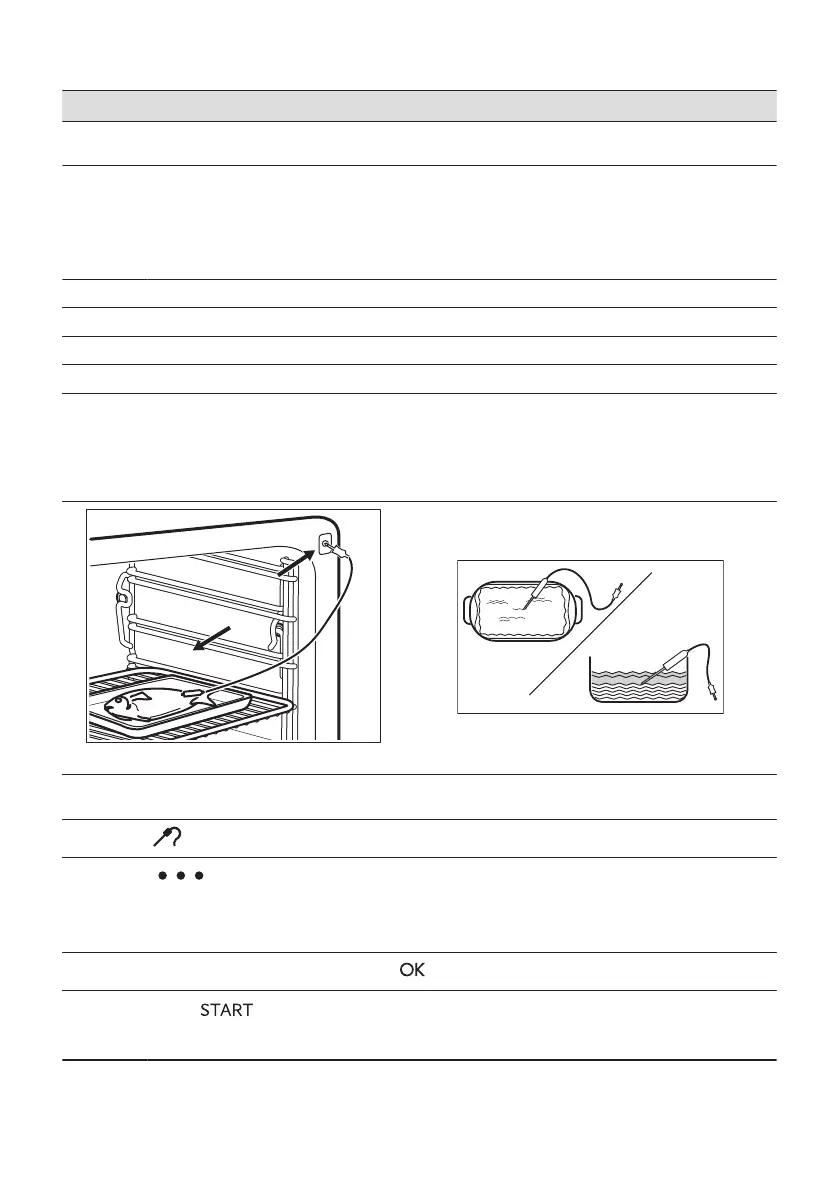
Step 3 Insert: Food Sensor.
Meat, poultry and fish Casserole
Insert the tip of Food Sensor into the centre of meat,
fish, in the thickest part if possible. Make sure that at
least 3/4 of Food Sensor is inside of the dish.
Insert the tip of Food Sensor exactly in the centre of the
casserole. Food Sensor should be stabilized in one place
during baking. Use a solid ingredient to achieve that. Use
the rim of the baking dish to support the silicone handle of
Food Sensor. The tip of Food Sensor should not touch the
bottom of a baking dish.
Step 4 Plug Food Sensor into the socket at the front of the oven.
The display shows the current temperature of: Food Sensor.
Step 5
- press to set the core temperature of the sensor.
Step 6
- press to set the preferred option:
• Sound alarm - when food reaches the core temperature, the signal sounds.
• Sound alarm and stop cooking - when food reaches the core temperature, the signal sounds
and the oven stops.
Step 7
Select the option and repeatedly press: to go to main screen.
Step 8
Press: .
When food reaches the set temperature, the signal sounds. You can choose to stop or to continue
cooking to make sure the food is well done.
ENGLISH 221


 To Next Page
 Loading...