Function Comment
3
Rotary knob
To adjust the settings and navigate through the menu.
Press to turn the appliance on.
Hold the rotary knob to turn on the setting screen.
Hold and turn the rotary knob to navigate through the menu.
Hold and press the rotary knob to confirm a setting or enter the
selected submenu.
To return to the previous menu find the option Back in the
menu list or confirm a selected setting.
4
To turn on selected function.
5
To turn off selected function.
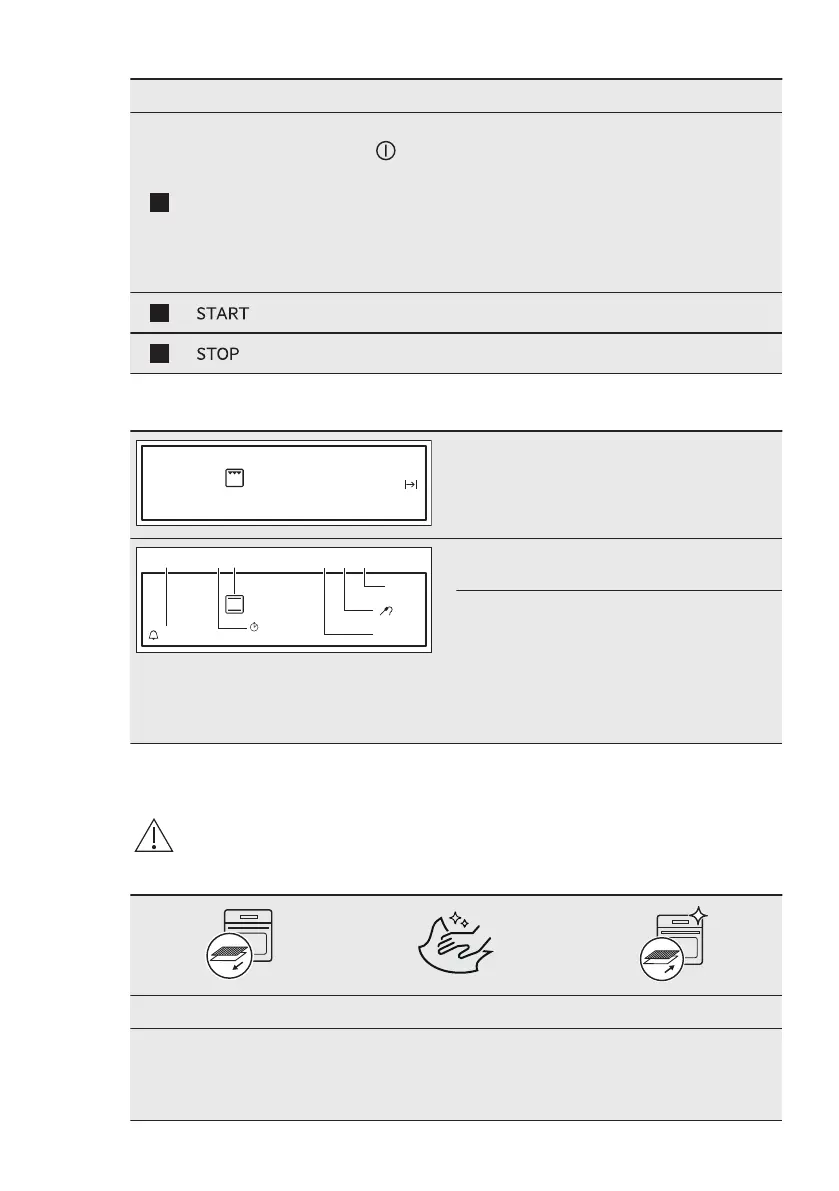
4.2 Display
After turning on, the display shows the main
screen with the heating function and the de‐
fault temperature.
Options
Menu
25min
85°C
170°C
1h 15m
A B C D E F
The display with maximum number of func‐
tions set:
A. Reminder
B. Up Timer
C. Heating function and temperature
D. Options or Time of Day
E. Duration time and End time of a function
or Food Sensor
F. Menu
5. BEFORE FIRST USE
WARNING!
Refer to Safety chapters.
5.1 Initial Cleaning
Step 1 Step 2 Step 3
Remove all accessories and
removable shelf supports
from the oven.
Clean the oven and the ac‐
cessories with a soft cloth,
warm water and a mild de‐
tergent.
Place the accessories and
the removable shelf supports
in the oven.
ENGLISH 9


 To Next Page