Checking the oven temperature
Press the Temperature check
button to display the current temperature of the oven.
Switching off the oven function
Use again and again, until the display does not show an oven function.
Heat- up indicator
If you switch on an oven function, the bars on the display come on one by one. The bars
show that the oven temperature increases.
Residual heat indicator
When you switch off the oven, the bars on the display show the residual heat.
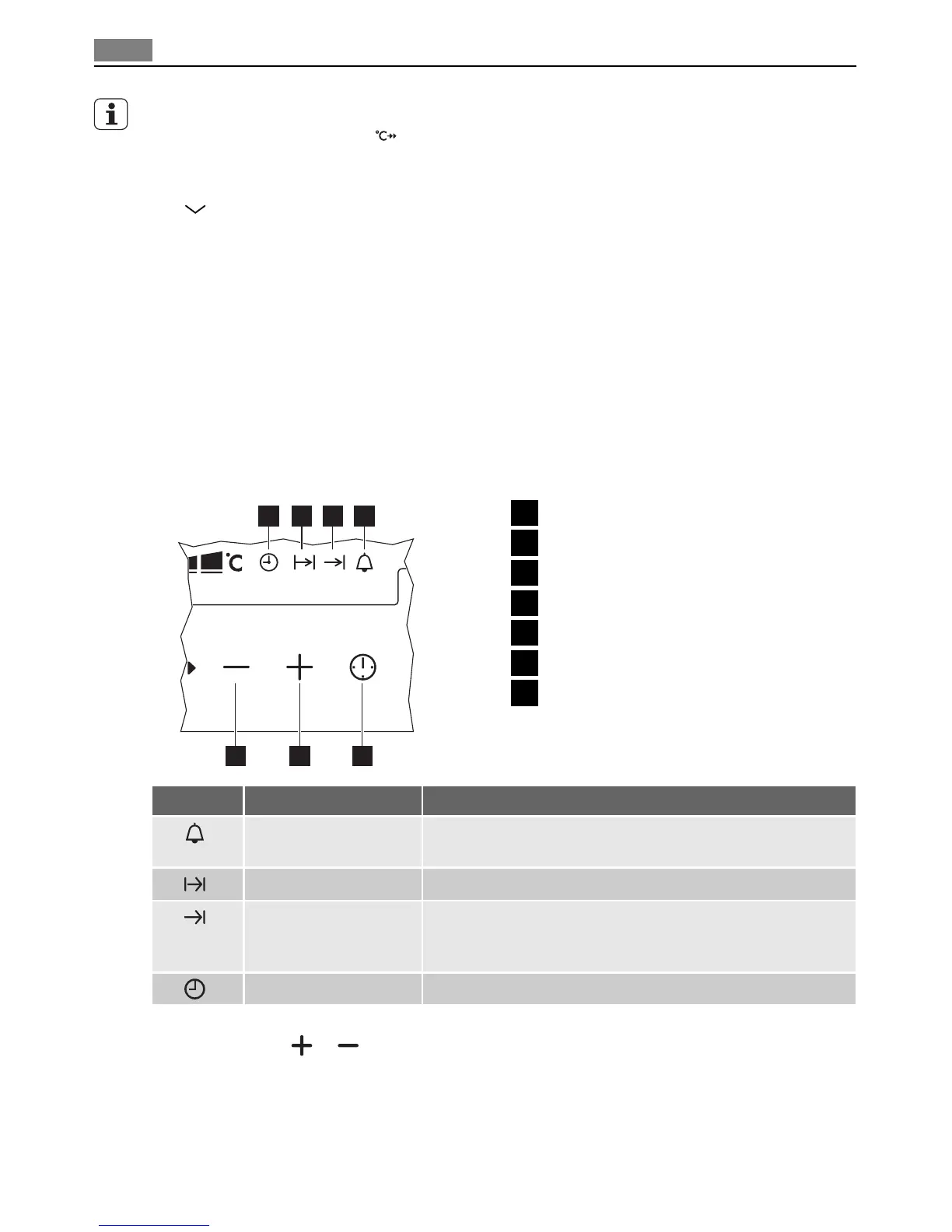
CLOCK FUNCTIONS
Clock functions
1
7 6 5
2 3 4
1
Time of day
2
Duration
3
End
4
Minute Minder
5
Selection button
6
Setting button (Plus)
7
Setting button (Minus)
SYMBOL FUNCTION DESCRIPTION
Minute Minder To set a countdown (max. 99 minutes). This function has no
effect on the operation of the appliance.
Duration To set how long the appliance has to be in operation.
End To set the switch-off time for an oven function.
You can use Duration and End at the same time, if the ap-
pliance is to be switched on and off automatically later.
Time of day To set, change or control the time of day.
• If you set a clock function, the symbol flashes for approximately 5 seconds. In these 5
seconds, touch
or to set the time.
• If you set the time, the symbol continues to flash for approximately 5 seconds. After
these 5 seconds, the symbol comes on. The time starts to count down.
Setting the clock functions
1. Switch on the appliance.
12 Clock functions


 To Next Page