When using liquid detergents add them
into a dosing ball (supplied by the
detergent's manufacturer). Put the dosing
ball inside the washing machine's drum,
on top of the garments.
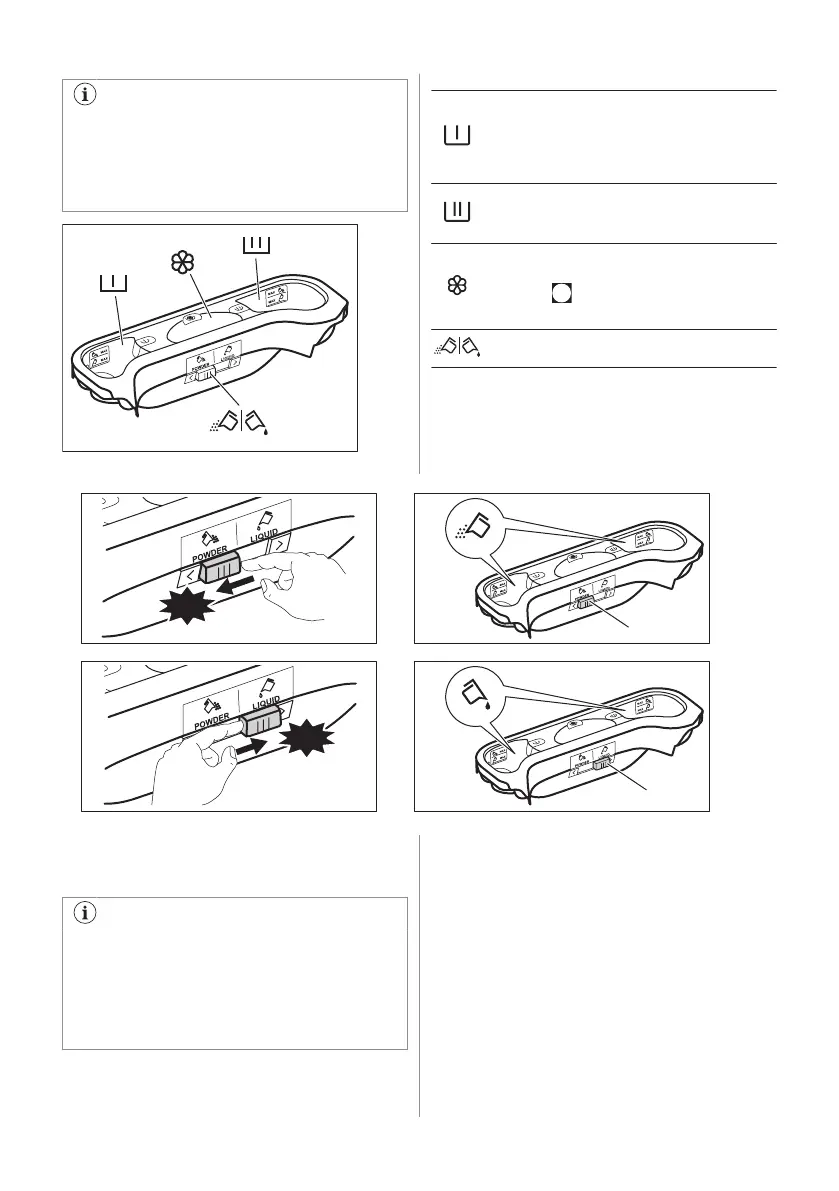
Detergent compartment for prewash phase.
The marks MAX are the maximum levels of
the quantity of detergent (powder or liquid).
When you set a programme with a stain, add
detergent (powder or liquid).
Detergent compartment for washing phase.
The marks MAX are the maximum levels of
the quantity of detergent (powder or liquid).
Compartment for liquid additives (fabric
conditioner, starch).
The mark
is the maximum level for the
quantity liquid additives.
Flap for powder or liquid detergent.
11.4 Liquid or powder detergent
• Position A for powder detergent (factory
setting).
• Position B for liquid detergent.
When you use the liquid detergent:
• Do not use gelatinous or thick liquid
detergents.
• Do not put more liquid then the
maximum level.
• Do not set the delay start function.
11.5 Setting a programme
1. Turn the programme knob. The related
programme indicator comes on.
The indicator of button Start/Pause flashes
with red colour.
The display shows the default temperature,
the spin speed and the empty indicator bars
of the available functions.
2. To change the temperature and/or the
spin speed, press the related buttons.
3. Set the available functions.
22 ENGLISH



 To Next Page