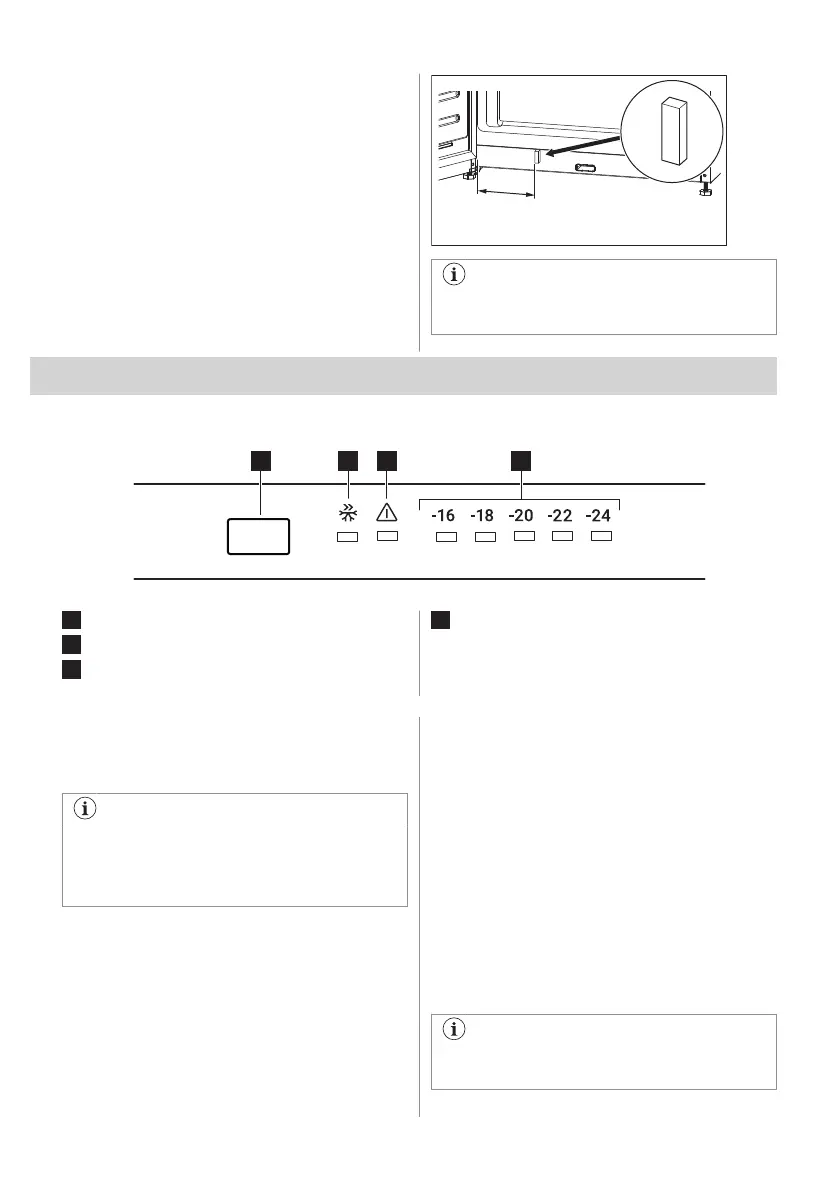
3.7 Easy opening
The cooling air contracts inside the appliance
causing suction, making it difficult to open the
door. To make opening the appliance easier,
use an adhesive overlay from the bag with
documentation.
To install the overlay:
1. Peel off the liner from the back of the
overlay.
2. Stick the overlay on the frame at the
bottom of the appliance, at a distance of
min. 60 mm to 100 mm from the hinge.
Keep the overlay away from children.
Hazard of swallowing.
4. OPERATION
4.1 Control panel
1
Temperature regulation button
2
Super Freeze indicator
3
Alarm indicator
4
Temperature indicators
4.2 Switching on and off
To switch on the appliance, insert the plug
into the wall socket.
When the appliance is switched on for
the first time, the interior light may turn on
after a one-minute delay due to opening
tests.
To switch off the appliance, unplug it.
4.3 Temperature regulation
Recommended set temperature is:
• -18°C for the freezer.
The temperature range may vary between
-16°C and -24°C .
To set the temperature of the appliance,
press the temperature regulation button
repeatedly until you reach the desired
temperature of the compartment.
Choose the setting keeping in mind that the
temperature inside the appliance depends on:
• room temperature,
• frequency of opening the door,
• quantity of food stored,
• appliance location.
A medium setting is generally the most
suitable one.
The temperature indicators show the set
temperature.
The set temperature will be reached
within 24 hours.
ENGLISH 9



 To Next Page