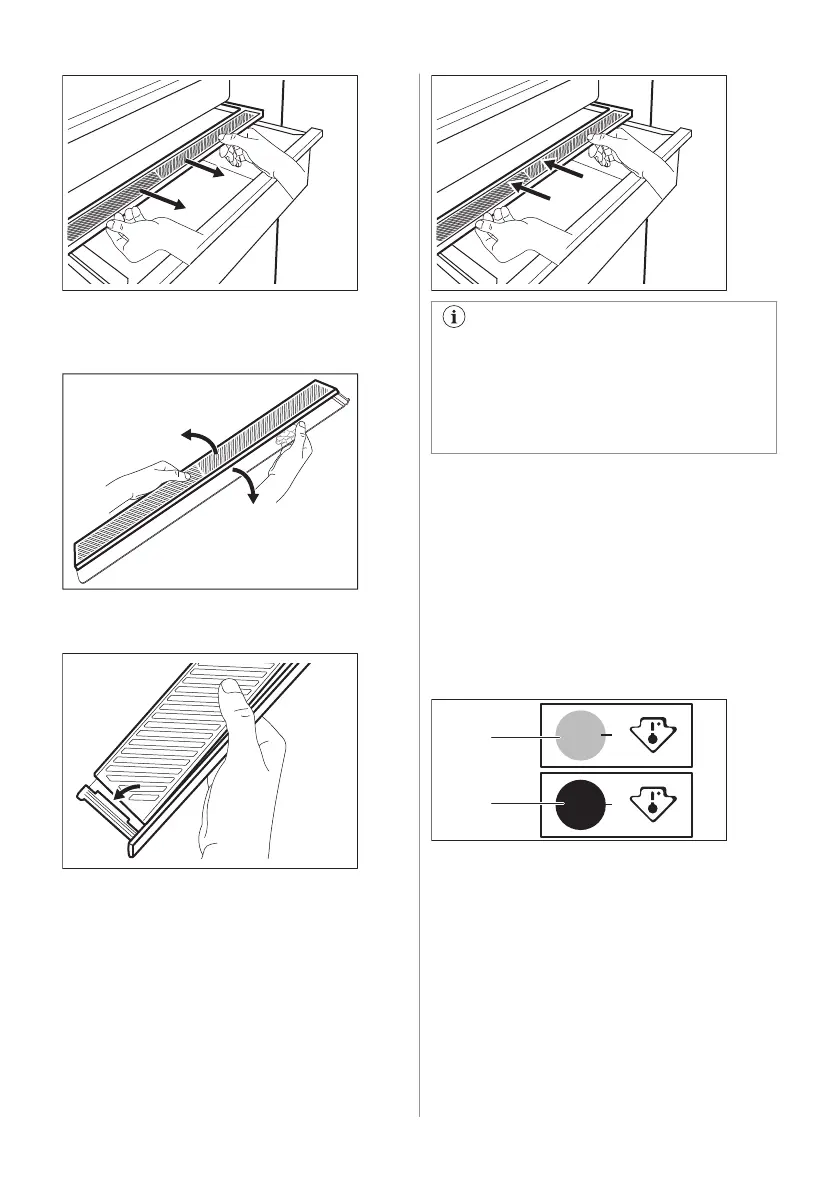
2. If you need to replace the device's white
membrane, grab the device in the middle
and separate the membrane from the
cover by pulling the cover.
3. Assemble a new membrane into the
cover by pressing the edge of the
membrane into the cover.
4. Reassemble the humidity control back on
the drawer.
Depending on the quantity and condition
of fruit and vegetables stored in the
GreenZone drawer, condensation may
occur.
In such a case, remove the condensation
using a soft cloth.
6.8 Temperature indicator
For proper storage of food the refrigerator is
equipped with the temperature indicator. The
symbol on the side wall of the appliance
indicates the coldest area in the refrigerator.
If OK is displayed (A), put fresh food into area
indicated by symbol, if not (B), wait at least
12 hours and check if it is OK (A).
If it is still not OK (B), adjust the setting
control to a colder setting.
6.9 MULTIFLOW
The refrigerator compartment is equipped
with the MULTIFLOW device that allows for
rapid and more effective cooling of food and
maintaining a more uniform temperature in
each part of the refrigerator compartment.
This device activates automatically when
needed.
16 ENGLISH



 To Next Page