4. OPERATION
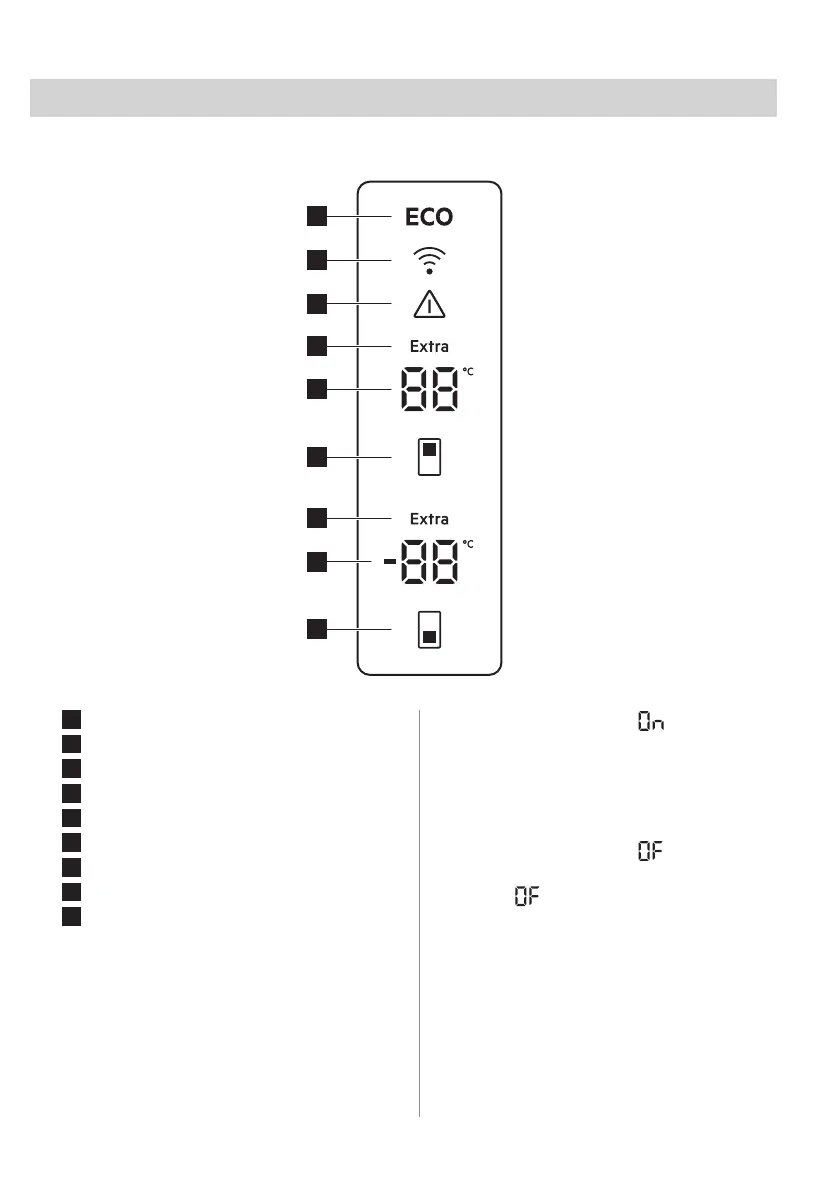
4.1 Control panel
1
Freezer temperature button
2
Freezer compartment indicator
3
Extra Freeze indicator
4
Fridge temperature button
5
Fridge compartment indicator
6
Extra Cool indicator
7
Alarm indicator
8
Connectivity indicator
9
ECOMETER indicator
4.2 Switching on
1. Connect the mains plug to the power
socket.
2. Press and hold the Freezer temperature
and Fridge temperature buttons for 10
seconds.
The display shows blinking indication.
4.3 Switching off
1. Press and hold the Freezer temperature
and Fridge temperature buttons for 10
seconds.
The display shows blinking
indicator.
2. The appliance is switched off and a
steady indication substitutes the
fridge temperature. Disconnect the mains
plug from the power socket.
4.4 Temperature regulation
Set the temperature of the appliance by
pressing the temperature buttons.
Recommended set temperatures are:
• +4°C for the fridge
ENGLISH 9



 To Next Page