6
10
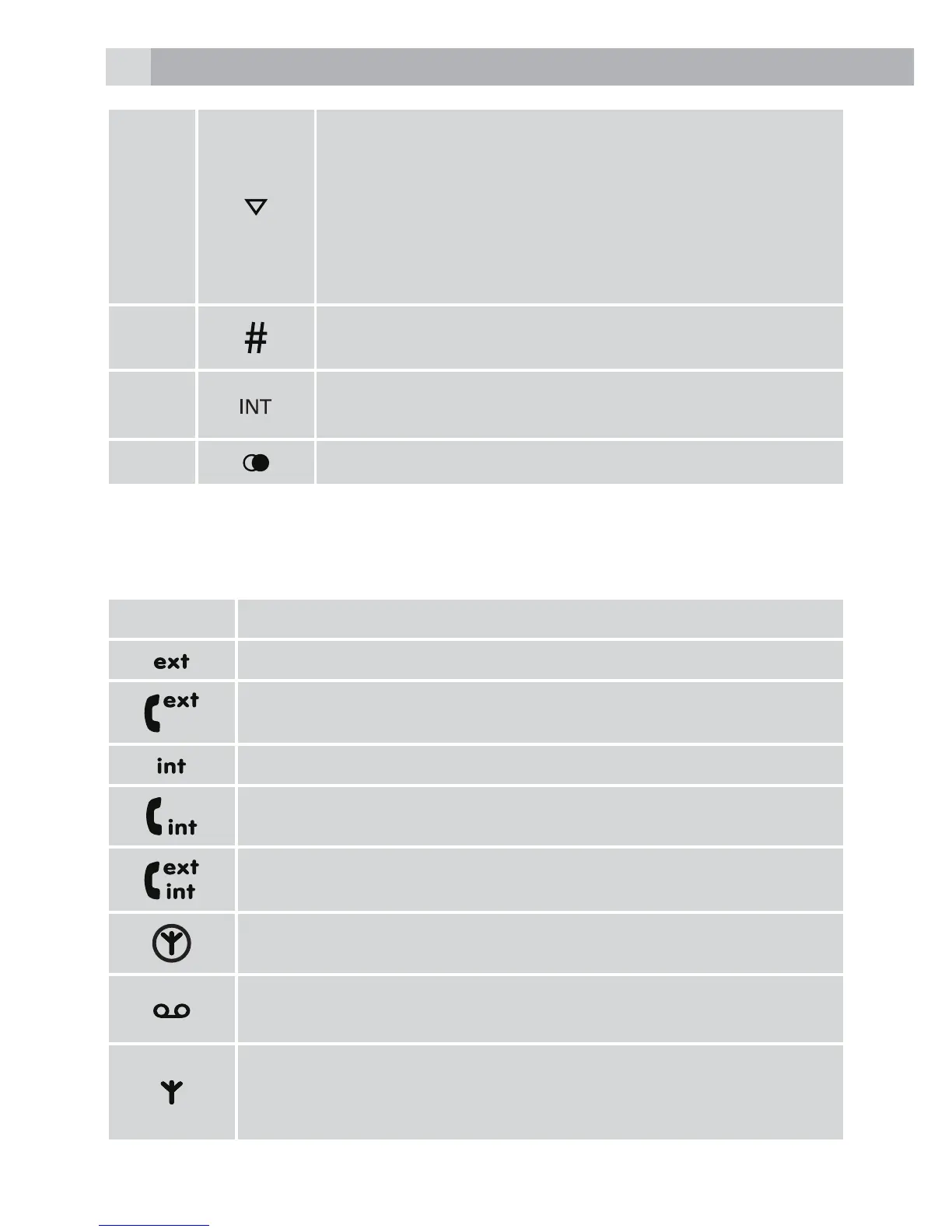
• During a call, press to decrease earpiece
volume.
• When the phone is ringing, press to decrease
the handset ringer volume.
• Press to scroll through the menu options,
redial list, calls list and phonebook entries.
• In standby mode, press to open the calls list.
11
• Press and hold to enter a pause (P) when pre-
dialling or storing numbers.
12
• Used to make internal calls and transfer calls to
other handsets registered to the base.
13
• In standby mode, press to open the redial list.
5.2 Display icons and symbols(see P2)
The LCD display gives you information on the current status of the
telephone.
Meaning
Flashes to indicate an incoming external call
External call in progress
Flashes to indicate an incoming internal call
Internal call in progress
3-way call in progress or transfer an external call to
another handset registered to the base
Eco mode is ON
Flashes to indicate new voicemail messages received
Off when there is no voicemail messages
Indicates signal strength
Flashes when handset is not registered to the base or when
out of range



 To Next Page