11
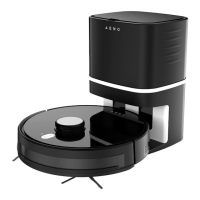
Using the docking station ❷ (See Figure c): plug the docking station into a
power outlet using the power plug ⓲. Align contacts at the bottom of the
vacuum cleaner body ❶ (between the side brushes ❼) with the contacts on
the charging station ⓳. If the vacuum cleaner is correctly installed, the docking
station LED ⓱ will be slowly blinking white.
ATTENTION! The docking station must be installed against a wall (See Figure c).
Remove all objects 1m to the left and 1m to the right of the station, as well as
2m in front of it.
Device Control Using its Buttons
To start operation, you should turn on the power switch ⓮ on the vacuum
cleaner body (See Figure b). A voice message on the device ready for operation
will sound after a few seconds. To start the vacuum cleaner, press the
“Start/Stop” button on its top panel. To stop the vacuum cleaner, press the
“Start/Stop” button again. After 10 minutes of inactivity, the vacuum cleaner will
be switched to the Sleep Mode, and all LEDs will go off. In order to switch the
device to the active mode again, press the “Start/Stop” button. After pressing
the “Station” button , the vacuum cleaner returns to the docking station for
recharging.
Device Control Using the Remote Control (See Figure d)
witch the vacuum cleaner on or off (
. The vacuum cleaner will
determine the end of cleaning time and will return to the
charging station to recharge
tart/stop the vacuum cleaner.
confirm time setting in “Setting the current time” and
“Scheduled operation” modes


 To Next Page