12
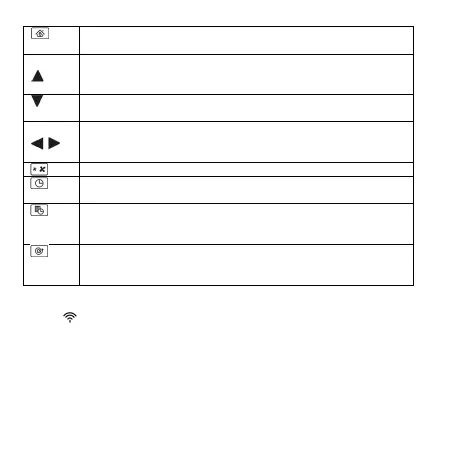
recharging
ove the vacuum cleaner forward
time in “Setting the current time” and “Scheduled operation”
modes
in “Setting the current time” and “Scheduled operation” modes
the vacuum cleaner left or right
or minutes in “Setting the current time” and “Scheduled
operation” modes
“Setting the current time”
confirm the current time setting
Button to switch to the “Scheduled operation” mode when t
vacuum cleaner starts operation daily at the set time. To reset
the schedule, press and hold the “Scheduled operation” button
cleaner will mop area of 1m in diameter. In this mode, the vacuum
cleaner will operate for 30 seconds only.
Remote Control of the Vacuum Cleaner
You may manage the vacuum cleaner from the AENO mobile app after its Wi-Fi
module being activated (See Figure b).
ATTENTION! Make sure your smartphone is connected to a 2.4 GHz Wi-Fi
network.
Connect the docking station to the power supply. Set the side switch of the
cleaner to the "ON" position and place the cleaner on the docking station.
Log in to your AENO app account or create a new one; to do that, download
the mobile app from Google Play or the Apple Store.


 To Next Page