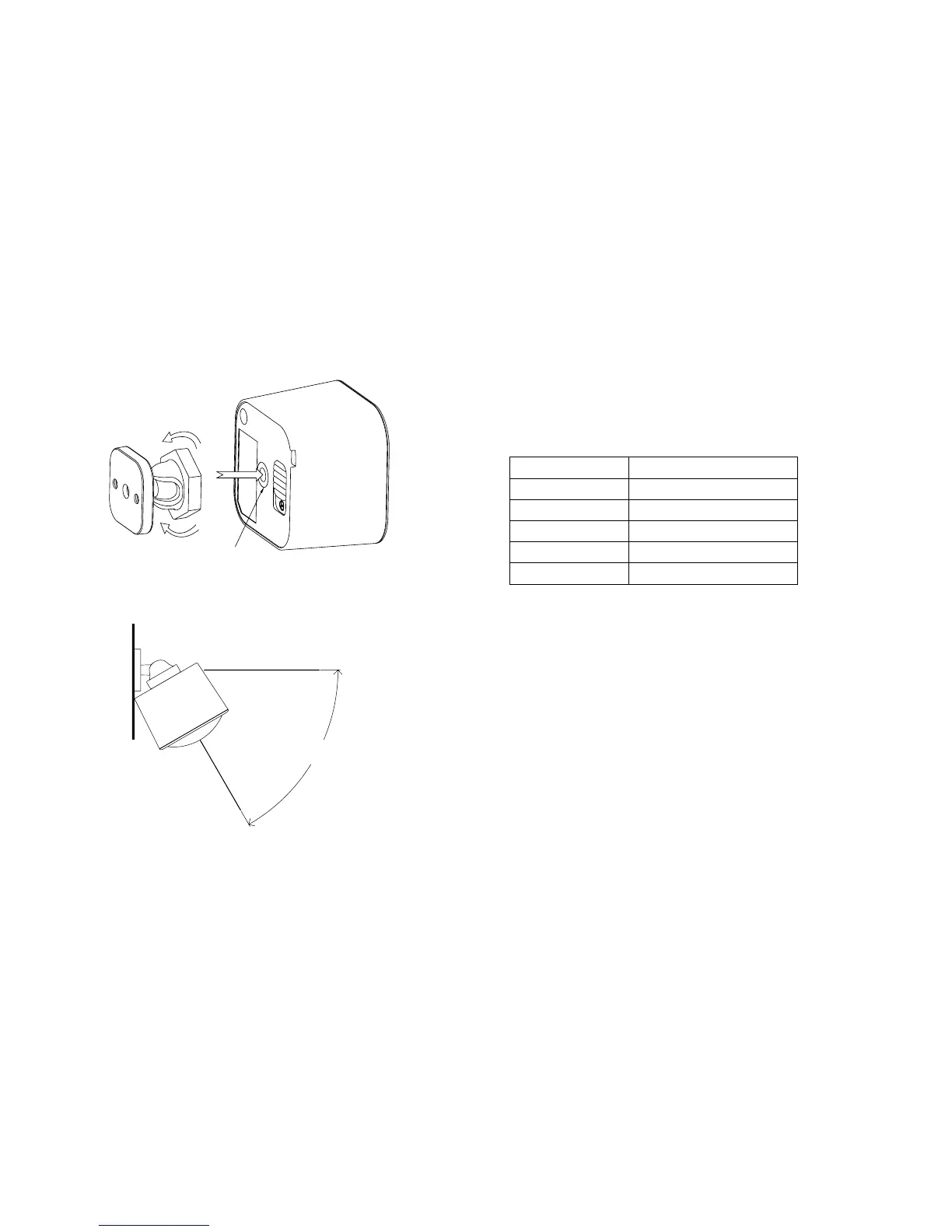
The Back-Mount Arm may be locked at various angles by turning
the Friction Lock clockwise and counter-clockwise to respectively
tighten or loosen the angle of the arm.
5.
Lock
Unlock
Screw hol
e
60°
10
The table above shows a decimal representation of all ags that
can be set on parameter 101-103 to report specic data.
Example use of the report table.
For example, if you want to report only the temperature and light
sensor you would add 32 + 64 and set the sum (96) to parameter
101, 102, or 103.
As another example, if you want to report only the light sensor and
battery, you would add 1 + 128, then set the sum (129) to parameter
101, 102, or 103.
And if you want to report all of the sensors, you would add the
whole table together and set the sum (241) to parameter 101, 102,
or 103.
Setting an automatic report interval.
Setting automatic report ags.
Parameter 101-103 [4 byte dec] can be configured through your
gateway in case the default settings of your MultiSensor are not
what you desire.
Decimal Flag
128 Light Sensor
64 Humidity Sensor
32 Temperature Sensor
16 Ultraviolet Sensor
1 Battery Sensor
15


 To Next Page