EasyManua.ls Logo

AEONS Technologies Professional Series - Step 2: Install Bottom and Top Cover; Step 3: Install Back Panel

Default Icon
8 pages
Print Icon
To Next Page IconTo Next Page
To Previous Page IconTo Previous Page
Loading...
4
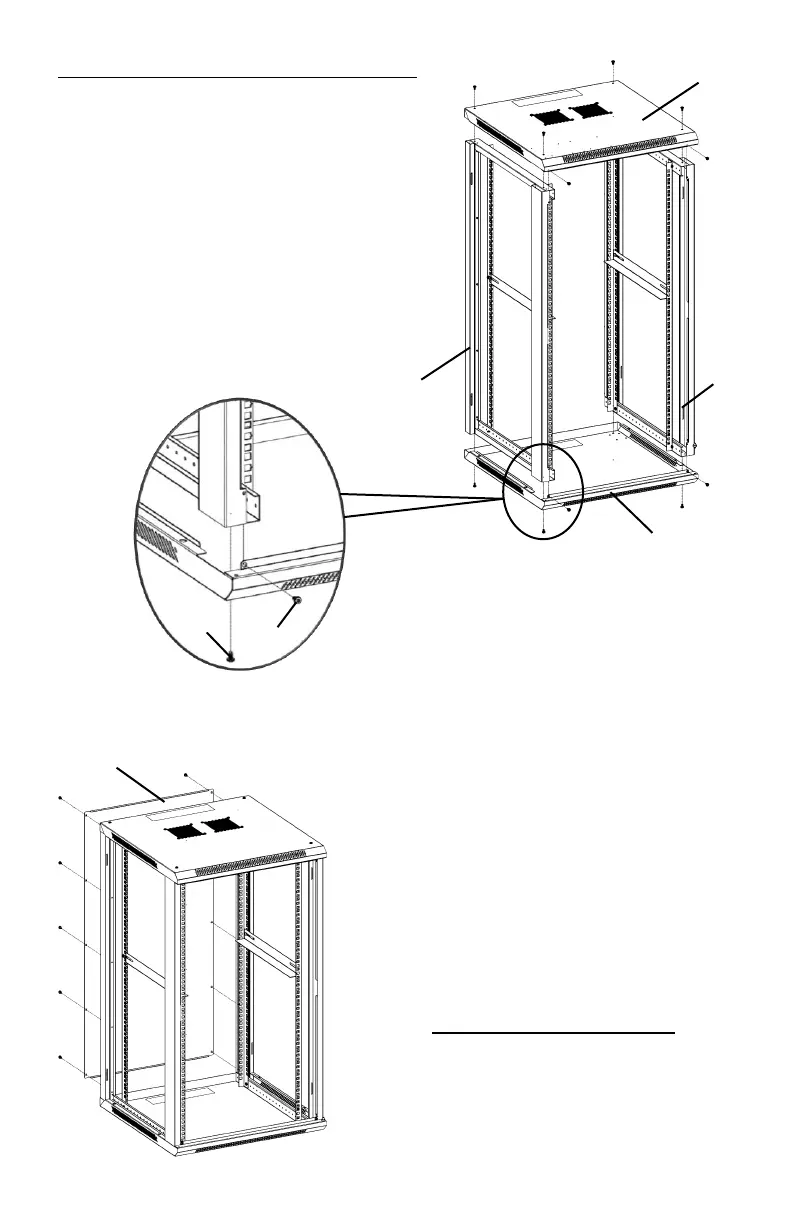
Step 2: Install Bottom and Top Cover
Lay Bottom Panel
J on a flat surface. Insert
Side Frames
F with large beam oriented to
the front and secure with M5.5 self-tapping
screws
C and
D . Repeat step to secure
Top Cover
I to Side Frames. For 15U - 22U
enclosure, please refer to Step 7 for
instruction on installation of casters.

I
F
F
J
D
C
Step 3: Install Back Panel
Attach Back Panel
M to the
assembly using M5.5 self-tapping
screws
C .
M

Related product manuals