15
HEATING PROGRAM
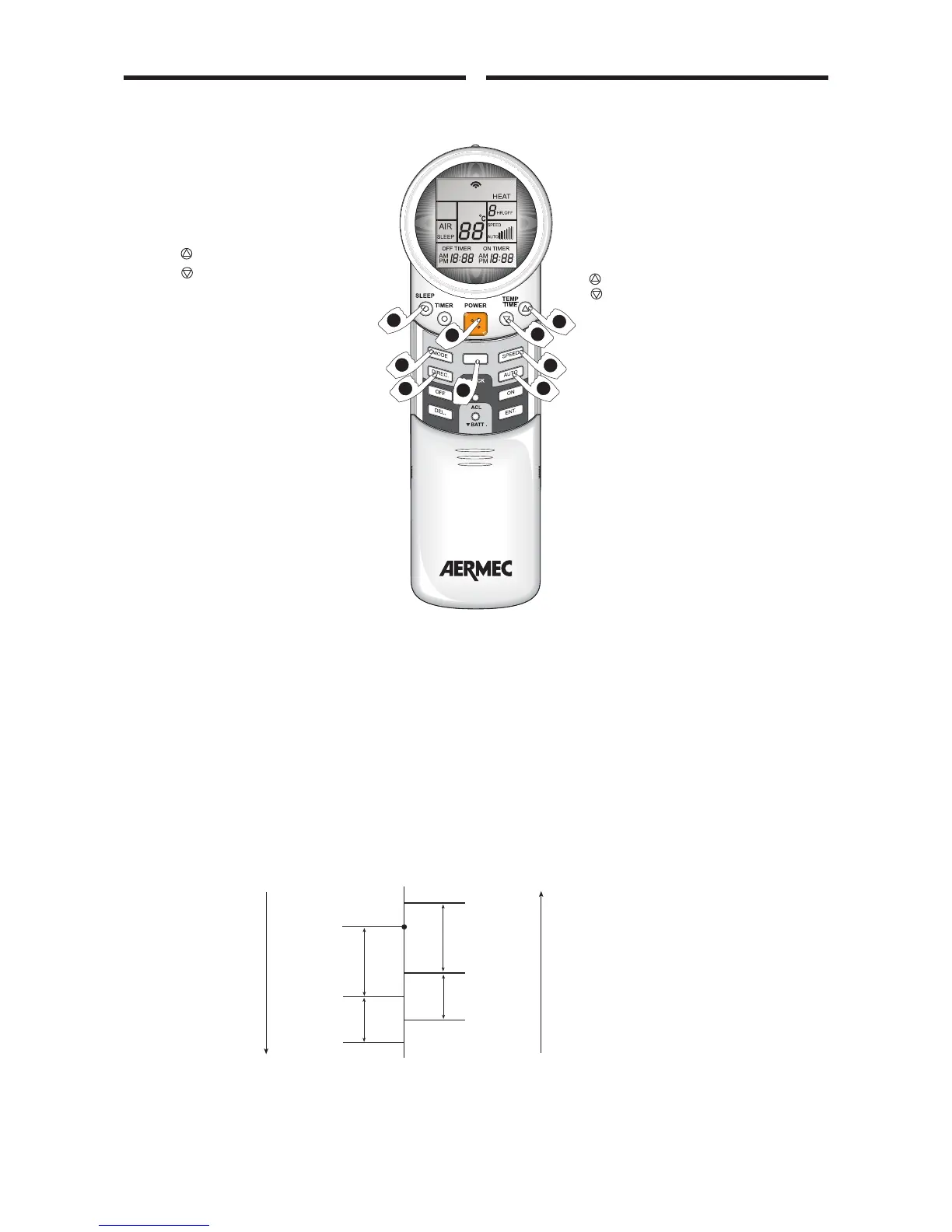
1) PRESS THE ON/OFF KEY
The conditioner is switched on and green
lamp (B) illuminates.
2) PRESS THE MODE KEY (PROGRAMS)
Press the MODE key several times until the
word HEAT is displayed.
3) ADJUST THE TEMPERATURE AS REQUI-
RED
To modify the set temperature use the fol-
lowing keys:
-
to increase the value;
-
to decrease the value.
Each time one of the above keys is pressed
the temperature is modified by 1 °C from 16
to 30 °C. The set value is shown on display.
4) FAN SPEED. SPEED KEY
Press the SPEED key several times to chan-
ge between low, medium and maximum
speed settings (displayed as a bar graph) or
to the AUTO microprocessor controlled
speed.
5) ADJUST AIR FLOW BY MEANS OF KEYS
DIREC. - AUTO
To ensure optimal air distribution, adjust
the horizontal deflector and vertical fins so
that air flow is not aimed directly at per-
sons. The vertical deflector fins must be
adjusted manually before the motor-driven
deflector is activated. Never adjust the hori-
zontal deflector manually.
Press the AUTO key to start continuous
oscillating movement of the horizontal
deflector.
Press the DIREC. Key as required to set one of the five
angles.
6) AIR PURIFICATION: AIR KEY
(Only for FCW 20 and FCW 30)
Press the AIR key: the message AIR is displayed and the
negative ion generator is activated and red lamp (A) illumi-
nates.
7) NIGHT-TIME PROGRAM - SLEEP KEY
Press the SLEEP key; the message SLEEP is displayed and the
night-time comfort program is activated. The program can
be set at any time of day. The lamp (A) illuminates.
PROGRAMMA RISCALDAMENTO
1) PREMERE IL TASTO ACCESO - SPENTO
Il condizionatore entra in funzione e si
accende la spia verde (B) di funzionamento.
2) PREMERE IL TASTO MODE (PROGRAMMI)
Premere il tasto MODE ripetutamente fin-
chè compare sul display la scritta HEAT.
3) REGOLARE LA TEMPERATURA
Se si vuole variare la temperatura impostata
utilizzare:
– il tasto
che permette di innalzarla;
– il tasto che permette di abbassarla.
Ogni volta che si preme uno dei tasti
la temperatura varia di 1 °C da 16 a 30 °C.
Il display mostra il valore impostato.
4) VELOCITA’ DI VENTILAZIONE, TASTO
SPEED
Premendo ripetutamente il tasto SPEED si
può passare alla velocità minima, media o
massima (visualizzate graficamente con
barre) e alla velocità gestita dal sistema di
controllo AUTO, secondo quanto riportato
nel grafico seguente.
5) ORIENTARE IL FLUSSO D’ARIA CON
TASTI DIREC. - AUTO
Per ottenere una distribuzione ottimale
dell’aria, regolare il deflettore orizzontale e
le alette verticali in modo che il flusso
d’aria non investa direttamente le persone.
Le alette deflettrici verticali devono essere
orientate manualmente prima di mettere in
funzione il deflettore motorizzato. Il deflet-
tore orizzontale non deve mai essere rego-
lato manualmente.
Premendo il tasto AUTO il deflettore oriz-
zontale inizierà un movimento continuo oscillante.
Premendo ripetutamente il tasto DIREC. il deflettore oriz-
zontale si orienterà su 5 diverse angolazioni.
6) DEPURAZIONE DELL’ARIA, TASTO AIR
(solo per FCW20 e FCW30)
Premendo il tasto AIR compare sul display la scritta AIR e si
attiva il generatore di ioni negativi e si accende la luce rossa (A).
7) PROGRAMMA NOTTURNO TASTO SLEEP
Premendo il tasto SLEEP compare sul display la scritta SLEEP
e si attiva il programma di benessere notturno. Attivabile in
ogni momento della giornata. Si accende la luce (A).
5
4
2
7
3
5
3
AIR
1
6



 To Next Page