10
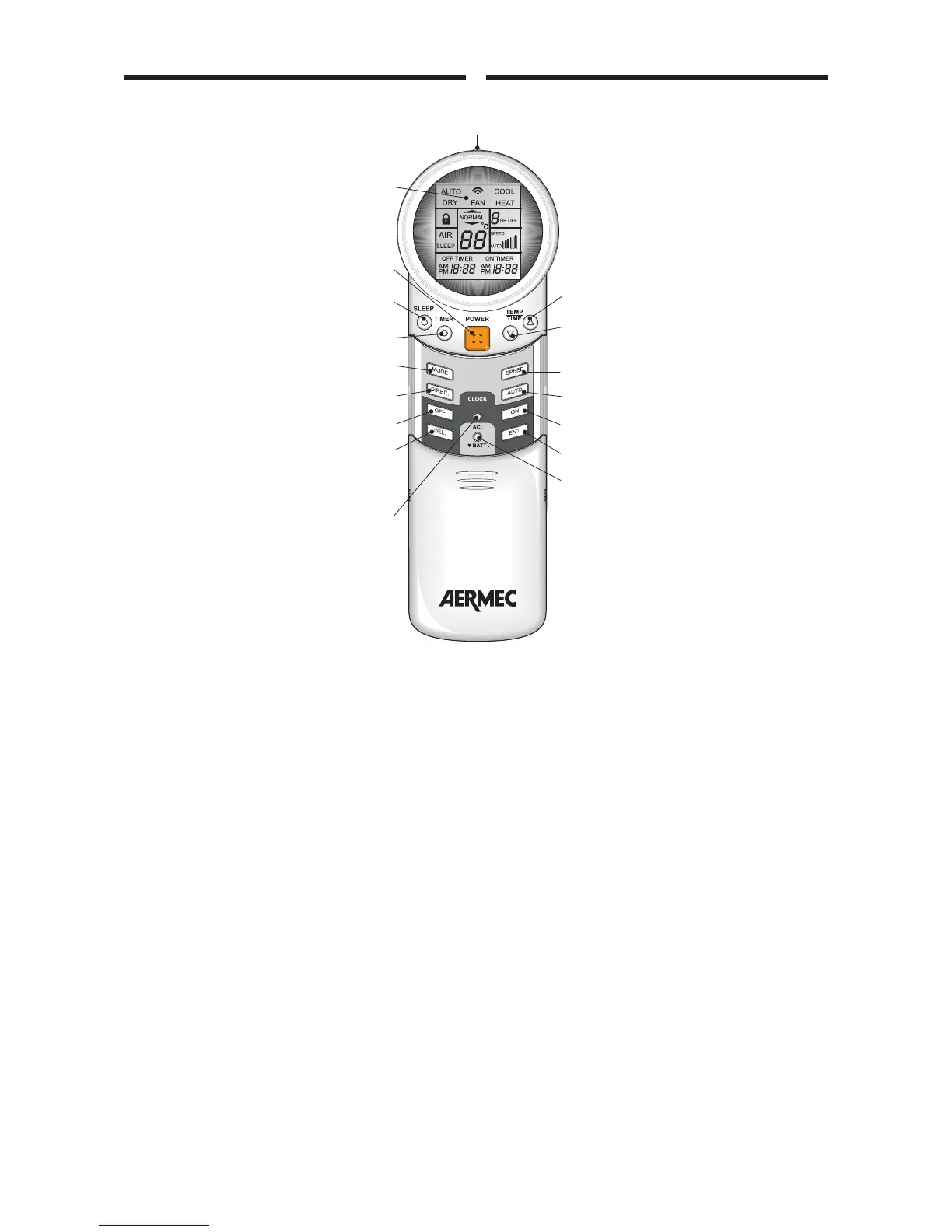
TELECOMANDO A RAGGI INFRAROSSI
a - TRASMETTITORE
Invia i segnali al ricevitore sul condizio-
natore. Deve essere tenuto rivolto verso il
ricevitore.
b - DISPLAY
c - ACCESO/SPENTO
d - SLEEP
Pulsante per abilitare il funzionamento
notturno. Modifica la temperatura impo-
stata in conformità con il tempo di funzio-
namento.
e - TIMER
Pulsante per la regolazione del temporiz-
zatore (1 ÷ 9 ore). Usare questo pulsante
per impostare velocemente il tempo di
funzionamento desiderato.
f - TEMP/TIME
Premere questo pulsante per impostare la
temperatura e l’orologio (aumentare).
g - TEMP/TIME
Premere questo pulsante per impostare la
temperatura e l’orologio (diminuire).
h - MODE
Premere questo pulsante per impostare le
diverse modalità di funzionamento (auto-
matico, freddo, caldo, deumidificazione e
ventilazione).
i - DIREC.
Premere questo pulsante per regolare il
flusso di aria in direzione verticale (5
posizioni).
l - AUTO
Premere questo pulsante per attivare la
regolazione automatica del flusso di aria
per mezzo del deflettore orizzontale.
m - AIR (solo per FCW20 e FCW30)
Premere questo pulsante per attivare il generatore di ioni
negativi.
n - SPEED
Premere questo pulsante per selezionare la velocità della
ventola (automatica, bassa, media e alta).
o - OFF (CLOCK)
Premere questo pulsante per selezionare l’orario di spegni-
mento dell’unità.
p - ON (CLOCK)
Premere questo pulsante per selezionare l’orario di accen-
sione dell’unità.
q - DEL. (CLOCK)
Premere questo pulsante per cancellare le impostazioni del
timer.
r - ENT. (CLOCK)
Premere questo pulsante per confermare le impostazioni del
timer.
s - CLOCK
Usare questo pulsante per impostare l’ora attuale.
t - ACL
Premere questo pulsante per cancellare tutte le impostazio-
ni attuali e ritornare alla impostazione originale.
INFRA RED REMOTE CONTROL
a - TRANSMITTER
Sends signals to receiver on conditioner.
Must be kept directed towards the recei-
ver.
b - DISPLAY
c - ON/OFF
d - SLEEP
Pushbutton to enable night-time mode.
Modifies set temperature according to
operation time.
e - TIMER
Pushbutton to adjust timer (1 - 9 hours).
Use this pushbutton for rapid setting
adjustments as required.
f - TEMP/TIME
Press this pushbutton to set the tempera-
ture and clock (UP).
g - TEMP/TIME
Press this pushbutton to set the tempera-
ture and clock (DOWN).
h - MODE
Press the pushbutton to set the various
operation modes (automatic, cooling,
heating, drying and fan).
i - DIREC.
Press this pushbutton to adjust the verti-
cal air flow direction (5 positions).
l - AUTO
Press this pushbutton to activate automa-
tic air follow regulation via the horizontal
deflector.
m - AIR (Only for FCW 20 and FCW 30)
Press this pushbutton to activate the
negative ion generator.
n - SPEED
Press this pushbutton to select the fan speed (automatic,
low, medium or high).
o - OFF (CLOCK)
Press this pushbutton to select the unit shutdown time.
p - ON (CLOCK)
Press this pushbutton to select the unit activation time.
q - DEL. (CLOCK)
Press this pushbutton to cancel timer settings.
r - ENT. (CLOCK)
Press this pushbutton to confirm timer settings.
s - CLOCK
Use this pushbutton to set the current time.
t - ACL
Press this pushbutton to delete all current settings and return
to original settings.



 To Next Page