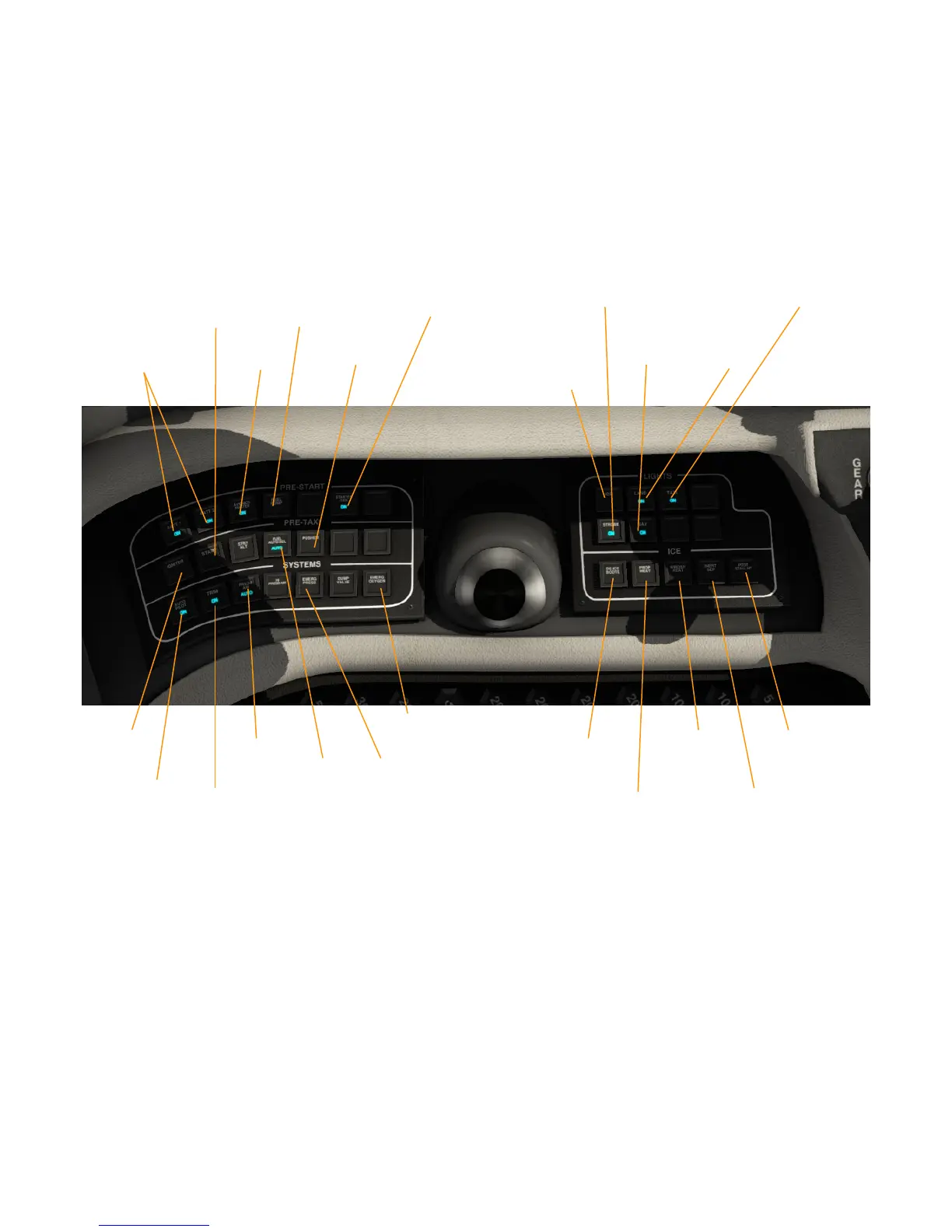
MASTER SWITCHES
Similar to the Epic Victory, the aircraft's main switches are placed behind the
pilot's yoke, albeit in a more simple layout. You can click the the yoke to hide it,
for better access to the switches.
On the left side, you find switches for starting up the aircraft and for initializing
various systems. On the right side, there are switches for deicing.
Behind the levers (Throttle, Condition and fuel), there are knobs for cabin
lightning.
To start the aircraft, use the fuel tank selector on the pedestal to select the
fuel tank with the larger amount of fuel. Switch on the batteries and avionics
with “Batt1”, “Batt2” and ''Avionics''.
Check levers position : Throttle, Prop and Condition in IDLE position.
Press “Fuel Pump” to switch on the fuel pump.
Finally, press and hold “Start” until NG > 10%, then enable the ''Igniter switch''.
After start, press “Starter Gen” is pressed. For later use of autopilot and electric
trim, you also need to press the “Autopilot” and “Trim” master switches.
Otherwise, autopilot and trim won't work. Please note that this autopilot switch
is not the same as the AP button you can find directly on the autopilot. Finally,
you should also enable “Press Air”, to ensure the cabin gets pressurized
properly.
13
Batteries
1&2
Avionics
Master
Fuel
Pump
Pusher
Landing
Light
Taxi
Light
Strobe
Lights
Navigation
Lights
Ice light
Detection
Prop
Heat
Inert
Sep
Windshield
Heat
Pitot
Heat
Igniter
Pressurize
Cabin
Starter
Generator
Automatic
Fuel Tank
Selection
Autopilot
Master
Trim
Master
Oxygen
Engine
Start
Dump
Cabin
Pressure
De ice
Boot


 To Next Page